
 Two years ago, I blogged about the challenge of seeking to preserve records of interactions with the Amazon Echo/Alexa family of devices and applications. I concluded:
“Listen, Amazon, Apple, Microsoft and all the other companies collecting vast volumes of our data through intelligent agents, apps and social networking sites, you must afford us a ready means to see and repatriate our data. It’s not enough to let us grab snatches via an unwieldy item-by-item interface. We have legal duties to meet, and if you wish to be partners in our digital lives, you must afford us reasonable means by which we can comply with the law when we anticipate litigation or respond to discovery. “
In a testament to my thought leadership, nothing whatsoever has happened since my call-to-arms in terms of the ability to preserve Alexa app history data. It’s as bad as it was two years ago and arguably worse because Echo products have grown so popular and the Alexa interface has been integrated into so many devices that the problem is bigger now by leaps and bounds.
Don’t get me wrong, I am Alexa’s biggest fan (and adore her sisters, “Amazon” and “Computer,” so-called for the alternate “wake words” I use to trigger voice communication to Amazon’s servers from other Echo devices). If anything, Craig the Consumer is happier now with the Echo ecosystem than two years ago. Wearing my user hat, Alexa’s a peach (and, yes, I am perfectly comfortable with her from a privacy point of view). Wearing my e-discovery propeller beanie, Alexa is a pain in the butt. She’s a data gold digger who cooks the books to make it supremely difficult to account for what she’s taken.
Granted, the Alexa app used to manage and monitor Alexa accounts offers a long “history” of interactions with Alexa in all her myriad manifestations (Settings>Alexa Account>History). Tragically for those seeking to preserve this historic data, the interface is unwieldy and time-wasting. I doubt they could have done worse if they’d set out to create a nearly-useless interface. Hmmm, I wonder…..
For example:
- There is no way to download the historic data or request it be supplied in a containerized format à la Facebook and Google’s Takeout. [Put aside using a subpoena as we are speaking of custodial-directed preservation of one’s own data, often before suit].
- Within the Alexa app, you cannot search or filter the history of voice interactions with Alexa. The only way to navigate the history (and make earlier history data visible and accessible) is to scroll down screen-by-screen, at a rate of about 15 transactions per screen. You can’t go directly to the end (oldest records), or search for an entry by text or date. You can’t see content “below the fold” without painstakingly shoving the scroll bar down, down, down, DOWN for (in my case) over 700 screens—minutes of tedious scrolling to reach December of 2015.
- Clicking on any entry in the history to examine it necessitates starting the whole tedious scrolling operation again. Clicking “back” in your browser doesn’t return you to where you left off in a list of thousands of entries. This is a big deal because you can’t see what response Alexa supplied or listen to the voice recording without clicking into each entry. Yet, after clicking on any entry, you must scroll starting from the top, all over again, to get back to where you were. Imagine reading a book where you can’t turn to the next page without perusing every prior page again-and-again. Now, imagine you must find where you left off without page numbers. It’s maddening.
- The data isn’t delimited, meaning that it’s not fielded for retrieval or sorting. It’s undifferentiated text without a means to uniquely identify each record apart from its date.
It would be simple, even trivial, for Amazon to make delimited history data readily downloadable in an easy-to-use format. But Amazon hasn’t done so, and a litigant’s duty to preserve ESI when its potentially relevant doesn’t disappear when collection isn’t pushbutton easy.
So, I sought an easy, no-cost way to preserve aggregate Amazon history data—an inelegant method to tide us over until Amazon gets on the stick or someone builds a better collection tool. I’ll concede my approach isn’t pretty; but, its dead simple and requires no special software or expertise.
With Echo history data, defensible preservation may allow for doing nothing. Amazon’s History page in the Alexa app retains transactions until deleted; so if you can be reasonably confident that entries won’t be deleted by the user or overwritten by Amazon, you can reasonably preserve them by leaving them alone: deleting nothing and insuring the account stays open.
But, if you must guard against the foreseeable risk of loss or simply deflect suspicion of same, you will want to duplicate and sequester Alexa history data. If you intend to electronically search an extensive Alexa history or bring it into a review tool, you have little recourse but to collect the contents in a searchable format. Forget screenshots for this; they aren’t text searchable and capturing 700 screenshots will turn a healthy brain to mush.
To start, let’s examine the History interface in the Alexa app which can be accessed on a phone but also via a Windows computer. I find it’s easier to preserve using a computer and mouse. Login to the Alexa account via https://alexa.amazon.com. Navigate to Settings>Alexa Account>History. You will see something that looks like this: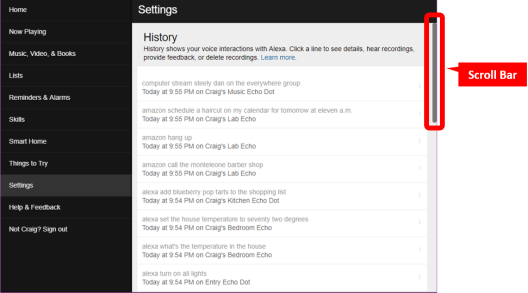
If you enter CTRL-A now, all of the content on the page would be selected. If you enter CTRL-C all of the selected content will be copied. But, the copied data would consist solely of the data seen on the screen, and none below. As noted, some 700+ additional screens follow this one; but, that content won’t be retrieved by the browser until the scroll bar is pulled down to make the other screens visible. As the scroll bar is pulled down and historical data retrieved, ALL of the data retrieved, including all that was briefly visible as you scrolled through it, is buffered and can be selected and copied. So If you scroll all the way to the earliest content (at the final, “bottom” screen of the scroll), you can then use CTRL-A (select all shortcut) and CTRL-C (copy all shortcut) to select and copy the entire contents of the history that appeared while scrolling.
Put simply, if I have 700 screens of history to scroll through, once I have done so, I can select all the scrolled data and copy it to the Windows clipboard to be pasted into a file or application for preservation.
Better yet, if the collected data is pasted into an Excel worksheet, the data will be easier to convert to delimited formats. The commands and the dates/devices when/where the commands were heard will occupy alternating cells, with the commands appearing in odd-numbered rows and the dates, times and devices in even-numbered rows. Like so:
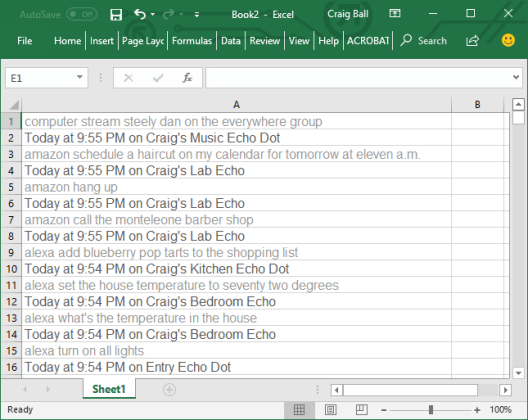
Putting the data in a spreadsheet makes it instantly text searchable. With some minor massaging, it can be restructured as a load file suitable for ingestion by an e-discovery review platform.
Is this an elegant or complete preservation solution? Far from it. It’s pretty lousy. It doesn’t collect the audio recordings of the spoken commands nor the responses supplied by Amazon, both available one-by-one, by clicking through individual entries; but, not currently retrievable apart from plodding manual methods. All that can be said of this solution is that, in its crude way, it works, and is better than nothing. For the moment, “nothing” appears to be its sole competitor.
 Ball in your Court
Stephen J. Lief said:
Just wait until someone alleges she helped kill someone or something similar
LikeLike
Matthew Golab said:
Very interesting. There are ways to practice ‘web scraping’ via the Python scripting language and other ways that would help you with this problem, and without going deep into Python, you can use a few different Python tools to scrape and output to a table in CSV. It may also be possible to probably collect the URL for each recording and work out a method of batch downloading the recordings via similar Python tinkerings.
I wonder if there are ways with the AWS developer / API tools to access the data in bulk.
In the Google world, it has a similar UI ‘infinite scroll’ interface where you have to keep endlessly scrolling until your hand falls off/you reach the end. Google lets you play the recordings, however it doesn’t appear that you could easily write a script to then download.
Quite convoluted and not very robust ways to download data though.
LikeLike
craigball said:
Excellent points, as always, Matthew. I haven’t explored API hooks into the data. As far as grabbing the recordings, good luck! Unfortunately it’s not a straightforward embedded URL that might be scrapped.; leastwise, not something I recognize as such. It’s a hyperlink of some sort, certainly; but, it seems like it’s scripted in some way that requires developer finesse. Thanks for weighing in.
LikeLike
Josh Headley said:
Agree with Matthew, and the data (to-do and shopping) is sitting in a SQLite database on the device (both android and iOS). Parsing the data out is pretty simple for any developer as there are only a few tables to join up and there is a growing body of knowledge on the meaning of the artifacts within. As noted, the audio recordings themselves (if they still exist) are stored out on the web, and there are certainly related-but-not-yet-known artifacts which only exist in the cloud and not on the device itself.
But until someone packages this export functionality into something usable by anyone who can operate the phone in the first place, your two options without getting super forensic-ey are 1) the soon-to-be-patented “Ball scroll-down-till-you-drop then copy-paste maneuver, or 2) find someone who can access the SQLite database from an easily-created backup and script the records out into a discovery-usable format like Excel or CSV.
Hopefully this will all be sorted out before the inevitable “I literally cannot stop buying stuff from Amazon” class action suit, of which I will be a class member in high standing : – )
LikeLiked by 1 person
Pingback: Amazon Makes it Difficult to Preserve ESI – Week 12 (484) – Everything Digital Forensics
Pingback: Influencing Ediscovery: The Voices Driving the Conversation
Pingback: Cloud Takeouts: Can I Get That to Go? | Ball in your Court