• Home
  • About
  • CRAIGBALL.COM
  • Disclaimer
  • Log In

Ball in your Court

~ Musings on e-discovery & forensics.

Ball in your Court

Monthly Archives: January 2021

Understanding the UPC: Because You Can

25 Monday Jan 2021

Posted by craigball in Computer Forensics, General Technology Posts

≈ 5 Comments

Where does the average person encounter binary data?  Though we daily confront a deluge of digital information, it’s all slickly packaged to spare us the bare binary bones of modern information technology.  All, that is, save the humble Universal Product Code, the bar code symbology on every packaged product we purchase from a 70-inch TV to a box of Pop Tarts.  Bar codes and their smarter Japanese cousins, QR Codes, are perhaps the most unvarnished example of binary encoding in our lives. 

Barcodes have an ancient tie to e-discovery as they were once used to Bates label hard copy documents, linking them to “objective coding” databases. A lawyer using barcoded documents was pretty hot stuff back in the day.

Just a dozen numeric characters are encoded by the ninety-five stripes of a UPC-A barcode, but those digits are encoded so ingeniously as to make them error resistant and virtually tamperproof. The black and white stripes of a UPC are the ones and zeroes of binary encoding.  Each number is encoded as seven bars and spaces (12×7=84 bars and spaces) and an additional eleven bars and spaces denote start, middle and end of the UPC.  The start and end markers are each encoded as bar-space-bar and the middle is always space-bar-space-bar-space.  Numbers in a bar code are encoded by the width of the bar or space, from one to four units. 

This image has an empty alt attribute; its file name is barcode-water.png

The bottle of Great Value purified water beside me sports the bar code at right.

Humans can read the numbers along the bottom, but the checkout scanner cannot; the scanner reads the bars. Before we delve into what the numbers signify in the transaction, let’s probe how the barcode embodies the numbers.  Here, I describe a bar code format called UPC-A.  It’s a one-dimensional code because it’s read across.  Other bar codes (e.g., QR codes) are two-dimensional codes and store more information because they use a matrix that’s read side-to-side and top-to-bottom.

The first two black bars on each end of the barcode signal the start and end of the sequence (bar-space-bar).  They also serve to establish the baseline width of a single bar to serve as a touchstone for measurement.  Bar codes must be scalable for different packaging, so the ability to change the size of the codes hinges on the ability to establish the scale of a single bar before reading the code.
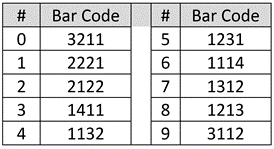
Each of the ten decimal digits of the UPC are encoded using seven “bar width” units per the schema in the table at right.

To convey the decimal string 078742, the encoded sequence is 3211 1312 1213 1312 1132 2122 where each number in the encoding is the width of the bars or spaces.  So, for the leading value “zero,” the number is encoded as seven consecutive units divided into bars of varying widths: a bar three units wide, then (denoted by the change in color from white to black or vice-versa), a bar two units wide, then one then one.  Do you see it? Once more, left-to-right, a white band, three units wide, a dark band two units wide , then a single white band and a single dark band (3-2-1-1 encoding the decimal value zero).

You could recast the encoding in ones and zeroes, where a black bar is a one and a white bar a zero. If you did, the first digit would be 0001101, the number seven would be 0111011 and so on; but there’s no need for that, because the bands of light and dark are far easier to read with a beam of light than a string of printed characters.

Taking a closer look at the first six digits of my water bottle’s UPC, I’ve superimposed the widths and corresponding decimal value for each group of seven units. The top is my idealized representation of the encoding and the bottom is taken from a photograph of the label:

Now that you know how the bars encode the numbers, let’s turn to what the twelve digits mean.  The first six digits generally denote the product manufacturer. 078742 is Walmart. 038000 is assigned to Kellogg’s.  Apple is 885909 and Starbucks is 099555.  The first digit can define the operation of the code.  For example, when the first digit is a 5, it signifies a coupon and ties the coupon to the purchase required for its use.  If the first digit is a 2, then the item is something sold by weight, like meats, fruit or vegetables, and the last six digits reflect the weight or price per pound.  If the first digit is a 3, the item is a pharmaceutical.

Following the leftmost six-digit manufacturer code is the middle marker (1111, as space-bar-space-bar-space) followed by five digits identifying the product.  Every size, color and combo demands a unique identifier to obtain accurate pricing and an up-to-date inventory.

The last digit in the UPC serves as an error-correcting check digit to ensure the code has been read correctly.  The check digit derives from a calculation performed on the other digits, such that if any digit is altered the check digit won’t match the changed sequence. Forget about altering a UPC with a black marker: the change wouldn’t work out to the same check digit, so the scanner will reject it.

In case you’re wondering, the first product to be scanned at a checkout counter using a bar code was a fifty stick pack of Juicy Fruit gum in Troy, Ohio on June 26, 1974.  It rang up for sixty-seven cents.  Today, 45 sticks will set you back $2.48 (UPC 22000109989).

Share this:

  • Email a link to a friend (Opens in new window) Email
  • Print (Opens in new window) Print
  • Share on X (Opens in new window) X
  • Share on Facebook (Opens in new window) Facebook
  • Share on LinkedIn (Opens in new window) LinkedIn
Like Loading...

Steganography: Because Who Doesn’t Love Bacon?

18 Monday Jan 2021

Posted by craigball in Uncategorized

≈ 5 Comments

I’m updating my E-Discovery Workbook to begin a new semester at the University of Texas School of Law next week, and I can’t help working in historical tidbits celebrating the antecedents of modern information technology.  The following is new material for my discussion of digital encoding: a topic I regard as essential to a good grasp of digital forensics and electronic evidence.  When you understand encoding, you understand why varying sources of electronically stored information are more alike than different and why forms of production matter.

We record information every day using 26 symbols called “the alphabet,” abetted by helpful signals called “punctuation.”  So, you could say that we write in hexavigesimal (Base26) encoding.

“Binary” or Base2 encoding is notating information using nothing but two symbols: conventionally, the numbers one and zero.  It’s often said that “computer data is stored as ones and zeroes;” but that’s a fiction.  In fact, binary data is stored physically, electronically, magnetically or optically using mechanisms that permit the detection of two clearly distinguishable “states,” whether manifested as faint voltage potentials (e.g., thumb drives), polar magnetic reversals (e.g., spinning hard drives) or pits on a reflective disc deflecting a laser beam (e.g., DVDs).  Ones and zeroes are simply a useful way to notate those states. You could use any two symbols as binary characters, or even two discrete characteristics of the “same” symbol. For now, just ponder how you might record or communicate two “different” characteristics, as by two different shapes, colors, sizes, orientations, markings, etc.

I free you from the trope of ones and zeroes to plumb the evolution of binary communication and explore an obscure coding cul-de-sac called Steganography, from the Greek, meaning “concealed writing.”  But first, we need an aside of Bacon.

I mean, of course, lawyer and statesman Sir Francis Bacon (1561-1626).  Among his many accomplishments, Bacon conceived a bilateral cipher (a “code” in modern parlance) enabling the hiding of messages omnia per omnia, or “anything by anything.”

Bacon’s cipher used the letters “A” and “B” to denote binary values; but if we use ones and zeros instead, we see the straight line from Bacon’s clever cipher to modern ASCII and Unicode encoding.

As with modern computer encoding, we need multiple binary digits (“bits”) to encode or “stand in for” the letters of the alphabet.  Bacon chose the five-bit sets at right:

If we substitute ones and zeroes (right), Bacon’s cipher starts to look uncannily like contemporary binary encodings.

Why five bits and not three or four? The answer lies in binary math (“Oh no! Not MATH!!”). Wait, wait; it won’t hurt. I promise!

If you have one binary digit (21), you have only two unique states (one or zero), so you can only encode two letters, say A and B.  If you have two binary digits (22 or 2×2), you can encode four letters, say A, B, C and D.  With three binary digits (23 or 2x2x2), you can encode eight letters.  Finally, with four binary digits (24 or 2x2x2x2), you can encode just sixteen letters.  So, do you see the problem in trying to encode the letters of a 26-letter alphabet?  You must use at least five binary digits (25 or 32) unless you are content to forgo ten letters.

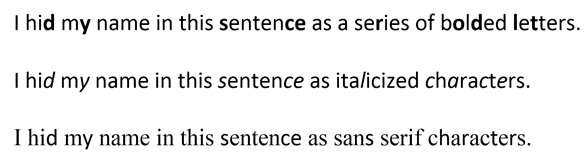
Sir Francis Bacon wasn’t especially interested in encoding text as bits. His goal was to hide messages in any medium, permitting a clued-in reader to distinguish between differences lurking in plain sight.  Those differences—whatever they might be—serve to denote the “A” or “B” in Bacon’s steganographic technique. For example:

That last one is quite subtle, right?  Here’s how it’s done:

To conceal my name in each of the respective examples, every unbolded/unitalicized/serif character signifies an “A” in Bacon’s cipher and every boldface/italicized/sans serif character signifies a “B” (ignore the spaces and punctuation).  The bold and italic approaches look wonky and could arouse suspicion, but if the fonts are chosen carefully, the absence of serifs should go unnoticed.  Take a closer look to see how it works:

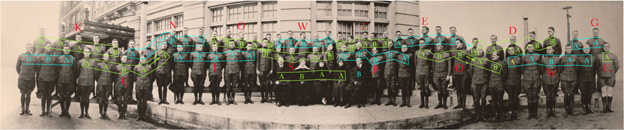
In my examples, I’ve used Bacon’s cipher to hide text within text, but it can as easily hide messages in almost anything.  My favorite example is the class photo of World War I cryptographers trained in Aurora, Illinois by famed cryptographers, William and Elizabeth Friedman.[1]  Before they headed for France, the newly minted codebreakers lined up for the cameraman; but there’s more going on here than meets the eye.

Taking to heart omnia per omnia, the Friedmans ingenuously encoded Sir Francis Bacon’s maxim “knowledge is power” within the photograph using Bacon’s cipher.  The 71 soldiers and their instructors convey the cipher text by facing or looking away from the camera.  Those facing denote an “A.”  Those looking away denote a “B.”  There weren’t quite enough present to encode the entire maxim, so the decoded message actually reads, “KNOWLEDGE IS POWE.”  Here’s the decoding:

A closer look:

Isn’t that mind blowing?!?!

Steganography is something most computer forensic examiners study but rarely use in practice.  Still, it’s a fascinating discipline with a history reaching back to ancient Greece, where masters tattooed secret messages on servants’ shaved scalps and hit “Send” once the hair grew back.  Digital technology brought new and difficult-to-decipher steganographic techniques enabling images, sound and messages to hitch a hidden ride on a wide range of electronic media.


[1] For this material, I’m indebted to “How to Make Anything Signify Anything” by William H. Sherman in Cabinet no. 40 (Winter 2010-2011).

Share this:

  • Email a link to a friend (Opens in new window) Email
  • Print (Opens in new window) Print
  • Share on X (Opens in new window) X
  • Share on Facebook (Opens in new window) Facebook
  • Share on LinkedIn (Opens in new window) LinkedIn
Like Loading...

What’s in a Name (or Hash Value)?

14 Thursday Jan 2021

Posted by craigball in Uncategorized

≈ 6 Comments

A question common to investigation of alleged data theft is, “Are any of our stolen files on our competitor’s systems?”  Forensic examiners track purloined IP using several strategies: among them, searching for matching filenames, hash values, metadata and content.  Any of these can be altered by data thieves seeking to cover their tracks, but most are too confident or too dim to bother.

A current matter underscored the pitfalls of filename and hash searches, prompting me to reflect on a long-ago case where hash searches caused headaches.  The old case stemmed from a settlement of a data theft event requiring a periodic audit of hashes of the defendant’s data to ensure that stolen data hasn’t re-emerged.  The plaintiff sought sanctions because its expert found hash values in the audit that matched hashes tied to stolen PowerPoint presentations.  The defendants were dumbfounded, certain they’d adhered to the settlement and not used any purloined PowerPoints. 

When I stepped in, I confirmed there were matching hash values, but none matched the PowerPoint PPT and PPTX files of interest.  Instead, the hashes matched only benign component image data within the presentations.  The components hashed were standard slide backgrounds (e.g., “woodgrain”) found in any copy of PowerPoint.  Both parties possessed PowerPoints using some of the same generic design elements, but none were the same presentations.  The hashing tool so thoroughly explored the files that embedded images were hashed separately from the files in which they were used and matched other generic elements in other presentations.  No threat at all!

Still other matching files turned out to be articles freely distributed at an industry trade show and zero-byte “null” files that would match any similarly empty files on any machine.  When every hash match was scrutinized, none proved to be stolen data.  Away went the sanctions motion.

The moral of the story is, although it’s extremely unlikely that two different files will share the same hash value, matching hash values don’t always signify the “same” file in practical terms.  Matching files may derive from independent sources, could be benign components of compilations or might match because they hold little or no content.  The math is powerful, but it mustn’t displace common sense.

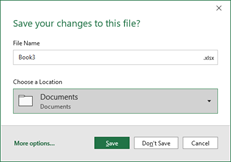
In the ongoing matter, a simple method used to identify contraband data was filename matching.  The requesting party sought to identify instances of a file called “Book3.xlsx;” and the search turned up hundreds of instances of identically named files in the producing party’s data–though not a single one hash-matched the file of interest.

Why so many false positives?  It turns out Microsoft Excel assigns an incremented name to any new spreadsheet (despite earlier-opened sheets having been closed) so long as even one prior sheet remains open.  So, if you’ve created eight Excel spreadsheets, renamed them and closed all but one, the next new sheet will be named Book9.xlsx by default.  The name “Book3.xlsx” signified only that two prior spreadsheets had been opened.  The takeaway is that, in any large collection, expect to turn up instances of various Book(n).xlsx files created when a user exited and saved a sheet without renaming it from its default name.

Electronic search—by hash, filename, metadata or keyword–is an invaluable tool in investigation and e-discovery; but one best used with a modicum of common sense by those who appreciate its limitations.

Share this:

  • Email a link to a friend (Opens in new window) Email
  • Print (Opens in new window) Print
  • Share on X (Opens in new window) X
  • Share on Facebook (Opens in new window) Facebook
  • Share on LinkedIn (Opens in new window) LinkedIn
Like Loading...
Follow Ball in your Court on WordPress.com

Enter your email address to subscribe to this blog and receive notifications of new posts by email.

Join 2,232 other subscribers

Recent Posts

  • 2026 Guide to AI and LLMs in Trial Practice January 9, 2026
  • A Master Table of Truth November 4, 2025
  • Kaylee Walstad, 1962-2025 August 19, 2025
  • Native or Not? Rethinking Public E-Mail Corpora for E-Discovery (Redux, 2013→2025) August 16, 2025
  • Still on Dial-Up: Why It’s Time to Retire the Enron Email Corpus August 15, 2025

Archives

RSS Feed RSS - Posts

CRAIGBALL.COM

Helping lawyers master technology

Categories

EDD Blogroll

  • Illuminating eDiscovery (Lighthouse)
  • The Relativity Blog
  • eDiscovery Today (Doug Austin)
  • Sedona Conference
  • Complex Discovery (Rob Robinson)
  • GLTC (Tom O'Connor)
  • E-D Team (Ralph Losey)
  • Basics of E-Discovery (Exterro)
  • Minerva 26 (Kelly Twigger)
  • CS DISCO Blog
  • eDiscovery Journal (Greg Buckles)
  • E-Discovery Law Alert (Gibbons)
  • Corporate E-Discovery Blog (Zapproved )

Admin

  • Create account
  • Log in
  • Entries feed
  • Comments feed
  • WordPress.com

Enter your email address to follow Ball in Your Court and receive notifications of new posts by email.

Website Powered by WordPress.com.

  • Subscribe Subscribed
    • Ball in your Court
    • Join 2,084 other subscribers
    • Already have a WordPress.com account? Log in now.
    • Ball in your Court
    • Subscribe Subscribed
    • Sign up
    • Log in
    • Report this content
    • View site in Reader
    • Manage subscriptions
    • Collapse this bar
 

Loading Comments...
 

    %d