• Home
  • About
  • CRAIGBALL.COM
  • Disclaimer
  • Log In

Ball in your Court

~ Musings on e-discovery & forensics.

Ball in your Court

Category Archives: Computer Forensics

Surviving a Registration Bomb Attack

02 Friday Feb 2024

Posted by craigball in Computer Forensics, E-Discovery, General Technology Posts, Personal

≈ 1 Comment

Tags

cyber-security, cybercrime, cybersecurity, phishing, security

It started just after 7:00 last night.  My mailbox swelled with messages confirming I’d subscribed to websites and newsletters around the world.  Within an hour, I’d received over 2,000 such messages, and they kept pouring in until I’d gotten 4,000 registration confirmations by 11:00pm. After that, the flood slowed to a trickle.

I was the victim of a registration bomb attack, a scary experience if you don’t grasp what’s happening or know how to protect yourself.  Fortunately, it wasn’t my first rodeo. 

During a similar attack a couple of years ago, I was like a dog on the Fourth of July–I didn’t know what was happening or how to deal with it.  But this time, my nerves weren’t wracked: I knew what was afoot and where the peril lay.

Cybersecurity is not my principal field of practice, but it’s a forensics-adjacent discipline and one where I try to keep abreast of developments.  So, much like a trial lawyer enjoying the rare chance to serve on a jury, being the target of a cyberattack is as instructive as inconvenient.  

While a registration bomb attack could be the work of a disgruntled reader (Hey! You can’t please everybody), more often they serve to mask attacks on legitimate accounts by burying notices of password resets, funds transfers or fraudulent credit card charges beneath a mountain of messages.  So, yes, you should treat a registration bomb attack as requiring immediate vigilance in terms of your finances.  Keep a weather eye out for small transfers, especially deposits into a bank account as these signal efforts to link your account to another as prelude to theft.  Likewise, look at your credit card transactions to ensure that recent charges are legitimate.  Finally—and the hardest to do amidst a deluge of registration notices—look for efforts to change credentials for e-commerce websites you use like Walmart.com or Amazon.com.

A registration bomb attack is a powerful reminder of the value of always deploying multifactor authentication (MFA) to protect your banking, brokerage and credit card accounts.  Those extra seconds expended on secure logins will spare you hours and days lost to a breach.  With MFA in place, an attacker who succeeds in changing your credentials won’t have the access codes texted to your phone, thwarting efforts to rob you.

The good news is that, if you’re vigilant in the hours a registration bomb is exploding in your email account and you have MFA protecting your accounts, you’re in good shape.

Now for the bad news: a registration bomb is a distributed attack, meaning that it uses a botnet to enlist a legion of unwitting, innocent participants—genuine websites—to do the dirty work of clogging your email account with registration confirmation requests.  Because the websites emailing you are legitimate, there’s nothing about their email to trigger a spam filter until YOU label the message as spam. Unfortunately, that’s what you must do: select the attack messages and label each one as spam.  Don’t bother to unsubscribe to the registrations; just label the messages as spam as quickly as you can. 

This is a pain. And you must be attuned to the potential to mistakenly blacklist senders whose messages you want at the same time you’re squashing the spam messages you don’t want and scanning for password change notices from your banks, brokers and e-commerce vendors.  It’s easier when you know how to select multiple messages before hitting the “spam” button (in Gmail, holding down the Shift key enables you to select a range of messages by selecting the first and last message in the range).  Happily, the onslaught of registration spam will stop; thousands become hundreds and hundreds become dozens in just hours (though you’ll likely get stragglers for days).

Registration bombing attacks will continue so long as the web is built around websites sending registration confirmation messages—a process ironically designed to protect you from spam.   If you’ve deployed the essential mechanisms to protect yourself online, particularly strong, unique passwords, multifactor authentication and diligent review of accounts for fraudulent transactions, don’t panic; the registration bomb will be no more than a short-lived inconvenience.  This, too, shall pass.

Share this:

  • Click to email a link to a friend (Opens in new window) Email
  • Click to print (Opens in new window) Print
  • Click to share on X (Opens in new window) X
  • Click to share on Facebook (Opens in new window) Facebook
  • Click to share on LinkedIn (Opens in new window) LinkedIn
Like Loading...

Monica Bay, 1949-2023

30 Monday Oct 2023

Posted by craigball in Computer Forensics, E-Discovery, General Technology Posts, Personal, Uncategorized

≈ 11 Comments

I’m saddened to share that Monica Bay, the forceful, revered former editor of Law Technology News (now Legaltech News) has died after a long, debilitating illness.  Though a durable resident of New York City and Connecticut, Monica’s life ended in California where it began.  Monica described herself as a “provocateur,” an apt descriptor from one gifted in finding the bon mot.  Monica was a journalist with soaring standards whose writing exemplified the high caliber of work she expected from her writers.  I cannot overstate Monica’s importance to the law technology community in her 17 years at the helm of LTN.  Monica mentored multitudes and by sheer force of her considerable strength and will, Monica transformed LTN from an industry organ purveying press releases to an award-winning journal unafraid to speak truth to power.

In her time as editor, Monica was everywhere and indefatigable.  Monica was my editor for much of her tenure at LTN including nine years where I contributed a monthly column she dubbed “Ball in Your Court” (see what I mean about her mastery of the well-turned phrase?)  We had a complicated relationship and butted heads often, but my submissions were always better for Monica’s merciless blue pencil.  I owe her an irredeemable debt.  She pushed me to the fore.  You wouldn’t be reading this now if it weren’t for Monica Bay’s efforts to elevate me.  The outsize recognition and writing awards I garnered weren’t my doing but Monica’s.  If life were a movie, Monica would be the influential publisher who tells the writer plucked from obscurity, “I made you and I can break you!” And it would be true.

This elegy would have been far better if she’d edited it.

Trying to illuminate Monica, I turned to Gmail to refresh my memory but backed off when I saw we’d shared more than 2,200 conversations since 2005.  I’d forgotten how she once loomed so large in my life.  In some of those exchanges, Monica generously called me, “hands down my best writer,” but I wouldn’t be surprised if she said that to everyone in her stable of “campers.”  Monica knew how to motivate, cajole and stroke the egos of her contributors. She was insightful about ego, too.

In 2010 when I carped that there’s always too much to do, and always somebody unhappy with me, she counseled, “Like me, you are an intense personality, and we can be difficult to live with at times. but that intensity and drive is also what makes you who you are, why you are successful, and why you are a breathtakingly good writer.  My favorite people in the world are ‘difficult.’”

I wince as I write that last paragraph because as much as she was brilliant in managing egos, Monica didn’t love that part of her work. She confided, “I think we have to be mindful that we don’t exercise our egos in a way that constrains — or worse case, cripples — those around us. That’s the hard part.”

Monica observed of a well-known commentator of the era, “he wouldn’t be able to write if he had to excise ‘I’ from his vocabulary… he annoys me more than the Red Sox or Jacobs Fields gnats.” 

That reminds me that Monica had a personal blog called “The Common Scold.”  She named it for a Puritan-era cause of action where opinionated women were punished by a dunk in a pond.  I mostly remember it for its focus on New York Yankees baseball, which became a passion for Monica when she moved east despite a lifelong disinterest in sports.  Monica, who insofar as I knew, never married, often referred to herself in the Scold as “Mrs. Derek Jeter.”  She was quirky that way and had a few quirky rules for writers.  One was that the word “solution” was banned, BANNED, in LTN.

To her credit, Monica Bay wasn’t afraid to nip at the hand that feeds.  Now, when every outlet has bent to the will of advertisers, Monica’s strict journalistic standards feel at once quaint and noble. Consider this excerpt from her 2009 Editorial Guidelines:

“Plain English: Law Technology News is committed to presenting information in a manner that is easily accessible to our readers. We avoid industry acronyms, jargon, and clichés, because we believe this language obfuscates rather than enhances understanding.

For example, the word “solution” has become meaningless and is banned from LTN unless it’s part of the name of a company.  Other words we edit out: revolutionary, deploy, mission critical, enterprise, strategic, robust, implement, seamless, initiative, -centric, strategic [sic], and form factor! We love plain English!”

Monica was many things more than simply an industry leader, from a wonderful choral singer to the niece of celebrated actress, Elaine Stritch.  She was my champion, mother figure, friend and scold.   I am in her debt.  And you are, too, Dear Reader, for Monica Bay pushed through barriers that fell under her confident stride.

Fifteen years ago, when Monica lost her father, and my mother was dying, we supported each other.  Monica called her dad’s demise the “great gift of dementia from the karma gods. No pain, just a gentle drift to his next destination.”  That beautifully describes her own shuffle off this mortal coil.  As the most loving parting gift I can offer my late, brilliant editor, I cede to her those last lovely words, “just a gentle drift to [her] next destination.”

[I have no information about services or memorials, but I look forward to commemorating Monica’s life and contributions with others who loved and admired her]

A nice tribute from Bob Ambrogi: https://www.lawnext.com/2023/10/i-am-deeply-saddened-to-report-the-death-of-monica-bay-friend-mentor-and-role-model-to-so-many-in-legal-tech.html and a sweeet remembrance from Mary Mack: https://edrm.net/2023/10/the-warmest-and-most-uncommon-scold/

Share this:

  • Click to email a link to a friend (Opens in new window) Email
  • Click to print (Opens in new window) Print
  • Click to share on X (Opens in new window) X
  • Click to share on Facebook (Opens in new window) Facebook
  • Click to share on LinkedIn (Opens in new window) LinkedIn
Like Loading...

Introducing the EDRM E-Mail Duplicate Identification Specification and Message Identification Hash (MIH)

16 Thursday Feb 2023

Posted by craigball in Computer Forensics, E-Discovery, General Technology Posts, Uncategorized

≈ 7 Comments

I’m proud to be the first to announce that the Electronic Discovery Reference Model (EDRM) has developed a specification for cross-platform identification of duplicate email messages, allowing for ready detection of duplicate messages that waste review time and increase cost. Leading e-discovery service and software providers support the new specification, making it possible for lawyers to improve discovery efficiency by a simple addition to requests for production. If that sounds too good to be true, read on and learn why and how it works.

THE PROBLEM

The triumph of information technology is the ease with which anyone can copy, retrieve and disseminate electronically stored information. Yet, for email in litigation and investigations, that blessing comes with the curse of massive replication, obliging document reviewers to assess and re-assess nearly identical messages for relevance and privilege. Duplicate messages waste time and money and carry a risk of inconsistent characterization. Seeing the same thing over-and-over again makes a tedious task harder.

Electronic discovery service providers and software tools ameliorate these costs, burdens and risks using algorithms to calculate hash values—essentially digital fingerprints—of segments of email messages, comparing those hash values to flag duplicates. Hash deduplication works well, but stumbles when minor variations prompt inconsistent outcomes for messages reviewers regard as being “the same.” Hash deduplication fails altogether when messages are exchanged in forms other than those native to email communications—a common practice in U.S. electronic discovery where efficient electronic forms are often printed to static page images.

Without the capability to hash identical segments of identical formats across different software platforms, reviewers cannot easily identify duplicates or readily determine what’s new versus what’s been seen before. When identical messages are processed by different tools and vendors or produced in different forms (so-called “cross-platform productions”), identification of duplicate messages becomes an error-prone, manual process or requires reprocessing of all documents.

Astonishingly, no cross-platform method of duplicate identification has emerged despite decades spent producing email in discovery and billions of dollars burned by reviewing duplicates.

Wouldn’t it be great if there was a solution to this delay, expense and tedium?

THE SOLUTION

When parties produce email in discovery and investigations, it’s customary to supply information about the messages called “metadata” in accompanying “load files.” Load files convey Bates numbers/Document IDs, message dates, sender, recipients and the like. Ideally, the composition of load files is specified in a well-crafted request for production or production protocol. Producing metadata is a practice that’s evolved over time to prompt little argument. For service providers, producing one more field of metadata is trivial, rarely requiring more effort than simply ticking a box.

The EDRM has crafted a new load file field called the EDRM Message Identification Hash (MIH), described in the EDRM Email Duplicate Identification Specification.

Gaining the benefit of the EDRM Email Duplicate Identification Specification is as simple as requesting that load files contain an EDRM Message Identification Hash (MIH) for each email message produced. The EDRM Email Duplicate Identification Specification is an open specification, so no fees or permissions are required to use it, and leading e-discovery service and software providers already support the new specification. For others, it’s simple to generate the MIH without redesigning software or impeding workflows. Too, the EDRM has made free tools available supporting the specification.

Any party with the MIH of an email message can readily determine if a copy of the message exists in their collection. Armed with MIH values for emails, parties can flag duplicates even when those duplicates take different forms, enabling native message formats to be compared to productions supplied as TIFF or PDF images.

The routine production of the MIH supports duplicate identification across platforms and parties. By requesting the EDRM MIH, parties receiving rolling or supplemental productions will know if they’ve received a message before, allowing reviewers to dedicate resources to new and unique evidence. Email messages produced by different parties in different forms using different service providers can be compared to instantly surface or suppress duplicates. Cross-platform email duplicate identification means that email productions can be compared across matters, too. Parties receiving production can easily tell if the same message was or was not produced in other cases. Cross-platform support also permits a cross-border ability to assess whether a message is a duplicate without the need to share personally-identifiable information restricted from dissemination by privacy laws.

IS THIS REALLY NEW?

Yes, and unprecedented. As noted, e-discovery service providers and law firm or corporate e-discovery teams have long employed cryptographic hashing internally to identify duplicate messages; but each does so differently dependent upon the process and software platform employed—sometimes in ways they regard as being proprietary—making it infeasible to compare hash values across providers and platforms. Even if competitors could agree to employ a common method, subtle differences in the way each process and normalize messages would defeat cross-platform comparison.

The EDRM Email Duplicate Identification Specification doesn’t require software platform and service providers to depart from the proprietary ways they deduplicate email. Instead, the Specification contemplates that e-discovery software providers add the ability to produce the EDRM MIH to their platform and that service providers supply a simple-to-determine Message Identification Hash (MIH) value that sidesteps the challenges just described by taking advantage of an underutilized feature of email communication standards called the “Message ID” and pairing it with the power of hash deduplication. If it sounds simple, it is–and by design. It’s far less complex than traditional approaches but sacrifices little or no effectiveness or utility. Crucially, it doesn’t require any difficult or expensive departure from the way parties engage in discovery and production of email messages.

WHAT SHOULD YOU DO TO BENEFIT?

All you need to do to begin reaping the benefits of cross-platform message duplicate identification is amend your Requests for Production to include the EDRM Message Identification Hash (MIH) among the metadata values routinely produced as load files. As a prominently published specification by the leading standards organization in e-discovery, it’s likely the producing party’s service provider or litigation support staff know what’s required. But if not, you can refer them to the EDRM Email Duplicate Identification Specification & Guidelines published at https://edrm.net/active-projects/dupeid/.

HOW DO YOU LEARN MORE?

The EDRM publishes a comprehensive set of resources describing and supporting the Specification & Guidelines that can be found at https://edrm.net/active-projects/dupeid/. All persons and firms deploying the EDRM MIH to identify duplicate messages should familiarize themselves with the considerations for its use.

EDRM WANTS YOUR FEEDBACK

The EDRM welcomes any feedback you may have on this new method of identifying cross platform email duplicates or on any of the resources provided. We are interested in further ideas you may have and expect the use of the EDRM MIH to evolve over time. You can post any feedback or questions at https://edrm.net/active-projects/dupeid/.

Share this:

  • Click to email a link to a friend (Opens in new window) Email
  • Click to print (Opens in new window) Print
  • Click to share on X (Opens in new window) X
  • Click to share on Facebook (Opens in new window) Facebook
  • Click to share on LinkedIn (Opens in new window) LinkedIn
Like Loading...

Not So Fine Principle Nine

17 Tuesday Jan 2023

Posted by craigball in Computer Forensics, E-Discovery, Uncategorized

≈ 8 Comments

For the second class meeting of my law school courses on E-Discovery and Digital Evidence, I require my students read the fourteen Sedona Conference Principles from the latest edition of “Best Practices, Recommendations & Principles for Addressing Electronic Document Production.” The Sedona principles are the bedrock of that group’s work on ESI and, notwithstanding my misgivings that the Principles have tilted toward blocking discovery more than guiding it, there’s much to commend in each of the three versions of the Principles released over the last twenty years.  They enjoy a constitutional durability in the eDiscovery community.

When my students read the Principles, I revisit them and each time, something jumps out at me.  This semester, it’s the musty language of Principle 9:

Principle 9: Absent a showing of special need and relevance, a responding party should not be required to preserve, review, or produce deleted, shadowed, fragmented, or residual electronically stored information.

The Sedona Principles, Third Edition: Best Practices, Recommendations & Principles for Addressing Electronic Document Production, 19 SEDONA CONF. J. (2018)

Save for the substitution of “electronically stored information” for the former “data or documents,” Principle 9 hasn’t been touched since its first drafts of 20+ years ago.  One could argue its longevity owes to an abiding wisdom and clarity. Indeed, the goals behind P9 are laudable and sound.  But the language troubles me, particularly the terms, “shadowed” and “fragmented,” which someone must have pulled out of their … I’ll say “hat” … during the Bush administration, and presumably no one said, “Wait, is that really a thing?”  In the ensuing decades, did no one question the wording or endeavor to fix it?

My objection is that both are terms of art used artlessly.  Consider “shadowed” ESI.  Run a search for shadowed ESI or data, and you’ll not hit anything on point but the Principle itself.  Examine the comments to Principle 9 and discover there’s no effort to explain or define shadowed ESI.  Head over to The Sedona Conference Glossary: eDiscovery and Digital Information Management, and you’ll find nary a mention of “shadowed” anything. 

That is not to say that there wasn’t a far-behind-the-scenes service existing in Microsoft Windows XP and Windows Server to facilitate access to locked files during backup that came to be called “Volume Shadow Copy Services” or “VSS,” but it wasn’t being used for forensics when the language of Principle 9 was floated.  I was a forensic examiner at the time and can assure you that my colleagues and I didn’t speak of “shadowed” data or documents.

But whether an argument can be made that it was a “thing” or not twenty years ago, it’s never been a term in common use, nor one broadly understood by lawyers and judges.  It’s not defined in the Principles or glossaries.  You’ll get no useful guidance from Google. 

What harm has it done?  None I can point to.  What good has it done?  None.  Yet, it might be time to consign “shadowed” to the dustbin of history and find something less vague.  It’s not gospel, it’s gobbledygook.

“Fragmented” is a term that’s long been used in reference to data storage, but not as a synonym for “residual” or “artifact.”  Fragmented files refer to information stored in non-contiguous clusters on a storage medium.  Many of the files we access and know to be readily accessible are fragmented in this fashion, and no one who understands the term in the context of ESI would confuse “fragmented” data or documents with something burdensome to retrieve.  But don’t take my word for that, Sedona’s own glossary backs me up.  Sedona’s Principle 9 doesn’t use “fragmented” as Sedona defines it.

If the drafters meant “fragments of data,” intending to convey “artifacts recoverable through computer forensics but not readily accessible to or comprehended by users,” then perhaps other words are needed, though I can’t imagine what those words would add that “deleted” or “residual” doesn’t cover.

This is small potatoes. No one need lose a wink of sleep over the sloppy wording, and I’m not the William Safire of e-discovery or digital forensics; but words matter.  When you are writing to guide persons without deep knowledge of the subject matter, your words matter very much.  If you use a term of art, make sure it’s a correct usage, a genuine one; and be certain you’ve either used it as experts do or define the anomalous usage in context.

When I fail to do that, Dear Reader, I hope you’ll call me on it, too.

Share this:

  • Click to email a link to a friend (Opens in new window) Email
  • Click to print (Opens in new window) Print
  • Click to share on X (Opens in new window) X
  • Click to share on Facebook (Opens in new window) Facebook
  • Click to share on LinkedIn (Opens in new window) LinkedIn
Like Loading...

The Annotated ESI Protocol

09 Monday Jan 2023

Posted by craigball in Computer Forensics, E-Discovery, Uncategorized

≈ 26 Comments

Tags

ESI Protocols

Periodically, I strive to pen something practical and compendious on electronic evidence and eDiscovery, drilling into a topic, that hasn’t seen prior comprehensive treatment.  I’ve done primers on metadata, forms of production, backup systems, databases, computer forensics, preservation letters, ESI processing, email, digital storage and more, all geared to a Luddite lawyer audience.  I’ve long wanted to write, “The Annotated ESI Protocol.” Finally, it’s done.

The notion behind the The Annotated ESI Protocol goes back 40 years when, as a fledgling personal injury lawyer, I found a book of annotated insurance policies.  What a prize!  Any plaintiff’s lawyer will tell you that success is about more than liability, causation and damages; you’ve got to establish coverage to get paid.  Those annotated insurance policies were worth their weight in gold.

As an homage to that treasured resource, I’ve sought to boil down decades of ESI protocols to a representative iteration and annotate the clauses, explaining the “why” and “how” of each.  I’ve yet to come across a perfect ESI protocol, and I don’t kid myself that I’ve crafted one.  My goal is to offer lawyers who are neither tech-savvy nor e-discovery aficionados a practical, contextual breakdown of a basic ESI protocol–more than simply a form to deploy blindly or an abstract discussion.  I’ve seen thirty-thousand-foot discussions of protocols by other commentators, yet none tied to the document or served up with an ESI protocol anyone can understand and accept. 

It pains me to supply the option of a static image (“TIFF+”) production, but battleships turn slowly, and persuading lawyers long wedded to wasteful ways that they should embrace native production is a tough row to hoe. My intent is that the TIFF+ option in the example sands off the roughest edges of those execrable images; so, if parties aren’t ready to do things the best way, at least we can help them do better.

Fingers crossed you’ll like The Annotated ESI Protocol and put it to work. Your comments here are always valued.

Share this:

  • Click to email a link to a friend (Opens in new window) Email
  • Click to print (Opens in new window) Print
  • Click to share on X (Opens in new window) X
  • Click to share on Facebook (Opens in new window) Facebook
  • Click to share on LinkedIn (Opens in new window) LinkedIn
Like Loading...

Seven Stages of Snakebitten Search

13 Tuesday Dec 2022

Posted by craigball in Computer Forensics, E-Discovery, General Technology Posts, Uncategorized

≈ 6 Comments

I’ve long been fascinated by electronic search.  I especially love delving into the arcane limitations of lexical search because, awful Grinch that I am, I get a kick out of explaining to lawyers why their hard-fought search queries and protocols are doomed to fail. But, once we work through the Seven Stages of Attorney E-Discovery Grief: Umbrage, Denial, Anger, Angry Denial, Fear, Finger Pointing, Threats and Acceptance, there’s almost always a workaround to get the job done with minimal wailing and gnashing of teeth.

Three consults today afforded three chances to chew over problematic search strategies: 

  • First, the ask was to search for old CAD/CAM drawings in situ on an opponent’s file servers based on words appearing on drawings. 
  • Another lawyer sought to run queries in M365 seeking responsive text in huge attachments.
  • The last lawyer wanted me to search the contents of a third-party’s laptop for subpoenaed documents but without the machine being imaged or its contents processed before search.

Most of my readers are e-discovery professionals so they’ll immediately snap to the reasons why each request is unlikely to work as planned. Before I delve into my concerns, let’s observe that all these requests seemed perfectly reasonable in the minds of the lawyers involved, and why not?  Isn’t that how keyword and Boolean search is supposed to work?  Sadly, our search reach often exceeds our grasp.

Have you got your answers to why they may fail?  Let’s compare notes.

  • When it comes to lexical search, CAD/CAM drawings differ markedly from Word documents and spreadsheets.  Word processed documents and spreadsheets contain text encoded as ASCII or Unicode characters.  That is, text is stored as, um, text.  In contrast, CAD/CAM drawings tend to be vector graphics.  They store instructions describing how to draw the contents of the plans geometrically; essentially how the annotations look rather than what they say. So, the text is an illustration of text, much like a JPG photograph of a road sign or a static TIFF image of a document—both inherently unsearchable for text unless paired with extracted or OCR text in ancillary load files.  Bottom line: Unless the CAD/CAM drawings are subjected to effective optical character recognition before being indexed for search, lexical searches won’t “see” any text on the face of the drawings and will fail.
  • M365 has a host of limits when it comes to indexing Cloud content for search, and of course, if it’s not in the index, it won’t turn up in response to search.  For example, M365 won’t parse and index an email attachment larger than 150MB.  Mind you, few attachments will run afoul of that capacious limit, but some will.  Similarly, M365 will only parse and index the first 2 million characters of any document.  That means only the first 600-1,000 pages of a document will be indexed and searchable.  Here again, that will suffice for the ordinary, but may prove untenable in matters involving long documents and data compilations.  There are other limits on, e.g., how deeply a search will recurse through nested- and embedded content and the body text size of a message that will index.  You can find a list of limits here (https://learn.microsoft.com/en-us/microsoft-365/compliance/limits-for-content-search?view=o365-worldwide#indexing-limits-for-email-messages) and a discussion of so-called “partially indexed” files here (https://learn.microsoft.com/en-us/microsoft-365/compliance/partially-indexed-items-in-content-search?view=o365-worldwide).  Remember, all sorts of file types aren’t parsed or indexed at all in M365.  You must tailor lexical search to the data under scrutiny.  It’s part of counsels’ duty of competence to know what their search tools can and cannot do when negotiating search protocols and responding to discovery using lexical search.
  • In their native environments, many documents sought in discovery live inside various container files ranging from e-mail and attachments in PST and OST mail containers to compressed Zip containers.  Encrypted files may  be thought of as being sealed inside an impenetrable container that won’t be searched.  The upshot is that much data on a laptop or desktop machine cannot be thoroughly searched by keywords and queries by simply running searches within an operating system environment (e.g., in Windows or MacOS).   Accordingly, forensic examiners and e-discovery service providers collect and “process” data to make it amenable to search.  Moreover, serial search of a computer’s hard drive (versus search of an index) is painfully slow, so unreasonably expensive when charged by the hour.  For more about processing ESI in discovery, here’s my 2019 primer (http://www.craigball.com/Ball_Processing_2019.pdf)

In case I don’t post before Chanukah, Christmas and the New Year, have a safe and joyous holiday!

Share this:

  • Click to email a link to a friend (Opens in new window) Email
  • Click to print (Opens in new window) Print
  • Click to share on X (Opens in new window) X
  • Click to share on Facebook (Opens in new window) Facebook
  • Click to share on LinkedIn (Opens in new window) LinkedIn
Like Loading...

Electronic Evidence Workbook 2022

13 Thursday Jan 2022

Posted by craigball in Computer Forensics, E-Discovery, General Technology Posts, Uncategorized

≈ 6 Comments

I’ve released a new version of the Electronic Evidence Workbook used in my three credit E-Discovery and Digital Evidence course at the University of Texas Law School, UT Computer Science School and UT School of Information. I prefer this release over any before because it presents the material more accessibly and logically, better tying the technical underpinnings to trial practice.

The chapters on processing are extensively revamped. I’m hell bent on making encoding understandable, and I’ve incorporated the new Processing Glossary I wrote for the EDRM. Glossaries are no one’s idea of light reading, but I hope this one proves a handy reference as the students cram for the five quizzes and final exam they’ll face.

Recognizing that a crucial component of competence in electronic discovery is mastering the arcane argot of legaltech, I’ve added Vital Vocabulary lists throughout, concluded chapters with Key Takeaway callouts and, for the first time, broken the Workbook into volumes such that this release covers just the first eight classes, almost entirely Information Technology.

Come Spring Break in mid-March, I’ll release the revamped omnibus volume adding new practical exercises in Search, Processing, Production, Review and Meet & Confer and introducing new tools. Because university students use Mac machines more than Windows PCs, the exercises ahead employ Cloud applications so as to be wholly platform-independent. The second half of the course folds in more case law to the relief of law students and chagrin of CS and IS students. The non-law students do a great job on the law but approach it with trepidation; the law students kiss the terra firma of case law like white-knuckled passengers off a turbulent flight.

Though written for grad students, the Workbook is also written for you, Dear Reader. If you’ve longed to learn more about information technology and e-discovery but never knew quite where or how to start, perhaps the 2022 Workbook is your gateway. The law students at UT Austin pay almost $60,000 per year for their educations; I’ll settle for a little feedback from you when you read it.

Share this:

  • Click to email a link to a friend (Opens in new window) Email
  • Click to print (Opens in new window) Print
  • Click to share on X (Opens in new window) X
  • Click to share on Facebook (Opens in new window) Facebook
  • Click to share on LinkedIn (Opens in new window) LinkedIn
Like Loading...

A Dozen Nips and Tucks for E-Discovery

03 Monday Jan 2022

Posted by craigball in Computer Forensics, E-Discovery, Uncategorized

≈ 7 Comments

Annually, I contribute to an E-Discovery Update presentation for top tier trial lawyers and annually I struggle to offer a handout that will be short enough for attendees to read and sufficiently pointed to prompt action. Ironically, predictably, the more successful the lawyers in attendance, the less moved they are to seek fresh approaches to discovery. Yet, we would be wise to observe that success tends not to depart abruptly but slips away on little cat feet, or as Hemingway described the velocity of a character’s path to bankruptcy, “Gradually, then suddenly.” A few nips and tucks may be all that’s needed to stay in fighting form. Accordingly, I wanted my list to be pithy with actionable takeaways like “have a production protocol, get a review platform and test your queries.” That may seem painfully obvious to you, Dear Reader, but it’s guidance yet to be embraced by leading lights in law. Here’s my 2022 list:

  1. Forms from a decade ago are obsolete.  Update your preservation letters and legal hold notices.  Remember: preservation letters go to the other side; legal hold notices to your clients.
  2. Custodial holds don’t fly.  Just telling a client, “don’t delete relevant data” isn’t enough and a misstep oft-cited by courts as attorney malfeasance.  Lawyers must guide and supervise clients in the identification, preservation and collection of relevant evidence.
  3. Be sure your legal hold process incorporates all elements of a defensible notification:
    i. Notice is Timely
    ii. Communicated through an effective channel
    iii. Issued by person(s) with clout
    iv. Sent to all necessary custodians
    v. Communicates gravity and accountability
    vi. Supplies context re: claim or litigation
    vii. Offers clear, practical guidance re: actions and deadlines
    viii. Sensibly scopes sources and forms
    ix. Identifies mechanism and contact for questions
    x. Incorporates acknowledgement, follow up and refresh
  4. Data dies daily; systems automatically purge and overwrite data over time.  The law requires parties promptly intercede to prevent loss of potentially relevant information by altering purge settings and otherwise interdicting deletion.  Don’t just assume it’s preserved, check to be certain.
  5. No e-discovery effort is complete in terms of preservation and collection if it fails to encompass mobile devices and cloud repositories.  Competent trial lawyers employ effective, defensible methods to protect, collect and review relevant mobile and cloud information.
  6. The pandemic pushed data to non-traditional locations and applications.  Don’t overlook data in conferencing apps like Zoom and collaboration tools like Slack.
  7. You should have an up-to-date ESI production protocol that fits the data and workflow. Know what an ESI protocol does and what features you can negotiate without prompting adverse outcomes.
  8. Don’t rely on untested keyword queries to find evidence.  Embrace the science of search.  TEST!
  9. Modern litigation demands use of review systems dedicated to electronically stored information (ESI) and staff trained in their use. Asked “What’s your review platform?” You should know the answer.
  10. Vendors paid by the gigabyte lack incentive to trim data volumes.  Clients will thank you to have sound strategies to cull and deduplicate the data that vendors ingest and host.  Big savings lie there.
  11. Courts demand an unprecedented level of communication and cooperation respecting ESI.  Transparency of process signals confidence and competence in your approach to e-discovery.
  12. There are no more free passes for ignorance.  Now, learn it, get help or get out.

Share this:

  • Click to email a link to a friend (Opens in new window) Email
  • Click to print (Opens in new window) Print
  • Click to share on X (Opens in new window) X
  • Click to share on Facebook (Opens in new window) Facebook
  • Click to share on LinkedIn (Opens in new window) LinkedIn
Like Loading...

Then his head exploded!

28 Tuesday Sep 2021

Posted by craigball in Computer Forensics, E-Discovery, General Technology Posts, Uncategorized

≈ 2 Comments

In the introduction to my Electronic Evidence Workbook, I note that my goal is to change the way readers think about electronically stored information and digital evidence. I want all who take my courses to see that modern electronic information is just a bunch of numbers and not be daunted by those numbers.

I find numbers reassuring and familiar, so I occasionally forget that some are allergic to numbers and loathe to wrap their heads around them.

Lately, one of my bright students identified himself as a “really bad with numbers person.” My lecture was on encoding as prologue to binary storage, and when I shifted too hastily from notating numbers in alternate bases (e.g., Base 2, 10, 16 and 64) and started in on encoding textual information as numbers (ASCII, Unicode), my student’s head exploded.

Boom!

At least that’s what he told me later. I didn’t hear anything when it happened, so I kept nattering on happily until class ended.

As we chatted, I realized that my student expected that encoding and decoding electronically stored information (ESI) would be a one-step process.  He was having trouble distinguishing the many ways that numbers (numeric values) can be notated from the many ways that numbers represent (“encode”) text and symbols like emoji.  Even as I write that sentence I suspect he’s not alone.

Of course, everyone’s first hurdle in understanding encoding is figuring out why to care about it at all.  Students care because they’re graded on their mastery of the material, but why should anyone else care; why should lawyers and litigation professionals like you care?  The best answer I can offer is that you’ll gain insight.  It will change the way you think about ESI in the same way that algebra changes the way you think about problem solving.  If you understand the fundamental nature of electronic evidence, you will be better equipped to preserve, prove and challenge its integrity as accurate and reliable information.

Electronic evidence is just data, and data are just numbers; so, understanding the numbers helps us better understand electronic evidence.

Understanding encoding requires we hearken back to those hazy days when we learned to tally and count by numbers.  Long ago, we understood quantities (numeric values) without knowing the numerals we would later use to symbolize quantities.  When we were three or four, “five” wasn’t yet Arabic 5, Roman V or even a symbolic tally like ||||. 

More likely, five was this:

If you’re from the Americas, Europe or Down Under, I’ll wager you were taught to count using the decimal system, a positional notation system with a base of 10.  Base 10 is so deeply ingrained in our psyches that it’s hard to conceive of numeric values being written any other way.  Decimal just feels like one, “true” way to count, but it’s not.  Writing numbers using an alternate base or “radix” is just as genuine, and it’s advantageous when information is stored or transmitted digitally.

Think about it.  Human beings count by tens because we evolved with ten digits on our hands.  Were that not so, old jokes like this one would make no sense: “Did you hear about the Aggie who was arrested for indecent exposure?  He had to count to eleven.”

Had our species evolved with eight fingers or twelve, we would have come to rely upon an octal or duodecimal counting system, and we would regard those systems as the “true” positional notation system for numeric values.  Ten only feels natural because we built everything around ten.

Computers don’t have fingers; instead, computers count using a slew of electronic switches that can be “on” or “off.”  Having just two states (on/off) makes it natural to count using Base 2, a binary counting system.  By convention, computer scientists notate the status of the switches using the numerals one and zero.  So, we tend to say that computers store information as ones and zeroes.  Yet, they don’t.

Computer storage devices like IBM cards, hard drives, tape, thumb drives and optical media store information as physical phenomena that can be reliably distinguished in either of two distinct states, e.g., punched holes, changes in magnetic polar orientation, minute electric potentials or deflection of laser beams.   We symbolize these two states as one or zero, but you could represent the status of binary data by, say, turning a light on or off.  Early computing systems did just that, hence all those flashing lights.

You can express any numeric value in any base without changing its value, just as it doesn’t change the numeric value of “five” to express it as Arabic “5” or Roman “V” or just by holding up five fingers. 

In positional notation systems, the order of numerals determines their contribution to the value of the number; that is, their contribution is the value of the digit multiplied by a factor determined by the position of the digit and the base.

The base/radix describes the number of unique digits, starting from zero, that a positional numeral system uses to represent numbers.  So, there are just two digits in base 2 (binary), ten in base 10 (decimal) and sixteen in base 16 (hexadecimal).  E-mail attachments are encoded using a whopping 64 digits in base 64.

We speak the decimal number 31,415 as “thirty-one thousand, four hundred and fifteen,” but were we faithfully adhering to its base 10 structure, we might say, “three ten thousands, one thousand, four hundreds, one ten and five ones.  The “base” ten means that there are ten characters used in the notation (0-9) and the value of each position is ten times the value of the position to its right.

The same decimal number 31,415 can be written as a binary number this way: 111101010110111

In base 2, two characters are used in the notation (0 and 1) and each position is twice the value of the position to its right.  If you multiply each digit times its position value and add the products, you’ll get a total equal in value to the decimal number 31,415.

A value written as five characters in base 10 requires 15 characters in base 2.  That seems inefficient until you recall that computers count using on-off switches and thrive on binary numbers.

The decimal value 31,415 can be written as a base 16 or hexadecimal number this way: 7AB7

In base 16, sixteen characters are used in the notation (0-9 and A-F) and each position is sixteen times the value of the position to its right.  If you multiply each digit times its position value and add the products, you’ll get a total equal in value to the decimal number 31,415.  But how do you multiply letters like A, B, C, D, E and F?  You do it by knowing the letters are used to denote values greater than 9, so A=10, B=11, C=12, D=13, E=14 and F=15.  Zero through nine plus the six values represented as letters comprise the sixteen characters needed to express numeric values in hexadecimal.

Once more, If you multiply each digit/character times its position value and add the products, you’ll get a total equal in value to the decimal number 31,415:

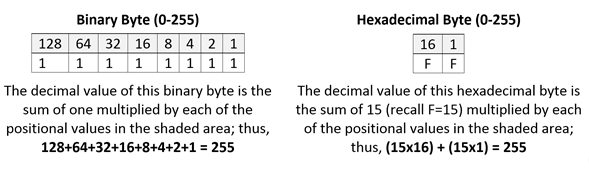
Computers work with binary data in eight-character sequences called bytes.  A binary sequence of eight ones and zeros (“bits”) can be arranged in 256 unique ways.   Long sequences of ones and zeroes are hard for humans to follow, so happily, two hexadecimal characters can also be arranged in 256 unique ways, meaning that just two base-16 characters can replace the eight characters of a binary byte (i.e., a binary value of 11111111 can be written in hex as FF).  Using hexadecimal characters allows programmers to write data in just 25% of the space required to write the same data in binary, and it’s easier for humans to follow.

Let’s take a quick look at why this is so.  A single binary byte can range from 0 to 255 (being 00000000 to 11111111).  Computers count from zero, so that range spans 256 unique values. The following table demonstrates why the largest value of an eight character binary byte (11111111) equals the largest value of just two hexadecimal characters (FF):

Hexadecimal values are everywhere in computing.  Litigation professionals encounter hexadecimal values as MD5 hash values and may run into them as IP addresses, Globally Unique Identifiers (GUIDs) and even color references.

Encoding Text

So far, I’ve described ways to encode the same numeric value in different bases.  Now, let’s shift gears to describe how computers use those numeric values to signify intelligible alphanumeric information like the letters of an alphabet, punctuation marks and emoji.  Again, data are just numbers, and those numbers signify something in the context of the application using that data, just as gesturing with two fingers may signify the number two, a peace sign, the V for Victory or a request that a blackjack dealer split a pair.  What numbers mean depends upon the encoding scheme applied to the values in the application; that is, the encoding scheme supplies the essential context needed to make the data intelligible.  If the number is used to describe an RGB color, then the hex value 7F00FF means violet.  Why?  Because each of the three values that make up the number (7F 00 FF) denote how much of the colors red, green and blue to mix to create the desired RGB color. In other contexts,  the same hex value could mean the decimal number 8,323,327, the binary string 11111110000000011111111 or the characters 缀ÿ.

ASCII

When the context is text, there are a host of standard ways, called Character Encodings or Code Pages, in which the numbers denote letters, punctuation and symbols.  Now nearly sixty years old, the American Standard Code for Information Interchange (ASCII, “ask-key”) is the basis for most modern character encoding schemes (though both Morse code and Baudot code are older).  Born in an era of teletypes and 7-bit bytes, ASCII’s original 128 codes included 33 non-printable codes for controlling machines (e.g., carriage return, ring bell) and 95 printable characters.  The ASCII character set follows:

Windows-1252

Later, when the byte standardized from seven to eight bits (recall a bit is a one or zero), 128 additional characters could be added to the character set, prompting the development of extended character encodings. Arguably the most used single-byte character set in the world is the Windows-1252 code page, the characters of which are set out in the following table (red dots signify unassigned values). 

Note that the first 128 control codes and characters (from NUL to DEL) match the ASCII encodings and the 128 characters that follow are the extended set.  Each character and control code has a corresponding fixed byte value, i.e., an upper-case B is hex 40 and the section sign, §, is hex A7.  To see the entire code page character set and the corresponding hexadecimal encodings on Wikipedia, click here.  Again, ASCII and the Windows-1252 code page are single byte encodings so they are limited to a maximum of 256 characters.

Unicode

The Windows-1252 code page works reasonably well so long as you’re writing in English and most European languages; but sporting only 256 characters, it won’t suffice if you’re writing in, say, Greek, Cyrillic, Arabic or Hebrew, and it’s wholly unsuited to Asian languages like Chinese, Japanese and Korean. 

Though programmers developed various ad hoc approaches to foreign language encodings, an increasingly interconnected world needed universal, systematic encoding mechanisms.  These methods would use more than one byte to represent each character, and the most widely adopted such system is Unicode.  In its latest incarnation (version 14.0, effective 9/14/21), Unicode standardizes the encoding of 159 written character sets called “scripts” comprising 144,697 characters, plus multiple symbol sets and emoji characters.

The Unicode Consortium crafted Unicode to co-exist with the longstanding ASCII and ANSI character sets by emulating the ASCII character set in corresponding byte values within the more extensible Unicode counterpart, UTF-8.  UTF-8 can represent all 128 ASCII characters using a single byte and all other Unicode characters using two, three or four bytes.  Because of its backward compatibility and multilingual adaptability, UTF-8 has become the most popular text encoding standard, especially on the Internet and within e-mail systems. 

Exploding Heads and Encoding Challenges

As tempting as it is to regard encoding as a binary backwater never touching lawyers’ lives, encoding issues routinely lie at the root of e-discovery disputes, even when the term “encoding” isn’t mentioned.  “Load file problems” are often encoding issues, as may be “search difficulties,” “processing exceptions” and “corrupted data.”  If an e-discovery processing tool reads Windows-1252 encoded text expecting UTF-8 encoded text or vice-versa, text and load files may be corrupted to the point that data will need to be re-processed and new production sets generated.  That’s costly, time-consuming and might be wholly avoidable, perhaps with just the smattering of knowledge of encoding gained here.

Share this:

  • Click to email a link to a friend (Opens in new window) Email
  • Click to print (Opens in new window) Print
  • Click to share on X (Opens in new window) X
  • Click to share on Facebook (Opens in new window) Facebook
  • Click to share on LinkedIn (Opens in new window) LinkedIn
Like Loading...

Ten Tips for Better ESI Expert Reports

24 Monday May 2021

Posted by craigball in Computer Forensics, E-Discovery, General Technology Posts

≈ 5 Comments

A lawyer I admire asked me to talk to her colleague about expert reports.  I haven’t had that conversation yet, but the request got me thinking about the elements of a competent expert report, especially reports in my areas of computer forensics and digital evidence.  I dashed off ten things I thought contribute to the quality of the best expert reports.  If these were rules, I’d have to concede I’ve learned their value by breaking a few of them.  I’ve left out basic writing tips like “use conversational language and simple declarative sentences.” There are lists of rules for good writing elsewhere and you should seek them out.  Instead, here’s my impromptu list of ten tips for crafting better expert reports on technical issues in electronic discovery and computer forensics:

  1. Answer the questions you were engaged to resolve.
  2. Don’t overreach your expertise.
  3. Define jargon, and share supporting data in useful, accessible ways.
  4. Distinguish factual findings from opinions.
  5. Include language addressing the applicable evidentiary standard.
  6. Eschew advocacy; let your expertise advocate for you.
  7. Challenge yourself and be fair.
  8. Proofread.  Edit.  Proofread again. Sleep on it. Edit again.
  9. Avoid assuming the fact finder’s role in terms of ultimate issues.
  10. Listen to your inner voice.

Most of these are self-explanatory but please permit me a few clarifying comments.

Answer the questions you were engaged to resolve.

My pet peeve with expert reports is that they don’t always address the questions important to the court and counsel.  I’ve seen reports spew hundreds of pages of tables and screenshots without conveying what any of it means to the issues in the case.  Sometimes you can’t answer the questions.  Fine.  Say so.  Other times you must break down or reframe the questions to conform to the evidence.  That’s okay, too, IF it’s not an abdication of the task you were brought in to accomplish.  But, the best, most useful and intelligible expert reports pose and answer specific questions.

Don’t overreach your expertise.

The standard to qualify as an expert witness is undemanding: do you possess specialized knowledge that would assist the trier of fact in understanding the evidence or resolving issues of fact? See, e.g., Federal Rule of Evidence 702.  With the bar so low, it can be tempting to overreach your expertise, particularly when pushed by a client to opine on something you aren’t fully qualified to address.  For example, I’m a certified computer forensic examiner and I studied accounting in college, but I’m not a forensic accountant.  I know a lot about digital forgery, but I’m not a trained questioned document examiner.  These are specialties.  I try to stay in my own lane and commend it to other experts.

Define jargon, and share supporting data in useful, accessible ways.

Can someone with an eighth-grade education and no technical expertise beyond that of the average computer user understand your report?  If not, you’re writing for the wrong audience.  We should write to express, not impress.  I love two-dollar words and the bon mot phrase, but they don’t serve me well when writing reports.  Never assume that a technical term will be universally understood.  If your grandparents wouldn’t know what it means, define it.

Computer forensic tools are prone to generate lengthy “reports” rife with incomprehensible data.  It’s tempting to tack them on as appendices to add heft and underscore how smart one must be to understand it all.  But it’s the expert’s responsibility to act as a guide to the data and ensure its import is clear.  I rarely testify—even by affidavit–without developing annotated demonstrative examples of the supporting data.  Don’t wait for the deposition or hearing to use demonstrative evidence; make points clear in the report.

Too, I’m fond of executive summaries; that is, an up-front, cut-to-the-chase paragraph relating the upshot of the report.

Distinguish factual findings from opinions.

The key distinction between expert and fact witnesses is that expert witnesses are permitted to express opinions that go beyond their personal observation.  A lay witness to a crash may testify to speeds based only upon what they saw with their own eyes.  An accident reconstructionist can express an opinion of how fast the cars were going based upon evidence that customarily informs expert opinions like skid marks and vehicle deformation.  Each type of testimony must satisfy different standards of proof in court; so, to make a clear and defensible record, it’s good practice to distinguish factual findings (“things you saw”) from opinions (“things you’ve concluded based upon what you saw AND your specialized knowledge, training and experience”).  This  naturally begets the next tip:

Include language addressing the applicable evidentiary standard.

Modern jurisprudence deploys safeguards like the Daubert standard to combat so-called “junk science.”  Technical expert opinions must be based upon a sound scientific methodology, viz., sufficient facts or data and the product of reliable principles and methods.  While a court acting as gatekeeper can infer the necessary underpinnings from an expert’s report and C.V., expressly stating that opinions are based upon proper and accepted standards makes for a better record.

Eschew advocacy; let your expertise advocate for you.

Mea culpa here.  Because I was a trial lawyer for three+ decades, I labor to restrain myself in my reporting to ensure that I’m not intruding into the lawyer’s realm of advocacy.  I don’t always succeed.  Even if you’re working for a side, be as scrupulously neutral as possible in your reporting.  Strive to act and sound like you don’t care who prevails even if you’re rooting for the home team.  If you do your job well, the facts will advocate the right outcome.

Challenge yourself and be fair.

My worst nightmare as an expert witness is that I will mistakenly opine that someone committed a bad act when they didn’t.  So, I’m always trying to punch holes in my own theories and asking myself, “how would I approach this if I were working for the other side?”  Nowhere is this more important than when working as a court-appointed neutral expert.  Even if you’d enjoying seeing a terrible person fry, be fair.  You stand in the shoes of the Court.

Proofread.  Edit.  Proofread again. Sleep on it. Edit again.

Who has that kind of time, right?  Still, try to find the time.  Few things undermine the credibility of an expert report like a bunch of spelling and grammatical errors.  Stress and fatigue make for poor first drafts.  It often takes a good night’s sleep (or at least a few hours away from the work) to catch the inartful phrase, typo or other careless error.

Avoid assuming the fact finder’s role in terms of ultimate issues.

Serving as a court Special Master a few years back, I opined that the evidence of a certain act was so overwhelming that the Court should only reach one result.  Accordingly, I ceased investigating the loss of certain data that I regarded as out-of-scope.  I was right…but I was also wrong.  The Court has a job to do and, by my eliding over an issue the Court was obliged to address, the Court had to rule without benefit of what a further inquiry into the missing evidence would have revealed. The outcome was the same, but by assuming the factfinder’s role on an ultimate issue, I made the Court’s job harder.  Don’t do that.

Listen to your inner voice.

In expressing expert opinions, too much certainty—a/k/a arrogance–is as perilous as too much doubt.  Perfect is not the standard, but you should be reasonably confident of  your opinion based on a careful and competent review of the evidence.  If something “feels” off, it may be your inner voice telling you to look again. 

Share this:

  • Click to email a link to a friend (Opens in new window) Email
  • Click to print (Opens in new window) Print
  • Click to share on X (Opens in new window) X
  • Click to share on Facebook (Opens in new window) Facebook
  • Click to share on LinkedIn (Opens in new window) LinkedIn
Like Loading...
← Older posts
Newer posts →
Follow Ball in your Court on WordPress.com

Enter your email address to subscribe to this blog and receive notifications of new posts by email.

Join 2,231 other subscribers

Recent Posts

  • A Master Table of Truth November 4, 2025
  • Kaylee Walstad, 1962-2025 August 19, 2025
  • Native or Not? Rethinking Public E-Mail Corpora for E-Discovery (Redux, 2013→2025) August 16, 2025
  • Still on Dial-Up: Why It’s Time to Retire the Enron Email Corpus August 15, 2025
  • Chambers Guidance: Using AI Large Language Models (LLMs) Wisely and Ethically June 19, 2025

Archives

RSS Feed RSS - Posts

CRAIGBALL.COM

Helping lawyers master technology

Categories

EDD Blogroll

  • Sedona Conference
  • E-D Team (Ralph Losey)
  • Basics of E-Discovery (Exterro)
  • CS DISCO Blog
  • eDiscovery Today (Doug Austin)
  • E-Discovery Law Alert (Gibbons)
  • eDiscovery Journal (Greg Buckles)
  • Illuminating eDiscovery (Lighthouse)
  • Complex Discovery (Rob Robinson)
  • Minerva 26 (Kelly Twigger)
  • Corporate E-Discovery Blog (Zapproved )
  • The Relativity Blog
  • GLTC (Tom O'Connor)

Admin

  • Create account
  • Log in
  • Entries feed
  • Comments feed
  • WordPress.com

Enter your email address to follow Ball in Your Court and receive notifications of new posts by email.

Website Powered by WordPress.com.

  • Subscribe Subscribed
    • Ball in your Court
    • Join 2,083 other subscribers
    • Already have a WordPress.com account? Log in now.
    • Ball in your Court
    • Subscribe Subscribed
    • Sign up
    • Log in
    • Report this content
    • View site in Reader
    • Manage subscriptions
    • Collapse this bar
 

Loading Comments...
 

    %d