• Home
  • About
  • CRAIGBALL.COM
  • Disclaimer
  • Log In

Ball in your Court

~ Musings on e-discovery & forensics.

Ball in your Court

Category Archives: Uncategorized

More Questions re: Alex Jones Defamation Case

05 Friday Aug 2022

Posted by craigball in Uncategorized

≈ 3 Comments

Yesterday, I posted on the inadvertent production of privileged texts and other matter in the Alex Jones defamation trial.  In the day that’s passed, the Austin, Texas jury returned a compensatory damages verdict of $4.1 million dollars, and minutes ago, assessed punitive damages of $45.2 million.  More has come to light overnight respecting the lawyers’ errors, confirming what I’d only been able to speculate about yesterday.  Now, I want to add a point about features of Texas law that very well could determine if there will be a mistrial or a new trial on appeal.

In yesterday’s post, I explored the Texas rules of procedure and evidence permitting a party who unwittingly produces privileged data to “snap back” that evidence by belatedly asserting its privileged character and demanding return (Tex. R. Civ. P. Rule 193.3 and Tex. R. Evid. Rule 511).  I also touched on counsel’s ethical duty to notify an opponent who has mistakenly supplied material relating to a lawyer’s representation of a client (ABA Model Rule of Professional Conduct 4.4b).

Concluding yesterday’s post, I posed questions:

  • Was a new link to a collection scrubbed of privileged content ever supplied?
  • Why didn’t defense counsel promptly object at trial and protect the record?  
  • Will we next need to discuss the crime/fraud exception to attorney-client privilege?

One of these now has an answer: Based on remarks of counsel at a hearing on Defendants’ Emergency Motion for Enforcement of Protective Order dated December 2, 2021 (filed August 4, 2022), the updated link promised was never supplied.  Further, no subsequent assertions of privilege or other action pursuant to Tex. R. Civ. P. Rule 193.3 were made by Defendants.  It appears the ball was dropped, prompting one to wonder whether defense counsel hoped he would wake up and find it was a bad dream (like–DATED REFERENCE WARNING–Pam seeing Bobby Ewing in the shower).  In the run up to a high-profile trial, it’s more likely it just slipped through the cracks.

Since defense counsel Andino Reynal clearly didn’t expect the text messages to emerge at trial, it remains a conundrum why defense counsel failed to object when they came up and were shown to the jury.  Take it from someone who spent decades trying cases in Texas courts and another decade teaching electronic evidence at Texas’ premier law school (whaddya mean “which one?“), when improper evidence that hurts your client is mentioned to a jury panel, let alone proffered for them to see, counsel must leap to his feet and assert a prompt, clear objection.  There are exceptions to this, but any trial lawyer worth his salt understands the duty to protect the record by timely objection.  Even if you’re loath to appear obstructionist by objecting, you nevertheless rise and say, “Objection.  May we approach, Your Honor?”  Then, quietly make your record at the bench.

This is rooky stuff: You protect the record by timely objection or waive grounds for that objection.

While I’m pointing fingers, I’m wondering why on Earth plaintiffs’ counsel Mark Bankston thought he could broach allegations of discovery misconduct in front of a Texas jury?!? 

This point hasn’t come up in any reporting I’ve seen but the Texas Supreme Court takes a dim view of litigants airing the dirty linen of discovery abuse to jury panels.  Texas’ approach is in marked contrast to Federal practice where judges let juries hear questions of spoliation. In Texas, as a matter of law, the trial judge determines whether spoliation has occurred and what sanctions to impose.  Evidence of spoliating conduct is inadmissible in Texas. Brookshire Bros., Ltd. v. Aldridge, 438 S.W.3d 9 (Tex. 2014)

An argument can be made that spoliation is one thing and telling the jury that opposing counsel “messed up” and supplied documents meant to stay hidden is something else.  Perhaps; but, I’ll bet my boots there was a pretrial order on a Motion in Limine barring mention of discovery disputes without first seeking leave of court.  Too, the Texas Supreme Court’s concern that juries may be prejudiced by discussion of matters reserved exclusively to the Court’s determination would seem to hold true for telling juries that opposing counsel “messed up.” 

There’s been a lot of digital ink devoted to lambasting defense counsel for his mistakes, but in his fervent (and understandable) eagerness to tag Alex Jones, it remains to be seen if Plaintiffs’ counsel overstepped and the whole damages phase must be retried. If so, UGH, just UGH!

P.S. I just noticed that plaintiffs’ counsel practices with a Houston firm with “Ball” in its name. That’s not me nor anyone in my family. No connection whatsoever.

Share this:

  • Click to email a link to a friend (Opens in new window) Email
  • Click to print (Opens in new window) Print
  • Click to share on X (Opens in new window) X
  • Click to share on Facebook (Opens in new window) Facebook
  • Click to share on LinkedIn (Opens in new window) LinkedIn
Like Loading...

Ripped from the Headlines: Alex Jones and Inadvertent Waiver

04 Thursday Aug 2022

Posted by craigball in Uncategorized

≈ 11 Comments

I reserve this space for topics I’ve mulled over carefully in hopes that, even if I’m late to the party, at least I’ll be properly dressed. But yesterday, the media covering the Alex Jones defamation damages trial in Austin lit up with the news that Jones’ counsel inadvertently produced privileged mobile text messages and failed to seek their return in time to prevent waiver of privilege. The “inadvertently” produced messages reveal that (SPOILER ALERT!) Jones is a discovery-obstructing, lying scumbag.

That’s not political commentary; that’s the key fact finding of the Court during the liability phase of the case (“scumbag” is synopsis, implicit but unstated by Her Honor).  Jones’ discovery misconduct was so egregious, it compelled the judge to enter a default judgment on liability.  Hence, the ongoing case determines only compensatory and punitive damages.

Wow! Seamy Texas headlines in my wheelhouse of e-discovery and digital evidence! Got to love that! I write (hastily) to explore the applicable Texas rules as well as to parse—admittedly on skeletal information–what seems to have transpired and what it signifies.

To begin, Alex Jones is a 48-year-old, right-wing conspiracy theorist broadcasting rants and raves to millions of listeners who get off on the garbage he spews. Jones and his InfoWars entities were sued for defamation arising from such vile acts as claiming that the murder of 20 six- and seven-year-old children at Sandy Hook Elementary School was a hoax and “false flag.” So, he’s a horrible person, but the legal and factual issues don’t change because a party is a horrible person; horrible people are why we need courts and lawyers.

On August 3, 2022, Jones was on the stand under cross-examination when plaintiffs’ lawyer Mark Bankston asked:

“Mr. Jones, did you know that 12 days ago, your attorneys messed up and sent me an entire digital copy of your entire cellphone with every text message you’ve sent for the past two years?  And when informed, did not take any steps to identify it as privileged or protect it any way, and as of two days ago, it fell free and clear into my possession and that is how I know you lied to me when you said you didn’t have text messages about Sandy Hook.  Did you know that?”

Jones previously testified he’d searched his phone for texts about Sandy Hook and found none.

Consider five elements of the question, because all go to the question of whether privileged communications produced in error may be used by counsel:

  1. “12 days ago”
  2. “your attorneys messed up”
  3. “sent me…every text message you’ve sent for the past two years.”
  4. “when informed, did not take any steps to identify it as privileged or protect it any way”
  5. “as of two days ago, it fell free and clear into my possession….”

Hearing this, any lawyer’s ears will perk up, certainly any e-discovery lawyer’s. Diligent, competent lawyers don’t ‘mess up” by producing every text message irrespective of relevance, responsiveness and privilege! That could prompt a waiver of privilege–every lawyer’s nightmare!

Unless the lawyer practices in the Great State of Texas, a jurisdiction with strong safeguards against unwitting waiver of privilege by inadvertent production. Texas Rule of Civil Procedure 193.3(d) offers a get-out-of-jail-free card that’s easy to play:

Tex. R. Civ. P. Rule 193.3 Asserting a Privilege

…

d) Privilege not waived by production. A party who produces material or information without intending to waive a claim of privilege does not waive that claim under these rules or the Rules of Evidence if – within ten days or a shorter time ordered by the court, after the producing party actually discovers that such production was made – the producing party amends the response, identifying the material or information produced and stating the privilege asserted. If the producing party thus amends the response to assert a privilege, any party who has obtained the specific material or information must promptly return the specified material or information and any copies pending any ruling by the court denying the privilege.

Aha! So THAT’S what all the twelve days/ten days/two days stuff is about!

Jones’ counsel had ten days from his discovery that privileged information had been unintentionally produced to amend the response to assert a privilege and demand its return. In Texas, we call that “snap-back” and in federal court, it’s what Rule 502 of the Federal Rules of Evidence was intended to fix.

Texas has its own evidence rule on point, Rule 511(b)(2):

Tex. R. Evid. Rule 511: Waiver by Voluntary Disclosure

…

(b) Lawyer-Client Privilege and Work Product; Limitations on Waiver

…

(2) Inadvertent Disclosure in State Civil Proceedings. When made in a Texas state proceeding, an inadvertent disclosure does not operate as a waiver if the holder followed the procedures of Rule of Civil Procedure 193.3(d).

Pulling it together:

At some point on or before Friday, July 22, 2022, defense counsel supplemented discovery responses in such a way that two years of Jones’ cell phone messages were produced.  How?  No clue!    Perhaps by placing it into a production “drop box” repository hosted online?  The method of production doesn’t matter, and the form of production is unhelpfully characterized as “digital;” even the time of production isn’t critical.  What matters most is when did defense counsel discover privileged information was produced and what did he do about it?

I expect the July 22 date refers to a communication from plaintiff’s counsel informing defense counsel that privileged or confidential material may have been inadvertently produced. 

I expect it because ABA Model Rule of Professional Conduct 4.4(b) provides:

“A lawyer who receives a document or electronically stored information relating to the representation of the lawyer’s client and knows or reasonably should know that the document or electronically stored information was inadvertently sent shall promptly notify the sender.”

Texas’ disciplinary rules don’t mirror ABA Model Rule 4.4(b), but smart, ethical counsel will supply the notice if for no other reason than failing to do so puts the lawyer receiving the information at risk of unpleasant outcomes, including being booted from the case by disqualification.

Once notified, the snap-back provision kicked in and—tick…tick…tick—defense counsel had ten days to “[amend] the response, identifying the material or information produced and stating the privilege asserted.”  Again, Texas liberally protects against unwitting privilege waiver, so all defense counsel had to do was write something, anything, akin to “the texts we supplied contain privileged attorney-client communications and non-responsive confidential information.  Return them now, destroy any copies and do not use of share any information they hold.”  It wouldn’t have required much specificity since plaintiffs’ counsel knew what he had and believed his opponents counsel “messed up.”  All it would have taken was a peep of timely objection. Yet, as plaintiffs’ counsel put it in court, defense counsel “did not take any steps to identify it as privileged or protect it any way.”

But, literally just as I’ve written the preceding, my dear friend, Mary Mack, the Empress of E-Discovery, sent a text indicating Plaintiffs’ counsel Bankston e-mailed defense counsel Reynal shortly before midnight on Friday, 7/22 and, discussed the production stating: “My assumption is now that you did not intend to send us this? Let me know if I am correct.”

The following day, July 23, 2022, defense counsel F. Andino Reynal replied:

“Thank you Mark.  There appears to have been a mistake in the file transfer…. Please disregard the link and I will work on resending.  Andino”

So, the plot thickens! It’s not clear that defense counsel “did not take any steps to identify it as privileged or protect it any way.” Still, if what I’ve related here is all there was in term of exchanges (and it shouldn’t be), plaintiffs’ counsel is betting heavily that specific assertions of privilege are required for snap back to apply and that citing a “mistake” and asking plaintiffs to “disregard the link” is insufficient to forestall waiver in a state that bends over backwards to protect attorneys from the consequences of inadvertent waiver.

Gutsy or unprofessional? Your call. Was a new link to a collection scrubbed of privileged content ever supplied? Why didn’t defense counsel promptly object at trial and protect the record? Will we next need to discuss the crime/fraud exception to attorney-client privilege? Any way you cut it, this mess promises to be a case study in discovery abuse and lawyer misconduct. Stay tuned!

UPDATE: Here’s a motion filed by Jones on August 4, 2022:

585543969-final-emergency-mtn-for-enforcement-of-p-oDownload

Share this:

  • Click to email a link to a friend (Opens in new window) Email
  • Click to print (Opens in new window) Print
  • Click to share on X (Opens in new window) X
  • Click to share on Facebook (Opens in new window) Facebook
  • Click to share on LinkedIn (Opens in new window) LinkedIn
Like Loading...

Understanding Air Conditioning…For When You Really Need to Keep Your Cool

23 Saturday Jul 2022

Posted by craigball in Uncategorized

≈ 2 Comments

This post isn’t about forensics or e-discovery, but you can hardly be expected to focus on ESI if you’re sweltering in a hot house!  Having lived most of my years in the balmy American South and Southwest, I regard air conditioning as essential; yet like water and electricity, air conditioning garners little thought until it stops working.  Recently, I explained the mechanics of air conditioning to a curious friend, and it made me see that grasping the fundamentals of air conditioning is more than just a useful academic exercise; it’s a skill that can spare you discomfort and even save significant sums.  If nothing else, you’ll understand what an A/C repair person does and maybe recognize when you’re being conned. 

I handle much of my own A/C maintenance and repair although I deal solely with the electrical components and leave the pressurized parts to professionals.  It’s not that pressurized components are terribly difficult to service, but doing so carries additional risks to person, property and the environment, and requires access to specialized tools and the correct formulation of refrigerant gas, the latter sold only to licensed service personnel.  Most often, “fixing” my central air conditioning system entails no more than blowing out drain lines, cleaning coils to improve thermal transfer and occasionally replacing a starter capacitor or contactor relay.  None of that is rocket science, but still, undertake electrical repair only if you know how to do so in safety!

The ABCs of A/C

Let’s spend a minute on thermodynamics and put names to the major components of a cooling system.

Air conditioning is extracting heat from interior air and transferring (“exchanging”) that heat to exterior air.  In so doing, moisture in the interior air condenses on cold surfaces lowering interior humidity, helping the interior to feel still cooler because our bodies cool better when air is drier.  The heat exchange process entails a pair of separate, connected coils of tubing over which a pair of electric fans circulate air.  The cold coil inside the house is called the “Evaporator” and the hot one outside is called the “Condenser.”  In the U.S., these coils contain a hydrofluorocarbon (HFC) gas serving as a “Refrigerant.”  For many years, the most common refrigerant was branded as Freon®, so most still refer to air conditioning refrigerants that way.

Refrigerants are gases at normal pressures and temperatures but become liquids when compressed.  If you’ve ever sprayed compressed air to, e.g., clean computer components, you may have noticed how the nozzle where the compressed air emerges gets quite cold or even freezes.  The process where a compressed liquid expands to a vapor or where a vapor becomes a liquid when pressurized is called “Phase Transition.”  Think of compressing a gas to liquid as pushing heat out and its expansion from liquid to gas as pulling heat in.

The compression and expansion of the liquid/gas refrigerant in the coils and connective tubing is the work of two more components: a “Compressor” and an “Expansion Valve.”  The compressor receives the expanded gaseous refrigerant and pressurizes it into a liquid state liberating its heat energy and pushing it through the condenser coils to carry that heat away.  In central air conditioners, the compressor sits outside the home, typically surrounded by the condenser coils and surmounted by a large fan circulating air over the hot condenser coils to disperse that heat to outside air.  The condenser coils travel through many thin metal fins serving as heat sinks, increasing the surface area over which the fan blows air to better disperse heat.

As the cooler, compressed liquid refrigerant leaves the condenser, it travels through copper tubing and enters the evaporator coil (usually located in an attic, basement or utility space) via the expansion valve regulating the flow of expanding refrigerant as it vaporizes.  This expansion chills the evaporator coil and a second blower fan circulates filtered air over the cold evaporator coil drawing heat from the interior air.  The warm, humid air traversing the evaporator coil leaves water on the coil like beads of sweat on a glass of iced tea—falling into a collection pan and draining to the sanitary system or outside.

Finally, and familiarly, the operation of the fans and compressor is controlled by an adjustable, temperature-sensing switch called the “Thermostat.”

Here’s a helpful infographic courtesy of the U.S. Department of Energy:

What Can Go Wrong?

If your A/C system fails because it’s lost refrigerant, that’s your worst-case scenario.  Apart from a repairable puncture of a refrigerant line by a nail or screw during construction or another freak occurrence, refrigerant leaks typically stem from deterioration of the coils and tubing as a result of corrosion.  When that occurs, your system is dead or dying and only a professional can help you. Too, rarely can they do much in the way of repairs short of replacing leaking components and recharging the system at great cost.

But coolant loss is not the most common reason A/C systems stop working, and you should be certain all quick, cheap fixes are considered before letting anyone sell you a replacement coil or system. 

In my experience living in communities where 100° Fahrenheit (38°C) temperatures are commonplace, central air conditioners most often stop cooling properly because:

  1. A clogged drain line trips a float switch;
  2. A starter capacitor has dried up; or
  3. A dirty coil has caused a thermal limit switch to trip.

Of course, there are other things that go wrong, and I respect you enough, Dear Reader, to elide over causes like the circuit breaker has tripped or the thermostat is set to heat.  In medicine, there’s a wonderful diagnostic metaphor that counsels, “When you hear hoofbeats, think horses, not zebras.”  Here, too, consider the most common problems before deciding that the compressor has shorted out or the Freon in your system is now parked somewhere over the North Pole.

Clogged Drain Line: All that water that drips from the cold evaporator coil has got to go somewhere and most of us prefer it not come down through the ceiling.  So, there are usually two drip pans below the evaporator.  The first, inside the A/C unit, tends to emerge via a short length of PVC drain line connected to a float switch, an aptly-named electrical device that turns off the A/C unit when a clogged drain line causes water to back up and “float” a switch to break a circuit.  The second is an external drain pan that serves as a failsafe when the main drain clogs AND the float switch fails.  This external pan should remain dry at all times, so it’s being dry signifies nothing respecting the primary drain line and float switch.  Clogged drain lines tend to manifest as the frequent cycling of the A/C such that the system doesn’t run long enough to cool the house.  In my homes, clogged lines tended to be caused by debris, mold or insects that blocked the line.  I resolve this by locating the standing riser (a short, often-capped, vertical piece of PVC in the drain line near where it exits from the inside air handler) and blowing or vacuuming it out, then flushing the line with vinegar or a diluted bleach solution.  I sometimes clear the line by blowing into the tubing using just my lung power, but I don’t recommend it as safe or satisfying.

Start Capacitor Failure: We all know how hard it is to move a static load (like a broken down automobile) and how much easier it becomes once it gets moving and you have the benefit of momentum.  When an A/C compressor or fan motor starts, it lacks momentum and must draw a heavy load of electrical current to get going.  A/C compressors and fans employ a start capacitor holding an extra “kick” of current to get things spinning without tripping a circuit breaker.  Over time, and particularly in very hot weather, capacitors lose their ability to deliver the surge of power needed to start the compressor or fan motor.  To the uninitiated, a bad capacitor presents just like a failed compressor, except that a replacement capacitor costs a few dollars whereas replacing a compressor runs to thousands of dollars.

Swapping out a bad start capacitor is dead simple and dirt cheap, but it requires that you take essential safety precautions including turning off power at the circuit breaker AND physically removing the A/C safety disconnect switch located at the condenser unit.  Also, be careful to note that the capacitor being replaced may store enough power to deliver a jolt, so don’t touch or short its terminals.  Often an aging capacitor and compressor can be rejuvenated by installation of a so-called “hard start kit,” a $10.00-$15.00 device that piggybacks on the existing capacitor and ensures sufficient start current to kick over a reluctant compressor.

Rather than supply the step-by-step of a capacitor replacement or hard start kit installation here, permit me to point you to countless Youtube videos on the topic.  The DIY parts are readily available on Amazon and again, safety first!

Dirty Coils: Coils are heat exchangers and anything that impedes thermal transfer, including dust, dirt, debris, corrosion on the coils, serves to diminish the system’s ability to shed heat and cool efficiently.  If the system can’t shed heat, it may overheat and trip a thermal limit switch shutting the compressor down  or causing it to “short cycle” erratically.  Accordingly, it’s important to only run your A/C system with air filters in place and to periodically hose off dirt and debris from the fins and coils of the exterior condenser unit.  For most systems, an annual rinse should suffice.

With luck, the fixes outlined above will ensure you keep cool and spare you needless service calls and expense.

Share this:

  • Click to email a link to a friend (Opens in new window) Email
  • Click to print (Opens in new window) Print
  • Click to share on X (Opens in new window) X
  • Click to share on Facebook (Opens in new window) Facebook
  • Click to share on LinkedIn (Opens in new window) LinkedIn
Like Loading...

Fast v. Godaddy.com: Exemplary Jurisprudence and Overlooked Opportunity?

19 Saturday Feb 2022

Posted by craigball in E-Discovery, Uncategorized

≈ 3 Comments

Two weeks ago, U.S. District Judge David Campbell of Arizona issued an order imposing serious sanctions for discovery abuse against a deceitful plaintiff in a case styled, Kristin Fast v Godaddy.com LLC et al.  The full 41-page opinion is an instructive read and I commend it to you; but if you’re in a hurry, Phil Favro offers a synopsis here.

Plaintiff Kristin Fast sought damages on theories built around an injury she claimed was aggravated by her work at Godaddy.com.  A skiing accident and surgery led Fast to be diagnosed with a syndrome called Complex Regional Pain (CRP).  I have every confidence CRP Syndrome is awful for those afflicted, but I would have gone in a different direction on the acronym. “Doctor, how long has the patient suffered from crap?”   But I digress.

Though he never stoops to say so, it’s clear Judge Campbell regards the plaintiff as full of crap, and she reveals herself to be someone who imagines she is the smartest person in the room…any room.  Ms. Fast is so smart that she felt entitled to creatively curate facts and jettison and recast unfavorable evidence–actions Judge Campbell finds Ms. Fast undertook with that rarest species of hubris, the “intent to deprive.”

Rule 37(e) of the Federal Rules of Civil Procedure was amended in 2015 to make it well-nigh impossible for a U.S. federal judge to punish a party’s failure to preserve electronically stored information (ESI) absent proof that the party acted with an “intent to deprive another party of the information’s use in the litigation.”  By “punish,” I mean assessing the most severe sanctions, like dismissing the action or instructing the jury it can infer that whatever the guilty party lost was unfavorable to the party who destroyed it.

Since its inception, there’s been uncertainty attendant to whether Rule 37(e) is the sole and exclusive remedy for the loss of ESI that should have been preserved for litigation.  Reasonable minds may conclude that, if “lost” ESI is ultimately recovered, sanctions aren’t available despite gross malfeasance.  That is, if the “lost” ESI wasn’t irreparably lost, it wasn’t “spoliated,” and no sanction may issue.  Not just no serious sanction; no sanction at all.

Not so, Judge Campbell makes clear.  Rule 37(e) is NOT the exclusive remedy for spoliation of ESI…so long as you dress the loss up as something you don’t call “spoliation.”

For example, plaintiff secretly recorded conversations using her phone, and a few (but not all) of these recordings miraculously surfaced long after they were supposed to have been produced.  Addressing a truly ‘lost’ digital recording, Judge Campbell writes, “And Defendants continue to be prejudiced by the failure of Plaintiff to produce the fourth recording she claimed to have made. It is not clear whether that recording is lost or Plaintiff has not produced it. Sanctions under Rule 37(c)(1) are authorized.” Fast at pp. 33-34.

As Chair of the Advisory Committee on the Federal Rules of Civil Procedure when the 2015 revision of Rule 37(e) was developed and adopted, Judge David Campbell is chief architect of the revision.  He knows how the Rule is supposed to work as well as anyone.[1]

That Judge Campbell construes the failure to produce ESI for causes not tied to spoliation as being a sufficient ground for FRCP 37(c)(1) sanctions ;is eye-opening to this writer.  Not that he’s the first judge to do so, but he’s an 800-pound gorilla on the point.

If the conventional wisdom is “Rule 37(e) is the exclusive remedy for spoliation sanctions for loss of ESI,” then Judge Campbell turns that on its head by adding in effect, ‘the full range of sanctions available under Rule 37(c)(1) are available for failing to produce ESI.’

Whoa, Nellie!  If the failure to produce ESI occurred because it was “lost,” then why isn’t Rule 37(e) the sole and exclusive path to sanctions?  The chief architect of 37(e) clearly indicates that sanctions for failing to produce lost ESI are proper under 37(c)(1) unless the failure was substantially justified or harmless. 

Granted, you’re still not likely to secure an order of dismissal or an adverse inference instruction for merely negligent delay or failure to produce; elements of bad faith are sure to be needed before the big guns come out.  But see FRCP Rule 37(b)(2)(A)(i)-(vi) and its sanctions for not obeying a discovery order.[2]

Still, Rule 37(c)(1) packs its own punch for conduct that violates Rule 26(e) (that’s the rule requiring parties to timely supplement discovery responses if the party learns that prior responses are materially incomplete or incorrect).  As the Court notes at p. 4, “Rule 37(c)(1) provides that a party who violates Rule 26(e) may not use the withheld information at trial unless the failure was substantially justified or harmless. This is “a ‘self-executing, automatic sanction to provide a strong inducement for disclosure of material…’” The Court adds, Rule 37(c)(1) also permits a court to order the payment of reasonable expenses caused by the failure, to inform the jury of the party’s failure, or to “impose other appropriate sanctions, including any of the orders listed in Rule 37(b)(2)(A)(i)-(vi).”  Those are big guns, too.  

Backup your Phones, Folks!

Another positive aspect of the sanctions order in Fast v Godaddy.com is that it characterizes mobile devices as sources of ESI that must be routinely preserved in anticipation of litigation.  I’ve been beating that drum for years, so it’s delightful to hear it from a Senior District Judge with tons of influence in e-discovery.

Still, there’s something about phones in the Order that throws me.  The Plaintiff claimed her iPhone was stolen, and the Court took the alleged theft to be true.  At p. 20, the Court states, “By failing to back up her iPhone, Plaintiff failed to take reasonable steps to preserve the ESI contained on the phone.”

I applaud that conclusion.  I’ve written and spoken quite a lot about how to quickly and cheaply backup iPhones for ESI preservation and of the need to do so.  Well done, Judge!

So, a party needs to foresee the loss of a phone or its contents and, rather than simply preserve the data in situ on the phone, a party must affirmatively act to back up the contents of the phone.

That would seem to be the takeaway, except when assessing intent on the next page, Judge Campbell writes, “Assuming the phone was stolen, that act could not have been foreseen or intended by Plaintiff, and neither could its corresponding loss of ESI. The Court therefore cannot find Plaintiff acted with an intent to deprive as required by Rule 37(e)(2).”

So, a party must foresee the loss of a phone or its contents as being sufficiently likely to require a copy of its contents be made, but that selfsame loss is not sufficiently foreseeable so as to supply the requisite intent to deprive?

I see the distinction, but where do we draw the line in practice?  Why is the phone itself not deemed a sufficient repository for the data to be preserved?  If the loss of the phone “could not have been foreseen,” why would there be an independent legal duty to back up the ESI contained on the phone?

It’s a fact that any device that stores ESI will fail or may be lost, stolen or destroyed.  Phones.  Laptops.  Electromagnetic drives.  Solid state drives.  Anything that stores ESI lives on borrowed time.  Is there a duty to maintain two copies of data stored on electronic media because of the inevitable and omnipresent risk of theft, loss or failure?  Or does that duty uniquely attach to phones?  If history has taught us anything it is that dogs have an insatiable hunger for homework.  Protect the evidence, people!

Duties of Counsel

Since the venerable Zubulake v. UBS Warburg decisions at the start of this millennium, Courts have warned lawyers over-and-over-again that there’s more to initiating a proper legal hold than just telling clients not to delete relevant ESI. Yet, lawyers seem resolutely immune to calls for competence.  Judge Campbell raises this in Footnote 18:

The Court is also concerned about the conduct of Plaintiff’s counsel in discovery. He had an affirmative obligation to ensure that his client conducted diligent and thorough searches for discoverable material and that discovery responses were complete and correct when made. See Fed. R. Civ. P. 26(g); Legault v. Zambarano, 105 F.3d 24, 28 (1st Cir. 1997) (“The Advisory Committee’s Notes to the 1983 amendments to Rule 26 spell out the obvious: a certifying lawyer must make ‘a reasonable effort to assure that the client has provided all the information and documents available to him that are responsive to the discovery demand.’”); Bruner v. City of Phoenix, No. CV-18-00664-PHX-DJH, 2020 WL 554387, at *8 (D. Ariz. Feb. 4, 2020) (“[I]t is not reasonable for counsel to simply give instructions to his clients and count on them to fulfill their discovery obligations. The Federal Rules of Civil Procedure place an affirmative obligation on an attorney to ensure that their clients’ search for responsive documents and information is complete. See Fed. R. Civ. P. 26(g).”); Stevens, 2019 WL 6499098, at *4 (criticizing “cavalier attitude toward the preservation requirement” where “counsel failed to immediately preserve obviously crucial evidence at a time when the duty to preserve existed and instead allowed the phone to remain in [his client’s] possession”).

Id. at Footnote 18, p. 39

The obligations of counsel to carry out a proper legal hold and collection, and counsels’ ability to meet those obligations, remains a river too few can ford.  But the lack of lawyer competence is not as reprehensible as the prevailing attitude of the bar respecting rife incompetence. No one seems to care, at least not enough to prioritize teaching information technology to lawyers and judges. If you don’t teach something, how can anyone be expected to learn it?  Just this month, we’ve seen two reported decisions where confusion concerning basic metadata made lawyers (and even a federal judge I admire) look incompetent in the management of ESI.  In re Cooley, No. 05-21-00445-CV, 2022 WL 304706 (Tex. App.–Dallas Feb. 2, 2022, orig. pro.) and Arconic Corp. v. Novelis Inc., No. 17-1434, 2022 BL 46179 (W.D. Pa. Feb. 10, 2022).

Coming back to Fast v. Godaddy.com, perhaps clucking one’s tongue at an errant lawyer in a footnote isn’t going to change things.  In their efforts to dredge a safe harbor in Rule 37(e), Judge Campbell and the distinguished Advisory Committee all-but-immunized the most common instances of spoliation from consequences.  Absent proof that spoliation occurred with an intent to deprive, what’s really the worst that occurs now?  The guilty party is compelled to belatedly do what they were obliged to do all along, or some split-baby fraction of same.  “Ow, my wrist!  Careful Judge, that slap nearly hurt.”

The efforts to rein in judicial discretion to punish gross incompetence has been good for business but bad for justice.  The fleeting interest in e-discovery education of 15+ years ago was driven by sanctions.  By Zubulake.  By Coleman (Parent) Holdings v. Morgan Stanley.  By Qualcomm v. Broadcom.  We never had much of a carrot supporting ESI competence, and 37(e) took away the stick.

Judges must get tougher, and demand more. Your Honors: Just because you didn’t know it when you were practicing doesn’t mean lawyers needn’t know it now. Citizens cannot hope for justice any better than you mete out.

If the bench, bar and public don’t demand competence be demonstrated to practice law, and we don’t meaningfully discourage incompetence in practice, why would anyone expect lawyer competence to improve?

If it weren’t so, I’d disclose it at the start; but to be clear in closing, I have no connection to the Fast v. Godaddy.com case, the parties or counsel.


[1] He clearly wishes others understood Rule 37 half so well, e.g., his Footnote 2 states, “It is therefore quite frustrating that, years after the 2015 revision, some lawyers and judges are still unaware of its significant change to the law of ESI spoliation. See, e.g., Holloway v. Cnty. of Orange, No. SA CV 19-01514-DOC (DFMx), 2021 WL 454239, at *2 (C.D. Cal. Jan. 20, 2021) (granting ESI spoliation sanctions without addressing the requirements of Rule 37(e)); Mercado Cordova v. Walmart P.R., No. 16-2195 (ADC), 2019 WL 3226893, at *4 (D.P.R. July 16, 2019) (same); Nutrition Distrib. LLC v. PEP Rsch., LLC, No. 16cv2328-WQH-BLM, 2018 WL 6323082, at *5 (S.D. Cal. Dec. 4, 2018) (ordering adverse inference instructions without addressing the strict requirements of Rule 37(e)(2), and applying the negligence standard that Rule 37(e) specifically rejected).”

[2] One of my many maxims is that “a Court guards its power more scrupulously than a party’s rights.”  That’s not a slam on courts, who must scrupulously protect the sanctity of their orders lest chaos ensue.  The lesson being that parties should endeavor to convert agreements about discovery obligations into orders whenever possible because a judge is far more likely to punish a transgression of its own order than an offense to a party.  At bottom, it’s just human nature to do that, right?

Share this:

  • Click to email a link to a friend (Opens in new window) Email
  • Click to print (Opens in new window) Print
  • Click to share on X (Opens in new window) X
  • Click to share on Facebook (Opens in new window) Facebook
  • Click to share on LinkedIn (Opens in new window) LinkedIn
Like Loading...

Six Powerful Points for Better Presentations

20 Thursday Jan 2022

Posted by craigball in Uncategorized

≈ 2 Comments

I use PowerPoint in my law practice more often than Microsoft Word.  Word processing tools are for preparing documents for people to read and understand; I use presentation tools like PowerPoint when I want people to see and understand.  PowerPoint isn’t a word processor; it’s a visual presentation tool.  You can fill slides with text as you might a word-processed document, but when you do, you’re killing the power of PowerPoint.

Text documents speak for themselves.  Presentations benefit from a narrator, i.e., you sharing your message.  An effective presentation supports your message.  It’s your ally and must not be your competitor.  The human brain cannot simultaneously read text and listen to words because both tasks draw on the same cognitive capability.  When we ask an audience to read text and hear words, text doesn’t reinforce the words; it competes with them.  Our language centers are overwhelmed trying to process both.  The result is a breakdown in comprehension and retention.  That breakdown is worst when a presentation proceeds at the brisk pace required to hold the attention of younger listeners.  And we need our audience’s attention! Attention is the hardest thing to grab and hang onto in this time of ubiquitous screens and constant connection.

We’ve all experienced someone talking to us as we try to read a document.  It’s rude, and makes it tough to follow the document or the conversation.  When handing a document to a judge, savvy advocates know to shut up and let the document do the talking.

Why then, do so many fine advocates insist on reading the text on their slides to the audience?

A savvy presenter knows not to speak when listeners are reading slides and limits the amount of text onscreen.  An effective presentation is Show and Tell, not Speak and Spell.  An effective presentation doesn’t stand alone; it needs a narrative.

This is heresy.  Most presenters build slide decks to suffice as handouts (NO!!) and present them by reading aloud that text which the listeners have already read or are struggling to plow through.  This is Death by PowerPoint, and it’s the reason so many presentations are far less effective and memorable than they could be.

PowerPoint in Trial?  Not So Much.

When I started using PowerPoint thirty-odd years ago, it was hard and costly to use visual persuasion in court.  Courtrooms weren’t well-equipped for presentation and old-school judges took a dim view of innovative techniques they worried might slow proceedings or inject error.  But I used them anyway, and greatly benefited.  Today, going to trial or a key hearing without a compelling visual presentation is going underprepared.  Judges like good visuals, and jurors need them.  Today, the presentation tools are right at hand in modern courtrooms.  Yet, even as we focus on visual presentation in court, the reality is that only a handful of disputes today are decided in courtrooms.  Most are resolved in settings unconstrained by the rules of evidence, making it more important that your presentation be engaging and informative than evidentiary.  Accordingly, it’s fine to use, say, stock photography, sound and even music, if the effect will be to get and hold focus so you can instruct and persuade.  Cases settle because one side fears an outcome more than the other.  When you are seeking to persuade an opponent to settle, it’s sensible to use and underscore emotion.  Few things do that as well as images, sounds and music.

As my practice gravitated from trial to teaching, testifying and consulting, I am less constrained by strict rules of evidence in framing my presentations.  I use richer media and more creative and provocative imagery, and I strive to use visual persuasion everywhere.  Whether you are presenting in a courtroom or in more free-wheeling settings, you need never eschew visual persuasion.  If you follow a few simple rules, it will always improve comprehension and retention of your message.

  1. Use Pictures to Persuade: Persuasion is telling a story the listener takes as true.  When you tell that story in pictures, you free the speech center of the listener’s brain to hear your words, and you empower the visual cortex to forge connections between the story and the memories and emotions conjured up by the images.  Instead of fighting to reconcile the written and spoken word, the visual and language cortices pull together, each reinforcing the other.  No doubt there is a pithy biochemical explanation for why this works; but all we need know is that it works.  It works really, really well.
  2. Follow the Five Second Rule: I won’t use a slide that takes more than a few seconds to apprehend.  If you must use text to make a point, never use more text than an average reader can read and understand in five seconds, tops.  That doesn’t mean spreading loads of text over many slides and clicking through like mad.  Make the point verbally, as narrator, at your own pace.  Text on the slide merely anchors a point and provides essential context.  Don’t ask it to do more.  Using just an image or a single word injects tension and prompt listeners to forge their own connections between the visual and the message.  The connections built of a listener’s curiosity are sturdy.  We better retain what we think through than what we are told.  If you can make the point with no text at all, do it.  The words come from you.  Use the screen for imagery.
  3. Fill the Slide: Don’t be afraid to give over the entire slide to your image.  Too many presenters leave room for text even when there’s little or no text.  We are so conditioned to treat images as adjuncts to the written word those images too often get added as little rectangles floating in a sea of dead space.  Don’t do it!  Use images of sufficient resolution that can be stretched to fill the screen without pixilation.  I’m fond of using solid areas of images for whatever bit of text I include.  Feel free to get creative with the image, using just a section or changing its orientation.  I sometimes add subtle movement to images using the Morph transition or motion path animation or a grow/shrink enhancement to take advantage of the fact that our primal survival senses are intensely attuned to movement.  It draws our attention, even when the movement is almost imperceptible.
  4. PowerPoint is not a Teleprompter: Presenters lard their slides with tons of text when they’re afraid they won’t otherwise remember what they want to say.  That’s lazy, but it’s also foolish, because it guarantees that your message won’t come across as clearly or stick as firmly.  Trust me: If you know your stuff, it won’t take more than one well-chosen image or word to trigger your recollection of everything you want to say.  If you need notes, use them or use the Speaker Notes feature of PowerPoint; but, be warned:  Audiences have a low tolerance for presenters reading to them.  While it’s acceptable to read a sentence or two, most people would rather hear your narration in a relaxed, conversational way.  Nothing belies your competence quite like reading a presentation.
  5. Bullet Points Don’t Wrap: I despise bullet points and strive not to use them. But, when I must use a bulleted list, I follow the ironclad rule that bullet points don’t wrap.  No “buts.”  No “what ifs?”  Never!  If any item in a bulleted list is so long that it won’t fit on a single line, it’s not a bullet point, and it’s got to go.
  6. Make It Big; Make It Flow: The presentation viewers can’t read is no better than the speech they can’t hear.  Never put text on a slide that you expect viewers to read unless it at least 24 points in size.  Bigger is better.  Don’t fudge on this.  You should be able to read the text on a slide when in slide sorter mode. 

A slide presentation doesn’t have to “feel” like a PowerPoint.  I’m flattered when people come up and ask me what program I used to present.  They’re shocked when I respond, “just PowerPoint.”  Use transitions and backgrounds to smooth the flow between slides and eliminate jarring segues.  A simple fade is sufficient; but I’m a huge fan of the Morph transition in PowerPoint that enables objects, words and text to re-assemble before the viewers’ eyes.  It’s slick; so, use “slick” with care and subtlety.  The transition should help the flow, not interrupt it.  Morph is also terrific for enlarging sections of images or documents.  It handles all of the calculations required for smoothly animating between slides called “tweening.”

But, Wait!  There’s More: PowerPoint does much more in my practice than just serve as a presentation tool.  I use its powerful screen capture and video editing tools to obtain and tweak imagery.  I use it to fashion sophisticated animations, and its powerful suite of drawing and photo-manipulation tools support extensive customization of images.  The drawing tools are handy when I need to crop an image, remove a background or convert vector graphics to pictures.  It’s also a convenient, adaptable canvas to paste to when capturing screen shots.

Share this:

  • Click to email a link to a friend (Opens in new window) Email
  • Click to print (Opens in new window) Print
  • Click to share on X (Opens in new window) X
  • Click to share on Facebook (Opens in new window) Facebook
  • Click to share on LinkedIn (Opens in new window) LinkedIn
Like Loading...

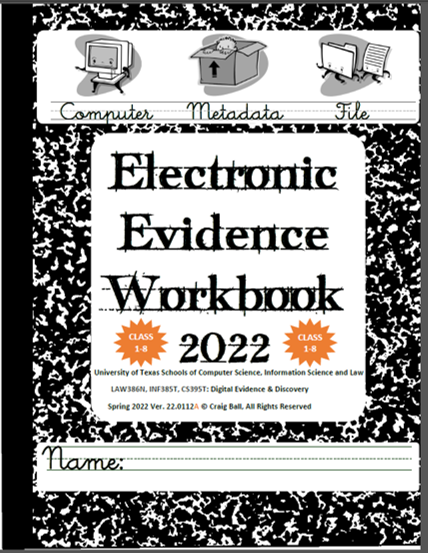
Electronic Evidence Workbook 2022

13 Thursday Jan 2022

Posted by craigball in Computer Forensics, E-Discovery, General Technology Posts, Uncategorized

≈ 6 Comments

I’ve released a new version of the Electronic Evidence Workbook used in my three credit E-Discovery and Digital Evidence course at the University of Texas Law School, UT Computer Science School and UT School of Information. I prefer this release over any before because it presents the material more accessibly and logically, better tying the technical underpinnings to trial practice.

The chapters on processing are extensively revamped. I’m hell bent on making encoding understandable, and I’ve incorporated the new Processing Glossary I wrote for the EDRM. Glossaries are no one’s idea of light reading, but I hope this one proves a handy reference as the students cram for the five quizzes and final exam they’ll face.

Recognizing that a crucial component of competence in electronic discovery is mastering the arcane argot of legaltech, I’ve added Vital Vocabulary lists throughout, concluded chapters with Key Takeaway callouts and, for the first time, broken the Workbook into volumes such that this release covers just the first eight classes, almost entirely Information Technology.

Come Spring Break in mid-March, I’ll release the revamped omnibus volume adding new practical exercises in Search, Processing, Production, Review and Meet & Confer and introducing new tools. Because university students use Mac machines more than Windows PCs, the exercises ahead employ Cloud applications so as to be wholly platform-independent. The second half of the course folds in more case law to the relief of law students and chagrin of CS and IS students. The non-law students do a great job on the law but approach it with trepidation; the law students kiss the terra firma of case law like white-knuckled passengers off a turbulent flight.

Though written for grad students, the Workbook is also written for you, Dear Reader. If you’ve longed to learn more about information technology and e-discovery but never knew quite where or how to start, perhaps the 2022 Workbook is your gateway. The law students at UT Austin pay almost $60,000 per year for their educations; I’ll settle for a little feedback from you when you read it.

Share this:

  • Click to email a link to a friend (Opens in new window) Email
  • Click to print (Opens in new window) Print
  • Click to share on X (Opens in new window) X
  • Click to share on Facebook (Opens in new window) Facebook
  • Click to share on LinkedIn (Opens in new window) LinkedIn
Like Loading...

A Dozen Nips and Tucks for E-Discovery

03 Monday Jan 2022

Posted by craigball in Computer Forensics, E-Discovery, Uncategorized

≈ 7 Comments

Annually, I contribute to an E-Discovery Update presentation for top tier trial lawyers and annually I struggle to offer a handout that will be short enough for attendees to read and sufficiently pointed to prompt action. Ironically, predictably, the more successful the lawyers in attendance, the less moved they are to seek fresh approaches to discovery. Yet, we would be wise to observe that success tends not to depart abruptly but slips away on little cat feet, or as Hemingway described the velocity of a character’s path to bankruptcy, “Gradually, then suddenly.” A few nips and tucks may be all that’s needed to stay in fighting form. Accordingly, I wanted my list to be pithy with actionable takeaways like “have a production protocol, get a review platform and test your queries.” That may seem painfully obvious to you, Dear Reader, but it’s guidance yet to be embraced by leading lights in law. Here’s my 2022 list:

  1. Forms from a decade ago are obsolete.  Update your preservation letters and legal hold notices.  Remember: preservation letters go to the other side; legal hold notices to your clients.
  2. Custodial holds don’t fly.  Just telling a client, “don’t delete relevant data” isn’t enough and a misstep oft-cited by courts as attorney malfeasance.  Lawyers must guide and supervise clients in the identification, preservation and collection of relevant evidence.
  3. Be sure your legal hold process incorporates all elements of a defensible notification:
    i. Notice is Timely
    ii. Communicated through an effective channel
    iii. Issued by person(s) with clout
    iv. Sent to all necessary custodians
    v. Communicates gravity and accountability
    vi. Supplies context re: claim or litigation
    vii. Offers clear, practical guidance re: actions and deadlines
    viii. Sensibly scopes sources and forms
    ix. Identifies mechanism and contact for questions
    x. Incorporates acknowledgement, follow up and refresh
  4. Data dies daily; systems automatically purge and overwrite data over time.  The law requires parties promptly intercede to prevent loss of potentially relevant information by altering purge settings and otherwise interdicting deletion.  Don’t just assume it’s preserved, check to be certain.
  5. No e-discovery effort is complete in terms of preservation and collection if it fails to encompass mobile devices and cloud repositories.  Competent trial lawyers employ effective, defensible methods to protect, collect and review relevant mobile and cloud information.
  6. The pandemic pushed data to non-traditional locations and applications.  Don’t overlook data in conferencing apps like Zoom and collaboration tools like Slack.
  7. You should have an up-to-date ESI production protocol that fits the data and workflow. Know what an ESI protocol does and what features you can negotiate without prompting adverse outcomes.
  8. Don’t rely on untested keyword queries to find evidence.  Embrace the science of search.  TEST!
  9. Modern litigation demands use of review systems dedicated to electronically stored information (ESI) and staff trained in their use. Asked “What’s your review platform?” You should know the answer.
  10. Vendors paid by the gigabyte lack incentive to trim data volumes.  Clients will thank you to have sound strategies to cull and deduplicate the data that vendors ingest and host.  Big savings lie there.
  11. Courts demand an unprecedented level of communication and cooperation respecting ESI.  Transparency of process signals confidence and competence in your approach to e-discovery.
  12. There are no more free passes for ignorance.  Now, learn it, get help or get out.

Share this:

  • Click to email a link to a friend (Opens in new window) Email
  • Click to print (Opens in new window) Print
  • Click to share on X (Opens in new window) X
  • Click to share on Facebook (Opens in new window) Facebook
  • Click to share on LinkedIn (Opens in new window) LinkedIn
Like Loading...

Federal Court Rules on Whether Documents Containing Agreed-Upon Keywords are Responsive Per Se

25 Monday Oct 2021

Posted by craigball in Uncategorized

≈ 6 Comments

Today, Doug Austin‘s splendid eDiscoveryToday blog featured O’Donnell/Salvatori Inc. v. Microsoft Corp., No. C20-882-MLP (W.D. Wash. Oct. 1, 2021), where a U.S. Magistrate sitting in Seattle opined on an issue I wrote about nine years ago (when there wasn’t a case to be found on the question): “Must a party produce all ESI retrieved from the use of negotiated search terms?” Magistrate Peterson wisely held that “a party’s agreement to run search terms does not waive its right to review the resulting documents for relevance so long as the review can be done in a reasonably timely manner.”

Because the issue remains contentious, I thought reprinting my long ago post and the associated practice tip (that would have kept the parties from tripping up) might be timely. Here it is (from March 22, 2013):

More than once, I’ve faced disputes stemming from diametrically different expectations concerning the use of keywords as a means to identify responsive ESI.  I don’t recall seeing a case on this; but, it wouldn’t surprise me if there was one.  If not, there soon will be because the issue is more common than one might imagine.

When requesting parties hammer out agreements on search terms to be run against the producing party’s ESI, sometimes the requesting party’s expectation is that any item responsive to the agreed-upon keywords (that is, any item that’s “hit”) must be produced unless withheld as privileged.  Put another way, the requesting party believes that, by agreeing to the use of a set of keywords as a proxy for attorney review of the entire potentially-responsive collection, and thereby relieving the producing party of the broader obligation to look at everything that may be responsive, those keywords define responsiveness per se, requiring production if not privileged.

Now I appreciate that some are reading that and getting hot under the collar.  You’re saying things like:

  • “We always have the right to review items hit for responsiveness!”
  • “It’s the Request for Production not the keyword hits that define the scope of e-discovery!”
  • “Nothing in the Rules or the law obliges a party to produce non-responsive items!”
    [Expletives omitted]

Perhaps; but, there’s sufficient ambiguity surrounding the issue to prompt prudent counsel to address the point explicitly when negotiating keyword search protocols, and especially when drafting agreed orders memorializing search protocols.

To appreciate why expectations should be plainly stated, one need only look at the differing incentives that may prompt disparate expectations.

What is a producing party’s incentive to limit the scope of search to only a handful of queries and keywords?  Federal law requires a producing party to search all reasonably accessible sources of information that may hold responsive information and to identify those potentially responsive sources that won’t be searched.  That’s a pretty broad mandate; so, it’s no wonder producing parties seek to narrow the scope by securing agreements to use keyword queries.  Producing parties have tons of incentive to limit the scope of review to only items with keyword hits.  It eases their burden, trims their cost and affords requesting parties cover from later complaints about scope and methodology.

What is the requesting party’s incentive to limit an opponent’s scope of search to only those items with keyword hits?  Requesting parties might respond that their incentive is to insure that they get to see the items with hits so long as they are not privileged.  By swapping keyword culling for human review, requesting parties need not rely upon an untrusted opponent’s self-interested assessment of the material.  Instead, if it’s hit by the agreed-upon keywords, the item will be produced unless it’s claimed to be privileged; in which case the requesting party gets to see its privilege log entry.  That’s often the contemplated quid pro quo.

Both arguments have considerable merit; and, yes, you can be compelled to produce non-responsive items, if the agreement entered into between the parties is construed to create that obligation.  Some might argue that the agreement to use queries is an agreement to treat those queries as requests for production.  You don’t have to agree, dear reader; but, you’d be wise to plan for opponents (and judges) who think this way.

These are issues we need to pay attention to as we move closer to broader adoption of technology-assisted review.  We may be gravitating to a place where counsel’s countermanding a machine’s “objective” characterization of a document as responsive will be viewed with suspicion.  Responding parties see electronic culling as just an extension of counsel’s judgment; but, requesting parties often see electronic culling as an objective arbiter of responsiveness.  Face it: requesting parties believe that opponents hide documents.  TAR and keyword search may be embraced by requesting parties as a means to get hold of helpful documents that would not otherwise see the light of day.

Practice Tip:  If you enter into an agreement with the other side to use keywords and queries for search, be clear about expectations with respect to the disposition of items hit by queries.  Assuming the items aren’t privileged, are they deemed responsive because they met the criteria used for search or is the producing party permitted or obliged to further cull for responsiveness based on the operative Requests for Production?  You may think this is clear to the other side; but, don’t count on it.  Likewise, don’t assume the Court shares your interpretation of the protocol.  Just settling upon an agreed-upon list of queries may not be sufficient to insure a meeting of the minds.

Share this:

  • Click to email a link to a friend (Opens in new window) Email
  • Click to print (Opens in new window) Print
  • Click to share on X (Opens in new window) X
  • Click to share on Facebook (Opens in new window) Facebook
  • Click to share on LinkedIn (Opens in new window) LinkedIn
Like Loading...

Did You Miss Tom’s Checklist Manifesto?

01 Friday Oct 2021

Posted by craigball in Uncategorized

≈ 4 Comments

I don’t often feature the work of others here; but sometimes I come across something that’s just so good, I can’t wait to sing its praises even as I wish it were something I’d written. One such gem is my great friend Tom O’Connor’s E-Discovery Checklist Manifesto. To give credit where due, Jeremy Greer and ACEDS honcho Michael Quartararo are authors as well, and their splendid work was underwritten by software seller, Digital WarRoom. As we all do, the Manifesto owes an acknowledged debt to the Electronic Discovery Reference Model (EDRM) where much of the same information can be found, but the Checklist Manifesto pulls the essentials together more simply and accessibly without leaving key points behind.

Because it emerged in the abyss of pandemic 2020, there’s a good chance you never heard mention of the E-Discovery Checklist Manifesto, so I hope you’ll like getting this heads up. It’s a quick read and worthy of being kept close at hand by newbies and old hands alike.

Share this:

  • Click to email a link to a friend (Opens in new window) Email
  • Click to print (Opens in new window) Print
  • Click to share on X (Opens in new window) X
  • Click to share on Facebook (Opens in new window) Facebook
  • Click to share on LinkedIn (Opens in new window) LinkedIn
Like Loading...

Then his head exploded!

28 Tuesday Sep 2021

Posted by craigball in Computer Forensics, E-Discovery, General Technology Posts, Uncategorized

≈ 2 Comments

In the introduction to my Electronic Evidence Workbook, I note that my goal is to change the way readers think about electronically stored information and digital evidence. I want all who take my courses to see that modern electronic information is just a bunch of numbers and not be daunted by those numbers.

I find numbers reassuring and familiar, so I occasionally forget that some are allergic to numbers and loathe to wrap their heads around them.

Lately, one of my bright students identified himself as a “really bad with numbers person.” My lecture was on encoding as prologue to binary storage, and when I shifted too hastily from notating numbers in alternate bases (e.g., Base 2, 10, 16 and 64) and started in on encoding textual information as numbers (ASCII, Unicode), my student’s head exploded.

Boom!

At least that’s what he told me later. I didn’t hear anything when it happened, so I kept nattering on happily until class ended.

As we chatted, I realized that my student expected that encoding and decoding electronically stored information (ESI) would be a one-step process.  He was having trouble distinguishing the many ways that numbers (numeric values) can be notated from the many ways that numbers represent (“encode”) text and symbols like emoji.  Even as I write that sentence I suspect he’s not alone.

Of course, everyone’s first hurdle in understanding encoding is figuring out why to care about it at all.  Students care because they’re graded on their mastery of the material, but why should anyone else care; why should lawyers and litigation professionals like you care?  The best answer I can offer is that you’ll gain insight.  It will change the way you think about ESI in the same way that algebra changes the way you think about problem solving.  If you understand the fundamental nature of electronic evidence, you will be better equipped to preserve, prove and challenge its integrity as accurate and reliable information.

Electronic evidence is just data, and data are just numbers; so, understanding the numbers helps us better understand electronic evidence.

Understanding encoding requires we hearken back to those hazy days when we learned to tally and count by numbers.  Long ago, we understood quantities (numeric values) without knowing the numerals we would later use to symbolize quantities.  When we were three or four, “five” wasn’t yet Arabic 5, Roman V or even a symbolic tally like ||||. 

More likely, five was this:

If you’re from the Americas, Europe or Down Under, I’ll wager you were taught to count using the decimal system, a positional notation system with a base of 10.  Base 10 is so deeply ingrained in our psyches that it’s hard to conceive of numeric values being written any other way.  Decimal just feels like one, “true” way to count, but it’s not.  Writing numbers using an alternate base or “radix” is just as genuine, and it’s advantageous when information is stored or transmitted digitally.

Think about it.  Human beings count by tens because we evolved with ten digits on our hands.  Were that not so, old jokes like this one would make no sense: “Did you hear about the Aggie who was arrested for indecent exposure?  He had to count to eleven.”

Had our species evolved with eight fingers or twelve, we would have come to rely upon an octal or duodecimal counting system, and we would regard those systems as the “true” positional notation system for numeric values.  Ten only feels natural because we built everything around ten.

Computers don’t have fingers; instead, computers count using a slew of electronic switches that can be “on” or “off.”  Having just two states (on/off) makes it natural to count using Base 2, a binary counting system.  By convention, computer scientists notate the status of the switches using the numerals one and zero.  So, we tend to say that computers store information as ones and zeroes.  Yet, they don’t.

Computer storage devices like IBM cards, hard drives, tape, thumb drives and optical media store information as physical phenomena that can be reliably distinguished in either of two distinct states, e.g., punched holes, changes in magnetic polar orientation, minute electric potentials or deflection of laser beams.   We symbolize these two states as one or zero, but you could represent the status of binary data by, say, turning a light on or off.  Early computing systems did just that, hence all those flashing lights.

You can express any numeric value in any base without changing its value, just as it doesn’t change the numeric value of “five” to express it as Arabic “5” or Roman “V” or just by holding up five fingers. 

In positional notation systems, the order of numerals determines their contribution to the value of the number; that is, their contribution is the value of the digit multiplied by a factor determined by the position of the digit and the base.

The base/radix describes the number of unique digits, starting from zero, that a positional numeral system uses to represent numbers.  So, there are just two digits in base 2 (binary), ten in base 10 (decimal) and sixteen in base 16 (hexadecimal).  E-mail attachments are encoded using a whopping 64 digits in base 64.

We speak the decimal number 31,415 as “thirty-one thousand, four hundred and fifteen,” but were we faithfully adhering to its base 10 structure, we might say, “three ten thousands, one thousand, four hundreds, one ten and five ones.  The “base” ten means that there are ten characters used in the notation (0-9) and the value of each position is ten times the value of the position to its right.

The same decimal number 31,415 can be written as a binary number this way: 111101010110111

In base 2, two characters are used in the notation (0 and 1) and each position is twice the value of the position to its right.  If you multiply each digit times its position value and add the products, you’ll get a total equal in value to the decimal number 31,415.

A value written as five characters in base 10 requires 15 characters in base 2.  That seems inefficient until you recall that computers count using on-off switches and thrive on binary numbers.

The decimal value 31,415 can be written as a base 16 or hexadecimal number this way: 7AB7

In base 16, sixteen characters are used in the notation (0-9 and A-F) and each position is sixteen times the value of the position to its right.  If you multiply each digit times its position value and add the products, you’ll get a total equal in value to the decimal number 31,415.  But how do you multiply letters like A, B, C, D, E and F?  You do it by knowing the letters are used to denote values greater than 9, so A=10, B=11, C=12, D=13, E=14 and F=15.  Zero through nine plus the six values represented as letters comprise the sixteen characters needed to express numeric values in hexadecimal.

Once more, If you multiply each digit/character times its position value and add the products, you’ll get a total equal in value to the decimal number 31,415:

Computers work with binary data in eight-character sequences called bytes.  A binary sequence of eight ones and zeros (“bits”) can be arranged in 256 unique ways.   Long sequences of ones and zeroes are hard for humans to follow, so happily, two hexadecimal characters can also be arranged in 256 unique ways, meaning that just two base-16 characters can replace the eight characters of a binary byte (i.e., a binary value of 11111111 can be written in hex as FF).  Using hexadecimal characters allows programmers to write data in just 25% of the space required to write the same data in binary, and it’s easier for humans to follow.

Let’s take a quick look at why this is so.  A single binary byte can range from 0 to 255 (being 00000000 to 11111111).  Computers count from zero, so that range spans 256 unique values. The following table demonstrates why the largest value of an eight character binary byte (11111111) equals the largest value of just two hexadecimal characters (FF):

Hexadecimal values are everywhere in computing.  Litigation professionals encounter hexadecimal values as MD5 hash values and may run into them as IP addresses, Globally Unique Identifiers (GUIDs) and even color references.

Encoding Text

So far, I’ve described ways to encode the same numeric value in different bases.  Now, let’s shift gears to describe how computers use those numeric values to signify intelligible alphanumeric information like the letters of an alphabet, punctuation marks and emoji.  Again, data are just numbers, and those numbers signify something in the context of the application using that data, just as gesturing with two fingers may signify the number two, a peace sign, the V for Victory or a request that a blackjack dealer split a pair.  What numbers mean depends upon the encoding scheme applied to the values in the application; that is, the encoding scheme supplies the essential context needed to make the data intelligible.  If the number is used to describe an RGB color, then the hex value 7F00FF means violet.  Why?  Because each of the three values that make up the number (7F 00 FF) denote how much of the colors red, green and blue to mix to create the desired RGB color. In other contexts,  the same hex value could mean the decimal number 8,323,327, the binary string 11111110000000011111111 or the characters 缀ÿ.

ASCII

When the context is text, there are a host of standard ways, called Character Encodings or Code Pages, in which the numbers denote letters, punctuation and symbols.  Now nearly sixty years old, the American Standard Code for Information Interchange (ASCII, “ask-key”) is the basis for most modern character encoding schemes (though both Morse code and Baudot code are older).  Born in an era of teletypes and 7-bit bytes, ASCII’s original 128 codes included 33 non-printable codes for controlling machines (e.g., carriage return, ring bell) and 95 printable characters.  The ASCII character set follows:

Windows-1252

Later, when the byte standardized from seven to eight bits (recall a bit is a one or zero), 128 additional characters could be added to the character set, prompting the development of extended character encodings. Arguably the most used single-byte character set in the world is the Windows-1252 code page, the characters of which are set out in the following table (red dots signify unassigned values). 

Note that the first 128 control codes and characters (from NUL to DEL) match the ASCII encodings and the 128 characters that follow are the extended set.  Each character and control code has a corresponding fixed byte value, i.e., an upper-case B is hex 40 and the section sign, §, is hex A7.  To see the entire code page character set and the corresponding hexadecimal encodings on Wikipedia, click here.  Again, ASCII and the Windows-1252 code page are single byte encodings so they are limited to a maximum of 256 characters.

Unicode

The Windows-1252 code page works reasonably well so long as you’re writing in English and most European languages; but sporting only 256 characters, it won’t suffice if you’re writing in, say, Greek, Cyrillic, Arabic or Hebrew, and it’s wholly unsuited to Asian languages like Chinese, Japanese and Korean. 

Though programmers developed various ad hoc approaches to foreign language encodings, an increasingly interconnected world needed universal, systematic encoding mechanisms.  These methods would use more than one byte to represent each character, and the most widely adopted such system is Unicode.  In its latest incarnation (version 14.0, effective 9/14/21), Unicode standardizes the encoding of 159 written character sets called “scripts” comprising 144,697 characters, plus multiple symbol sets and emoji characters.

The Unicode Consortium crafted Unicode to co-exist with the longstanding ASCII and ANSI character sets by emulating the ASCII character set in corresponding byte values within the more extensible Unicode counterpart, UTF-8.  UTF-8 can represent all 128 ASCII characters using a single byte and all other Unicode characters using two, three or four bytes.  Because of its backward compatibility and multilingual adaptability, UTF-8 has become the most popular text encoding standard, especially on the Internet and within e-mail systems. 

Exploding Heads and Encoding Challenges

As tempting as it is to regard encoding as a binary backwater never touching lawyers’ lives, encoding issues routinely lie at the root of e-discovery disputes, even when the term “encoding” isn’t mentioned.  “Load file problems” are often encoding issues, as may be “search difficulties,” “processing exceptions” and “corrupted data.”  If an e-discovery processing tool reads Windows-1252 encoded text expecting UTF-8 encoded text or vice-versa, text and load files may be corrupted to the point that data will need to be re-processed and new production sets generated.  That’s costly, time-consuming and might be wholly avoidable, perhaps with just the smattering of knowledge of encoding gained here.

Share this:

  • Click to email a link to a friend (Opens in new window) Email
  • Click to print (Opens in new window) Print
  • Click to share on X (Opens in new window) X
  • Click to share on Facebook (Opens in new window) Facebook
  • Click to share on LinkedIn (Opens in new window) LinkedIn
Like Loading...
← Older posts
Newer posts →
Follow Ball in your Court on WordPress.com

Enter your email address to subscribe to this blog and receive notifications of new posts by email.

Join 2,229 other subscribers

Recent Posts

  • 2026 Guide to AI and LLMs in Trial Practice January 9, 2026
  • A Master Table of Truth November 4, 2025
  • Kaylee Walstad, 1962-2025 August 19, 2025
  • Native or Not? Rethinking Public E-Mail Corpora for E-Discovery (Redux, 2013→2025) August 16, 2025
  • Still on Dial-Up: Why It’s Time to Retire the Enron Email Corpus August 15, 2025

Archives

RSS Feed RSS - Posts

CRAIGBALL.COM

Helping lawyers master technology

Categories

EDD Blogroll

  • E-Discovery Law Alert (Gibbons)
  • Complex Discovery (Rob Robinson)
  • E-D Team (Ralph Losey)
  • Basics of E-Discovery (Exterro)
  • GLTC (Tom O'Connor)
  • eDiscovery Today (Doug Austin)
  • CS DISCO Blog
  • Illuminating eDiscovery (Lighthouse)
  • The Relativity Blog
  • Minerva 26 (Kelly Twigger)
  • eDiscovery Journal (Greg Buckles)
  • Sedona Conference
  • Corporate E-Discovery Blog (Zapproved )

Admin

  • Create account
  • Log in
  • Entries feed
  • Comments feed
  • WordPress.com

Enter your email address to follow Ball in Your Court and receive notifications of new posts by email.

Website Powered by WordPress.com.

  • Subscribe Subscribed
    • Ball in your Court
    • Join 2,081 other subscribers
    • Already have a WordPress.com account? Log in now.
    • Ball in your Court
    • Subscribe Subscribed
    • Sign up
    • Log in
    • Report this content
    • View site in Reader
    • Manage subscriptions
    • Collapse this bar
 

Loading Comments...
 

    %d