• Home
  • About
  • CRAIGBALL.COM
  • Disclaimer
  • Log In

Ball in your Court

~ Musings on e-discovery & forensics.

Ball in your Court

Category Archives: Uncategorized

Thanks for Stopping By

20 Friday Aug 2021

Posted by craigball in Uncategorized

≈ 11 Comments

Today marks the tenth anniversary of this blog. It was born of frustration when years of essays I’d contributed to an American Lawyer Media blog were sold to Lexis, and stashed behind a paywall without so much as a by your leave. “Never again!” I vowed. I knew I’d lose readers going it alone, but I would be master of my destiny.

I christened the site with a quote from David Copperfield: “Whether I shall turn out to be the hero of my own life, or whether that station will be held by anybody else, these pages must show, adding, “I want the heroes of this site to be its readers: the lawyers, judges, support personnel and others with the wisdom to know they must master electronic evidence and the temerity to try. Blogging is an indulgence and a responsibility.  If I want you to visit, I’ve got to give you something worth your time.  Here, I’ll share things I’ve picked up about electronic discovery and computer forensics, striving to make those topics as interesting, exciting and engaging for you as they are for me.” 

So it began, and ten years on, I’ve written 228 posts, acquired 1,715 subscribers and been privileged to have 260,000 heroes stop by. I hope that I have shaped your thinking as you have shaped mine. Thank you.

Writing these pages has been a decade of joy. Ball in Your Court has been my place to float ideas, debate issues, fete friends, share discoveries, celebrate triumphs and mourn the passing of the dearly beloved. It would count for nothing at all without you, Dear Reader. I’m so grateful to know you’re there. Be well.

Share this:

  • Click to email a link to a friend (Opens in new window) Email
  • Click to print (Opens in new window) Print
  • Click to share on X (Opens in new window) X
  • Click to share on Facebook (Opens in new window) Facebook
  • Click to share on LinkedIn (Opens in new window) LinkedIn
Like Loading...

Why E-Discovery and Digital Evidence?

03 Tuesday Aug 2021

Posted by craigball in Uncategorized

≈ 3 Comments

On the eve of each semester, I revise my E-Discovery Workbook to hasten my law students’ arrival at that glorious “aha” moment when the readings and exercises coalesce into something like understanding. In the decade I’ve been teaching E-Discovery and Digital Evidence, I’ve learned a good deal about what does and doesn’t work. I’ve also learned what I need to change in myself to teach them; not just the superstars who make teaching a joy, but the students who stumble and grumble and worry me to death. Some of what I’ve learned goes to the assumptions that I can and cannot safely make about my students’ understanding of law practice and the so-called “real world.” I fear I may do them a disservice if I dive into the fantastic world of forensic evidence without ensuring they have a context for what it is and why it matters. So, the material that follows is my latest effort on that score. I hope you find it worth your time and I’m grateful for your feedback and comments.

Introducing E-Discovery and Digital Evidence

The passing mention made of discovery during first year civil procedure classes cannot prepare law students to grasp the extent to which discovery devours litigators’ lives. For every hour spent in trial, attorneys and trial teams devote hundreds or thousands of hours to discovery and its attendant disputes.

Too, discovery is a trial lawyer’s most daunting ethical challenge. It demands lawyers seek and surrender information providing aid and comfort to the enemy—over the objections of clients, irrespective of the merits of the case, and no matter how much they distrust or detest the other side. Is there a corollary duty to act against interest in any other profession?

Discovery is hard because it runs counter to human nature, and electronic discovery is harder because it demands a specialized knowledge and experience few lawyers possess and far afield of conventional legal scholarship. E-discovery skills, as much as they’ve been key to lawyer competency for decades, are yet apt to be denigrated or delegated.

Civil discovery is a high-stakes game of “Simon Says.”  Counsel must phrase demands for information with sufficient precision to implicate what’s relevant, yet with adequate breadth to forestall evasion. It’s as confounding as it sounds, making it miraculous that discovery works as well as it does. The key factors making it work are counsel’s professional integrity and judges’ enforcement of the rules.

Counsel’s professional integrity isn’t mere altruism; the failure to protect and produce relevant evidence carries consequences ranging from damaged professional reputations to costly remedial actions to so-called “death penalty” sanctions, where a discovery cheater forfeits the right to pursue or defend a claim. Lawyers may face monetary sanctions and referral to disciplinary authorities.

The American system of civil discovery embodies the principle that just outcomes are more likely when parties to litigation have access to facts established by relevant evidence. Since relevant evidence often lies within the exclusive province of those not served by disclosure, justice necessitates a means to compel disclosure, subject to exceptions grounded on claims of privilege, privacy, and proportionality.

The U.S. Federal Rules of Civil Procedure articulate the scope of discovery as, “Parties may obtain discovery regarding any nonprivileged matter that is relevant to any party’s claim or defense and proportional to the needs of the case….”  Adding, “Information within this scope of discovery need not be admissible in evidence to be discoverable.”  Rule 401 of the Federal Rules of Evidence defines evidence as relevant if it has any tendency to make a fact more or less probable than it would be without the evidence and the fact is of consequence in determining the action (i.e., the fact is material).

Relevant.  Proportional. Nonprivileged. Commit these touchstones to memory.

The discovery of an opponent’s electronically stored information begins with a request for production under Rule 34 of the Federal Rules of Civil Procedure or a similar state rule of procedure. Rule 34 lets a party request any other party produce any designated documents or electronically stored information—including writings, drawings, graphs, charts, photographs, sound recordings, images, and other data or data compilations—in the responding party’s possession, custody, or control.  The responding party must respond to the request in writing within 30 days and may lodge specific objections and withhold production pursuant to those objections.

The simplicity of the rule hardly hints at its complexity in practice.  A multibillion-dollar industry of litigation service providers and consultants exists to support discovery, and a crazy quilt of court rulings lays bare the ignorance, obstinance, guile, and ingenuity of lawyers and clients grappling with the preservation and exchange of electronic evidence.

To appreciate what competent counsel must know about digital discovery, consider the everyday case where a customer slips and falls in a grocery store. A store employee witnesses the fall, helps the customer up and escorts her to the store manager, who prepares a written incident report. The customer claims the fall was caused by a pool of grease on the floor alongside a display of roasted chickens.  The customer returns home but feels enough pain to visit an emergency room the next day. After months of medication and therapy, doctors diagnose a spinal injury necessitating surgery. When the grocery store refuses to pay for medical care, the customer hires a lawyer to seek compensation.

From the standpoint of relevance in discovery, the case will stand on three legs: liability, causation and damages.

To establish liability, tort law requires the plaintiff demonstrate duty and a breach of that duty. The store owes customers a duty to furnish reasonably safe premises and to act reasonably to correct or warn of an unsafe condition like slippery chicken fat on the floor.  Yet, the store’s personnel must be aware of the condition to be obliged to correct or warn of the hazard or the defect must be present for a sufficient time that a reasonable store should have become aware of the hazard and protected its customers.

The store defends against liability by asserting that there was no grease on the floor and, alternatively, that any grease on the floor was spilt by another customer and, despite exercising reasonable care, the store lacked the opportunity to find and clean up the spill before the fall. The store also asserts the plaintiff failed to watch where she was walking, contributing to cause her injuries. Finally, the store contests damages and causation, arguing that the plaintiff exaggerates the extent of her injuries and something other than the fall—perhaps a pre-existing condition or an unrelated trauma—is the true cause of plaintiff’s complaints.

As plaintiff’s counsel ponders the potentially relevant evidence in the store’s control, he wonders:

  1. Who might have witnessed the fall or the conditions?
  2. Were witness statements obtained?
  3. How did the store clean up after the fall?
  4. Were photographs taken?
  5. Were video cameras monitoring the premises?
  6. Is there a history of other falls?
  7. Did the roasted chicken display leak?
  8. How frequently are the floors inspected and cleaned?

Defense counsel has her own questions:

  1. Did the plaintiff stage the fall to profit from a claim?
  2. Did the plaintiff suffer from a pre-existing condition?
  3. Has the plaintiff made other claims?
  4. Was the plaintiff impaired by drink, drugs or disability?
  5. Has the plaintiff behaved inconsistently with her claimed infirmities?

Both sides worry whether the other side acted diligently to preserve relevant evidence and if anyone has altered or destroyed probative material. In gauging proportionality, comparable cases have prompted damage awards ranging from one-half million to two million dollars.

The store is part of a national chain, so there are detailed policies and procedures setting out how to police and document the premises for hazards and deal with injuries on the property. There’s an extensive network of digital video cameras throughout the store, warehouse, and parking lot.  A database logs register sales, and all self-checkout scanners incorporate cameras. Employees clock in and out of their shifts digitally. Multiple suppliers and subcontractors come and go daily. Virtually everyone carries a cell phone or other device tracking geolocation and exertion.  A corporate database serves to manage claims, investigations, and dispositions. Even a simple fall on chicken fat casts a long shadow of electronic artifacts.

Video of the fall and the area where it occurred is crucial evidence. Store policy required a manager review and preserve video of the event before recordings overwrite every 14 days. The manager reviewed the store video and, from one of the deli-area feeds, kept footage beginning one minute before the fall until five minutes afterward, when a store employee led the plaintiff away, but before cleanup occurred. In the video, another kiosk obstructs the view of the floor. The manager also preserved video of the plaintiff arriving and leaving the premises. In one, plaintiff is looking at her phone. The surveillance system overwrote other video recordings two weeks later.

The manager photographed the area showing the condition of the floor, but arrived after employees mopped and placed yellow caution cones. The store’s counsel claims staff mopped because the plaintiff dropped a chicken she’d selected, spilling grease when she fell, not because there was any grease already on the floor.

The parties engage in discovery seeking the customary complement of medical records and expenses, lost earnings documentation, store policies and procedures, similar prior incidents, and incident investigations.

Seeking to identify eyewitnesses or others who may have spilled grease buying roast chicken, plaintiff requests the store “produce for a period one hour before and after the fall, any photographic or transaction record (including credit- and loyalty-card identifying data) of any persons on the premises.”  Plaintiff makes the same request for “any persons who purchased roast chicken.”  Plaintiff also demands the names, addresses, and phone numbers of employees or contractors on the premises within one hour on either side of her fall.

In its discovery, the store asks that plaintiff “produce any texts, call records, application data or other evidence of phone usage for one hour before and after the alleged fall and the contents of any social networking posts for six months prior to the alleged injury to the present where any content, comment, or imagery in the post touches or concerns the Plaintiff’s state of mind, physical activity, or consumption of drugs or alcohol.”  The store also demands that plaintiff produce “data from any devices (including, but not limited to, phones, apps, fitness equipment, fitness monitors, and smart watches) that record or report information about the plaintiff’s sleep, vital signs, activity, location, movement, or exertion from six months prior to the alleged fall to the present date.”

Chances are both sides will balk at production of the electronically stored data, and it will eventually emerge that neither side considered the data sought when obliged to preserve potentially relevant evidence in anticipation of litigation. The parties will meet and confer, seeking to resolve the dispute; but when they don’t arrive at a compromise narrowing the scope of the requests, both sides will file Motions to Compel asking the Court to order their opponent to hand over the information sought.

The parties will object on various grounds, alleging that the information isn’t relevant, doesn’t exist, or is not reasonably accessible. Lawyers will point to undue burden and cost, oppression, excessive inroads into private matters, and even claims the data requested is privileged or a trade secret. Requests will be challenged as “disproportionate to the needs of the case.”

One side assures the judge it’s just a few clicks to gather the data sought.  With equal certainty, the other side counters that the task requires teams of expensive experts and months of programming and review.

Plaintiff’s counsel points out that every roast chicken sold the day of the fall bore a Universal Product Code (UPC) scanned at a register to establish its price and update the store’s inventory control system.  Thus, every roast chicken sale was logged and the name of every buyer who used a credit, debit, loyalty, or EBT/SNAP assistance card was likewise recorded. “It’s right there on the register receipts,” counsel argues, “Just print them out.”  “It’s the same for every employee,” he adds, “they scan people in and out like roast chickens.”

Plaintiff is less sanguine about the defense’s demand for phone, social networking, and fitness monitor evidence, uncertain how to collect, review, and produce whatever’s not been lost to the passage of time. “It’s going to take forever to look at it all,” she protests, “and who knows if there’s anything relevant? It’s disproportional!”

The defendant concedes it tracks purchases and card usage, but not in the same system. The store claims it can’t pair the transactions and, if they produce the names, will those buyers prove to be eyewitnesses? Defense counsel cries, “Judge, it’s a fishing expedition!”

As both sides dodge and dither, the information sought in discovery vanishes as, e.g., the store purges old records or plaintiff upgrades her digital devices.  All but a minute of video leading up to the fall has been overwritten by the time the first discovery request is served.  When that scant minute proves too short to establish how long the grease was on the floor, the plaintiff is prejudiced and files a Motion for Sanctions seeking to punish the defendant for the failure to preserve crucial evidence.  When it’s learned the plaintiff closed her Facebook account after the fall and her posts are gone, the defendant files its own Motion for Sanctions.

The defendant will argue that it shouldn’t be punished because it didn’t intend to deprive the plaintiff of the video; “it just seemed like a minute was enough.” Defendant will claim harm occasioned by the loss of plaintiff’s Facebook posts, positing the lost posts would have shown the plaintiff to be physically active and happy, undermining plaintiff’s claims of disability and lost enjoyment of life.

This is just a run-of-the-mill slip and fall case, but the outcome depends upon the exchange of an assortment of relevant and probative sources of electronic evidence.

Now, consider the far-flung volume and variety of electronic evidence in a class action brought for 100,000 employees, for a million injured by a massive data breach or a bet-the-company patent fight between technology titans. We cannot throw up our hands and say, “It’s too much! It’s too hard! It’s too expensive!”

Instead, we must balance the need to afford access to information enabling resolution of disputes based on relevant evidence against denying that access because costs and burdens outweigh benefits. Competency is key because disparity breeds distrust. Most would agree that the better a lawyer’s grasp of information systems and electronic evidence, the greater the potential for consensus with a knowledgeable opponent acting in good faith.

But, when it comes to competency in e-discovery, there’s little agreement. Must lawyers comprehend the discovery tasks they delegate to others? Where is the line between delegating discovery to laypersons and the unauthorized practice of law? How does a lawyer counsel a client to preserve and produce what the lawyer does not understand and cannot articulate?

We can define literacy and measure reading proficiency; but there is no measure of literacy when it comes to electronic evidence and e-discovery. How can one become literate in the conventional sense without knowing an alphabet, possessing a vocabulary, and understanding the concepts of words and phrases? A gift for pattern recognition might let a savant fake it for a time; but genuine literacy entails mastering fundamentals, like awareness of speech sounds (phonology), spelling patterns (orthography), word meaning (semantics), grammar, (syntax), and patterns of word formation (morphology). One in eight adult Americans cannot read. Do we expect any of them are lawyers?

Electronic evidence and e-discovery literacy demands more than what’s required for computer literacy (the ability to use computers and related technology efficiently) or digital literacy (the ability to find, evaluate, and communicate information via digital platforms). Computer and digital literacy are just a start: necessary but insufficient.

Competence in e-discovery and digital evidence encompasses a working knowledge of matters touching evidence integrity and being equipped to support and challenge the authenticity and admissibility of electronic evidence. Competence requires that one understand, inter alia, what electronically stored information is, where it resides, the forms it takes, and the metadata it implicates. What makes it trustworthy? How is it forged and manipulated? What constitutes a chain of custody sufficient to counter attacks on your handling of evidence? How do you properly preserve data without altering it? How do you communicate technical obligations to technical personnel without understanding the language they speak and the environment in which they work? How do you seek, cull, search, sort, review, and produce electronically stored information? What does it cost? How long does it take?

We expect banking attorneys to understand banking and real estate attorneys to understand real estate. Shouldn’t we expect trial lawyers to understand e-evidence and e-discovery? If so, do we start by teaching them the alphabet or do we hope they can learn to fake it without fundamentals?

This course reflects my sense that, while one can surely become a fine physician without it, I want my doctor to have taken biochemistry…and passed. Likewise, I believe students of electronic evidence and e-discovery must not be strangers to data storage, collection, encoding, processing, metadata, search, forms of production, and the vocabulary of information technology and computer forensics.

If you believe that all a trial lawyer needs to know is the law, this is not the course for you. Here, we celebrate the “e” in e-discovery and e-evidence. You’ll get your hands dirty with data, use modern tools and learn to speak geek. We strive together toward competence and confidence, so that you may emerge, not as ill-equipped computer scientists, but poised to be truly tech-savvy litigators.

Share this:

  • Click to email a link to a friend (Opens in new window) Email
  • Click to print (Opens in new window) Print
  • Click to share on X (Opens in new window) X
  • Click to share on Facebook (Opens in new window) Facebook
  • Click to share on LinkedIn (Opens in new window) LinkedIn
Like Loading...

Is Pinpoint the Future of eDiscovery?

08 Tuesday Jun 2021

Posted by craigball in Uncategorized

≈ 37 Comments

Like most, I mark time in milestones, and a milestone year for me is 1908.  That was the year my lawyer father, Herbert Ball, was born–113 years ago tomorrow. To be clear, dad probably wasn’t born a lawyer; yet everything about him supported the conclusion that he sprang from the womb clutching a Harvard Law degree.  “Aught eight” was also the year another lawyer, William Howard Taft, became President of the United States; and still another lawyer, Thomas Riley Marshall, became Governor of Indiana.  Marshall would go on to be Vice President of the United States under Woodrow Wilson; yet, if you know Thomas R. Marshall’s name at all, it is only as the man who reportedly said, “What this country needs is a really good five-cent cigar.”

Nope.  Sorry.  Uh-uh. What this country needs is a really low cost e-discovery platform.  Something simple that lets lawyers see and search electronic evidence without spending a bunch of money.  Or any money, really.

I’ve decried the absence of low-cost eDiscovery tools since Edison recorded sound.  A dozen years ago, I laid down the EDna Challenge begging the vendor community for something a lawyer could use to process and review small collections of ESI for less than $1,000.00.  They all laughed.

The vendors are laughing still…all the way to the bank.  Yet, a glimmer of hope crept over the transom today as I dragged and dropped a container file holding 50,000 e-mail messages into a free Google tool called Pinpoint.

Within minutes, Google converted the emails to PDFs and ran optical character recognition (OCR) against embedded imagery.  I quickly realized that Pinpoint hadn’t processed email attachments, so I grabbed the native attachments and pointed Pinpoint to them.  The attachments uploaded, images were OCR’ed and audio files were transcribed!  Even handwritten items were converted to searchable text!  What? WHAT!

I expected a Google product to be adept at search, but WOW!  Pinpoint’s AI proved a powerful adjunct to human exploration.  Pinpoint automatically searches for spelling variants and synonymous terms, though you can restrict searches to exact matches using quotation marks.  Searching John Podesta’s email for “Hillary Clinton” turned up documents that only contained the initials, “HRC.”  Whoa!  A search for “victory” hit on documents with the term “winning,” and Pinpoint found those hits within images deployed in a PowerPoint presentation.

Pinpoint OCRs and enables keyword search and entity filtering for these file types:

  • PDF
  • Emails (.EML) and email archives (.MBOX)
  • Images (.JPEG, .PNG, .GIF, .BMP, .TIFF)
  • Text (.TXT, .RTF)
  • Structured text (.CSV, .XML, .TSV)
  • Microsoft Word (.DOC, .DOCX)
  • Microsoft Excel (.XLS, .XLSX)
  • Microsoft PowerPoint (.PPT, .PPTX)
  • Web pages (.HTML)
  • Audio (.MP3, .MP4, .M4A, .WAV, .FLAC, .WMA, .AAC, .RA, .RAM, .AIF, .AIFF)

When you run keyword searches, Pinpoint highlights hits. Highlighting works for native PDFs and files Pinpoint converted to PDFs:

  • Emails (.EML) and email archives (.MBOX)
  • Images (.JPEG, .PNG, .GIF, .BMP, .TIFF)
  • Microsoft Word (.DOC, .DOCX)
  • Microsoft PowerPoint (.PPT, .PPTX)
  • Audio (.MP3, .MP4, .M4A, .WAV, .FLAC, .WMA, .AAC, .RA, .RAM, .AIF, .AIFF)

Pinpoint instantly displays any document it converts to PDF and users can search and filter the following file types, but to view the content of these native formats you must open them outside of Pinpoint:

  • Microsoft Excel (.XLS, .XLSX)
  • Structured text (.CSV, .XML, .TSV)
  • Web pages (.HTML)

Pinpoint supports collaboration by enabling Pinpoint users to share their collections.  Other users can see, search, filter and download documents but won’t be able to add to the collection.

Pinpoint is a glimpse of an affordable future for eDiscovery.  Truly, it’s eDiscovery for everyone, but not without limitations.  Tagging is clumsy, export is an item-by-item slog and users are currently limited to 100GB of storage and about 200 thousand files.  Mail containers must be converted to MBOX or EML formats to load.  Right now, it’s just not built for eDiscovery.  It’s designed for journalists, and there are key things it can’t do that lawyers need.

But consider what it can do: no cost processing and hosting of the filetypes common to eDiscovery.  Brilliant search.  Automatic transcription of sound files and automatic OCR of images, with solid privacy and security for uploaded content. For free.

The power and the promise are there.  The price is right.  There’s no public development roadmap for Pinpoint but it won’t take much for it to become a capable tool for DIY eDiscovery.  Next time you wonder, “Where’s the Google for eDiscovery?” the answer may be easy to Pinpoint.

Share this:

  • Click to email a link to a friend (Opens in new window) Email
  • Click to print (Opens in new window) Print
  • Click to share on X (Opens in new window) X
  • Click to share on Facebook (Opens in new window) Facebook
  • Click to share on LinkedIn (Opens in new window) LinkedIn
Like Loading...

Steganography: Because Who Doesn’t Love Bacon?

18 Monday Jan 2021

Posted by craigball in Uncategorized

≈ 5 Comments

I’m updating my E-Discovery Workbook to begin a new semester at the University of Texas School of Law next week, and I can’t help working in historical tidbits celebrating the antecedents of modern information technology.  The following is new material for my discussion of digital encoding: a topic I regard as essential to a good grasp of digital forensics and electronic evidence.  When you understand encoding, you understand why varying sources of electronically stored information are more alike than different and why forms of production matter.

We record information every day using 26 symbols called “the alphabet,” abetted by helpful signals called “punctuation.”  So, you could say that we write in hexavigesimal (Base26) encoding.

“Binary” or Base2 encoding is notating information using nothing but two symbols: conventionally, the numbers one and zero.  It’s often said that “computer data is stored as ones and zeroes;” but that’s a fiction.  In fact, binary data is stored physically, electronically, magnetically or optically using mechanisms that permit the detection of two clearly distinguishable “states,” whether manifested as faint voltage potentials (e.g., thumb drives), polar magnetic reversals (e.g., spinning hard drives) or pits on a reflective disc deflecting a laser beam (e.g., DVDs).  Ones and zeroes are simply a useful way to notate those states. You could use any two symbols as binary characters, or even two discrete characteristics of the “same” symbol. For now, just ponder how you might record or communicate two “different” characteristics, as by two different shapes, colors, sizes, orientations, markings, etc.

I free you from the trope of ones and zeroes to plumb the evolution of binary communication and explore an obscure coding cul-de-sac called Steganography, from the Greek, meaning “concealed writing.”  But first, we need an aside of Bacon.

I mean, of course, lawyer and statesman Sir Francis Bacon (1561-1626).  Among his many accomplishments, Bacon conceived a bilateral cipher (a “code” in modern parlance) enabling the hiding of messages omnia per omnia, or “anything by anything.”

Bacon’s cipher used the letters “A” and “B” to denote binary values; but if we use ones and zeros instead, we see the straight line from Bacon’s clever cipher to modern ASCII and Unicode encoding.

As with modern computer encoding, we need multiple binary digits (“bits”) to encode or “stand in for” the letters of the alphabet.  Bacon chose the five-bit sets at right:

If we substitute ones and zeroes (right), Bacon’s cipher starts to look uncannily like contemporary binary encodings.

Why five bits and not three or four? The answer lies in binary math (“Oh no! Not MATH!!”). Wait, wait; it won’t hurt. I promise!

If you have one binary digit (21), you have only two unique states (one or zero), so you can only encode two letters, say A and B.  If you have two binary digits (22 or 2×2), you can encode four letters, say A, B, C and D.  With three binary digits (23 or 2x2x2), you can encode eight letters.  Finally, with four binary digits (24 or 2x2x2x2), you can encode just sixteen letters.  So, do you see the problem in trying to encode the letters of a 26-letter alphabet?  You must use at least five binary digits (25 or 32) unless you are content to forgo ten letters.

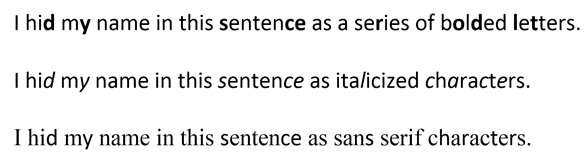
Sir Francis Bacon wasn’t especially interested in encoding text as bits. His goal was to hide messages in any medium, permitting a clued-in reader to distinguish between differences lurking in plain sight.  Those differences—whatever they might be—serve to denote the “A” or “B” in Bacon’s steganographic technique. For example:

That last one is quite subtle, right?  Here’s how it’s done:

To conceal my name in each of the respective examples, every unbolded/unitalicized/serif character signifies an “A” in Bacon’s cipher and every boldface/italicized/sans serif character signifies a “B” (ignore the spaces and punctuation).  The bold and italic approaches look wonky and could arouse suspicion, but if the fonts are chosen carefully, the absence of serifs should go unnoticed.  Take a closer look to see how it works:

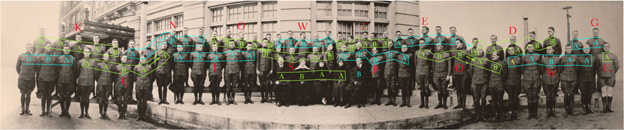
In my examples, I’ve used Bacon’s cipher to hide text within text, but it can as easily hide messages in almost anything.  My favorite example is the class photo of World War I cryptographers trained in Aurora, Illinois by famed cryptographers, William and Elizabeth Friedman.[1]  Before they headed for France, the newly minted codebreakers lined up for the cameraman; but there’s more going on here than meets the eye.

Taking to heart omnia per omnia, the Friedmans ingenuously encoded Sir Francis Bacon’s maxim “knowledge is power” within the photograph using Bacon’s cipher.  The 71 soldiers and their instructors convey the cipher text by facing or looking away from the camera.  Those facing denote an “A.”  Those looking away denote a “B.”  There weren’t quite enough present to encode the entire maxim, so the decoded message actually reads, “KNOWLEDGE IS POWE.”  Here’s the decoding:

A closer look:

Isn’t that mind blowing?!?!

Steganography is something most computer forensic examiners study but rarely use in practice.  Still, it’s a fascinating discipline with a history reaching back to ancient Greece, where masters tattooed secret messages on servants’ shaved scalps and hit “Send” once the hair grew back.  Digital technology brought new and difficult-to-decipher steganographic techniques enabling images, sound and messages to hitch a hidden ride on a wide range of electronic media.


[1] For this material, I’m indebted to “How to Make Anything Signify Anything” by William H. Sherman in Cabinet no. 40 (Winter 2010-2011).

Share this:

  • Click to email a link to a friend (Opens in new window) Email
  • Click to print (Opens in new window) Print
  • Click to share on X (Opens in new window) X
  • Click to share on Facebook (Opens in new window) Facebook
  • Click to share on LinkedIn (Opens in new window) LinkedIn
Like Loading...

What’s in a Name (or Hash Value)?

14 Thursday Jan 2021

Posted by craigball in Uncategorized

≈ 6 Comments

A question common to investigation of alleged data theft is, “Are any of our stolen files on our competitor’s systems?”  Forensic examiners track purloined IP using several strategies: among them, searching for matching filenames, hash values, metadata and content.  Any of these can be altered by data thieves seeking to cover their tracks, but most are too confident or too dim to bother.

A current matter underscored the pitfalls of filename and hash searches, prompting me to reflect on a long-ago case where hash searches caused headaches.  The old case stemmed from a settlement of a data theft event requiring a periodic audit of hashes of the defendant’s data to ensure that stolen data hasn’t re-emerged.  The plaintiff sought sanctions because its expert found hash values in the audit that matched hashes tied to stolen PowerPoint presentations.  The defendants were dumbfounded, certain they’d adhered to the settlement and not used any purloined PowerPoints. 

When I stepped in, I confirmed there were matching hash values, but none matched the PowerPoint PPT and PPTX files of interest.  Instead, the hashes matched only benign component image data within the presentations.  The components hashed were standard slide backgrounds (e.g., “woodgrain”) found in any copy of PowerPoint.  Both parties possessed PowerPoints using some of the same generic design elements, but none were the same presentations.  The hashing tool so thoroughly explored the files that embedded images were hashed separately from the files in which they were used and matched other generic elements in other presentations.  No threat at all!

Still other matching files turned out to be articles freely distributed at an industry trade show and zero-byte “null” files that would match any similarly empty files on any machine.  When every hash match was scrutinized, none proved to be stolen data.  Away went the sanctions motion.

The moral of the story is, although it’s extremely unlikely that two different files will share the same hash value, matching hash values don’t always signify the “same” file in practical terms.  Matching files may derive from independent sources, could be benign components of compilations or might match because they hold little or no content.  The math is powerful, but it mustn’t displace common sense.

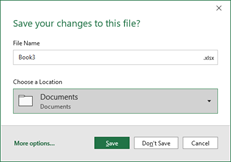
In the ongoing matter, a simple method used to identify contraband data was filename matching.  The requesting party sought to identify instances of a file called “Book3.xlsx;” and the search turned up hundreds of instances of identically named files in the producing party’s data–though not a single one hash-matched the file of interest.

Why so many false positives?  It turns out Microsoft Excel assigns an incremented name to any new spreadsheet (despite earlier-opened sheets having been closed) so long as even one prior sheet remains open.  So, if you’ve created eight Excel spreadsheets, renamed them and closed all but one, the next new sheet will be named Book9.xlsx by default.  The name “Book3.xlsx” signified only that two prior spreadsheets had been opened.  The takeaway is that, in any large collection, expect to turn up instances of various Book(n).xlsx files created when a user exited and saved a sheet without renaming it from its default name.

Electronic search—by hash, filename, metadata or keyword–is an invaluable tool in investigation and e-discovery; but one best used with a modicum of common sense by those who appreciate its limitations.

Share this:

  • Click to email a link to a friend (Opens in new window) Email
  • Click to print (Opens in new window) Print
  • Click to share on X (Opens in new window) X
  • Click to share on Facebook (Opens in new window) Facebook
  • Click to share on LinkedIn (Opens in new window) LinkedIn
Like Loading...

C’mon! Bates Numbering Native Production is Easy!

22 Sunday Nov 2020

Posted by craigball in Uncategorized

≈ 10 Comments

Sometimes, the other side balks at a proposed e-discovery protocol, arguing it’s unduly burdensome to rename native files to their Bates numbers. I find that odd because parties have always named files for Bates numbers whilst doing clunky TIFF productions.  Where did they think the names of all those TIFF images came from?  The truth is, litigants have been naming files to match Bates numbers for as long as we’ve done e-discovery!  It’s easy!

It’s one thing to say something is easy and another to prove its simplicity.  Certainly, if you use an e-discovery vendor, it’s as easy as saying, “Bates number the native files.”  They know what to do. But anyone doing electronic production in-house can add Bates numbers to filenames simply, quickly and cheaply. 

There are various ways to do it.  You can prepend Bates number (Bates##_filename.ext), append Bates number (filename_Bates##.ext) or replace the filename with the Bates number, storing the original name in a load file.  You can even add protective language like “PRODUCED SUBJECT TO PROTECTIVE ORDER.”

Multiple free and low-cost bulk renaming tools are available.  I’ve long praised a powerful, flexible too called Bulk Renaming Utility. It’s free for personal use and $93 for commercial purposes; a powerful tool, but overwhelming to some.  Seeking a simpler tool and one free to use commercially, I found two: File Renamer Basic and Ant Renamer.  Both impressed me with their flexibility and ease of use. 

For Mac users, there’s a nice free tool called File Renamer for MacOS 64 bit, which I’ll also touch on below.

Let’s look at how to configure both Windows tools to Bates number a production.

Suppose the production protocol reads:

Bates Numbers. All Bates numbers will consist of a three-digit Alpha Prefix, followed immediately by an 8-digit numeric: AAA########. There must be no spaces in the Bates number. Any numbers with less than 8 digits will be front padded with zeros to reach the required 8 digits. ESI will be Bates numbered by substituting, prepending or appending the Bates number for/to the file name.

Assuming there have been ten other items produced earlier,, we must begin Bates numbering at DEF00000011.  For this tutorial, I’ll use just six photos of American coins, but it could as easily be thousands of files of any sort.  Here are thumbnails of the exemplar photos:

The table below lists the filenames and MD5 hash values of the files, allowing us to confirm that a renaming tool won’t otherwise alter the evidence.

Original NameTypeSizeMD5 Hash
dime.jpgjpg747049EB20D0367DEF7F43D0B2EBDFCF8D881
dollar.jpgjpg791920A914C48360374CC434047B3CB5DDEEC
half_dollar.pngpng104763F12B793582DF4863C55A3299769F0885
nickel.jpgjpg4758922F1BDE59CE36229B6ED782F1E1CFB92
penny.jpgjpg10178681199ED5A45E56C8D23BFB24394C27B4
quarter.jpgjpg178375D6B866EFEB8F75D7C3395914F5AAB007

To demonstrate, I placed working copies of all the files needing Bates numbers in a Desktop folder named Production photos 11-21-20.  Inside this folder, I made an empty subfolder called BATES NUMBERED PHOTOS.  You don’t have follow suit, but however you approach it, don’t work on the source evidence; instead, create and produce renamed working copies.

File Renamer Basic

After installing and kicking off the program, I set the following parameters:

  1. Configure the “Folder” and “Copy to” paths.
  2. Set the three-digit Alpha Prefix required by the Protocol (I used “DEF” for Defendants).
  3. Set Unique Parameter to “Numbers,” “Increment” by 1, mask with eight zeroes and “Start at 11” (the next unassigned Bates number).
  4. Set Separator to a single underscore.  [While the protocol neither requires nor prohibits adding a separator between the Bates number and filename, I like to add it for clarity]
  5. In the Filename settings box, check “Place Unique Parameter before Filename.”
  6. Click “Preview,” and if you’re happy with the preview, click “Apply.”

Running hash values against the renamed files, we see that renaming the files has not altered their hash values.

NameTypeSizeMD5 Hash
DEF00000011_dime.jpgjpg747049EB20D0367DEF7F43D0B2EBDFCF8D881
DEF00000012_dollar.jpgjpg791920A914C48360374CC434047B3CB5DDEEC
DEF00000013_half_dollar.pngpng104763F12B793582DF4863C55A3299769F0885
DEF00000014_nickel.jpgjpg4758922F1BDE59CE36229B6ED782F1E1CFB92
DEF00000015_penny.jpgjpg10178681199ED5A45E56C8D23BFB24394C27B4
DEF00000016_quarter.jpgjpg178375D6B866EFEB8F75D7C3395914F5AAB007

Ant Renamer

After installing and kicking off the program, I set the following parameters:

  1. Using “Add Folders,” navigate to and select the folder with the files to be renamed.
  2. Click F10 to launch the Options menu and, under the >Processing tab, check the box “Copy instead of Rename,” then click “OK.”
  3. Under “Actions,” select “Enumeration” and configure the mask as: DEF%num%_%name%%ext%
  4. Set “Start at:” to 11 and “Number of Digits” to 8.
  5. Click “Preview of Selected Files” and, if all seems well, click GO on the menu.

Note that these settings will create a Bates numbered set of duplicate files in the same folder as the source files, NOT in the subfolder.

Frankly, it’s harder to describe the task than to complete it. After a few minutes playing with the settings, you’ll easily figure out how to prepend a Bates number, append it or swap it for the original name. Once you’ve gotten the settings where you’d like them, File Renamer Basic allows you to save your custom settings as a profile and apply it to future productions.

I spent only a short time investigating The Mac application FileRenamer, but it was intuitive enough to use without any unmanly reading of directions and took just seconds to configure numbering and set a mask to finish the task. I configured numbering in Settings>Numbering (Initial value: 11, Increment: 1 and Fixed Length with Leading Zeroes: 8) then the mask to include the three-digit alpha prefix, padded numbering and underscore separator to precede the filename (DEF%num%_%name%).

Easy as pie! And while we’re on the subject of pie, HAPPY THANKSGIVING!

Share this:

  • Click to email a link to a friend (Opens in new window) Email
  • Click to print (Opens in new window) Print
  • Click to share on X (Opens in new window) X
  • Click to share on Facebook (Opens in new window) Facebook
  • Click to share on LinkedIn (Opens in new window) LinkedIn
Like Loading...

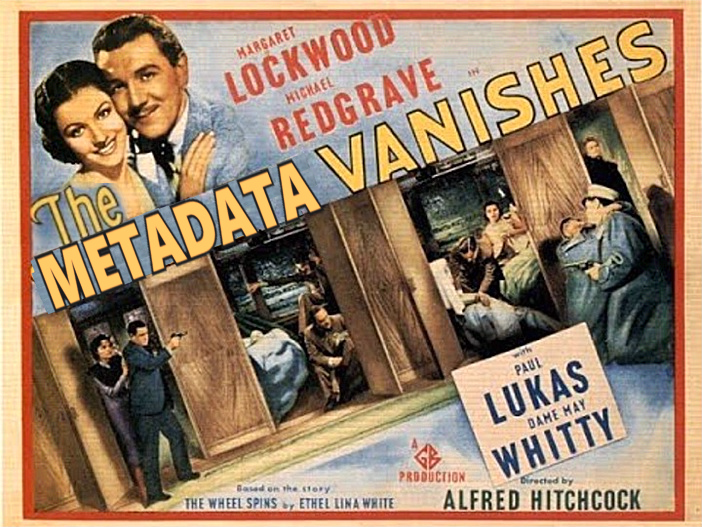
The Metadata Vanishes

20 Friday Nov 2020

Posted by craigball in Uncategorized

≈ 12 Comments

I love solving puzzles.  I come by it honestly. My late mother was a nationally ranked New York Times crossword puzzler, and though I lack her prodigious gifts, I start each morning racing on the Times crossword.  I mention puzzling to note that the best part of my forensics work is finding the answer to electronic evidence puzzles.  This week’s challenge comes from a legal assistant caught between a rock and a hard place, actually between the plaintiff and defense counsel.  The defense objected that photos produced in discovery lacked metadata, while the plaintiff insisted the photos he had furnished contained the “missing” metadata.  How could they both be right?  The mystified legal assistant had simply saved the photos from the transmitting message and sent them on to the other side.  She hadn’t removed any metadata.  Or had she?

I had to figure out what happened and keep it from happening again.

First, some technical underpinnings: 

What do we mean by metadata?  Digital photos, particularly those taken with cell phone cameras, hold more information than shows up in the pretty pictures.  Stored within the photos is a type of application metadata called EXIF (for Exchangeable Image File Format). EXIF holds camera settings, including the make and model of the camera or phone, time and date information, geolocation coordinates and more.  Because it’s application metadata, it’s content stored within the file and moves with the file when copied or transmitted…unless someone or something makes it disappear.

There’s a second sort of metadata called system metadata, It’s context; data about the file that’s stored without the file, typically in the system’s file table that serves as a directory of electronically stored information.  System metadata includes such things as a file’s name, location, modified and created dates and more.  Because it’s stored outside a file, it doesn’t move with the file but must be rounded up when a file is copied or transmitted.  Precious little system metadata follows a file when it’s e-mailed, often just the file’s name, size and type (although Apple systems include the file’s last modified and created dates).

The defense was seeing dates and times for photos that did not line up with the actual dates and times the photos were taken.  Too, the camera and geolocation data that should have been in the EXIF segments of the pictures were gone when plaintiffs produced them.

Picture formats and EXIF metadata: The photos produced were taken with an iPhone and stored on a Mac computer.  When most of us think of digital photos, we probably think of JPEG images stored as files with the extension .JPG.  The JPEG photo format has been around for almost thirty years and been the most common format for much of that time.  JPEG is what’s termed “lossy compression” referring to its ability to make image files smaller in size by jettisoning parts of the image that contribute to resolution and detail.  The more tightly you compress a JPEG image (and the more often you do it), the “jaggier” and more distorted the image becomes.

As digital cameras have improved, digital photographs have grown larger in size, eating up storage space.  Two-thirds of the data on my iPhone are photographs.  Seeking a more efficient way to store images and video, Apple started phasing out JPEG images in 2017.  The replacement was a format called High Efficiency Image File Format which, as implemented by Apple, photos are stored as High-Efficiency Image Containers with the file extension .HEIC. 

The benefit is that, for comparable image quality, HEIC images are roughly half the size of JPEG images, and they hold EXIF data.  The downside is that most of the world still expects a picture to be a JPEG and the Windows and Cloud realms need time to catch up.  To remain compatible with other devices and operating systems, Apple converts HEIC images to JPEGs for sharing via e-mail.

Now, there’s something to consider!  Did Apple strip out the EXIF metadata from the HEIC photos when it converted them to JPEGs? Hold that thought while I lay a little more foundation.

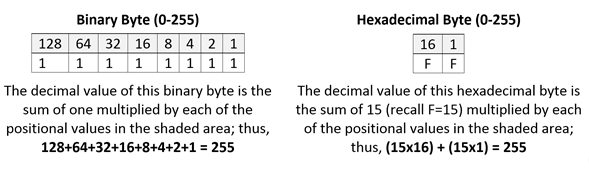
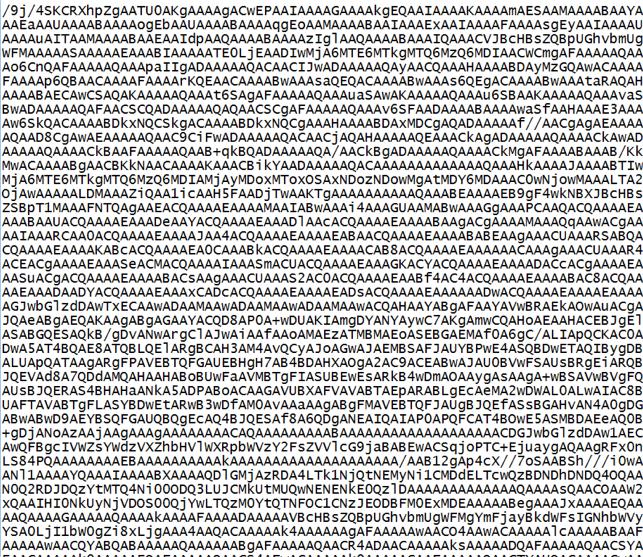
Encoding in Base64: E-mail is one of the earliest Internet tools.  It hearkens back to an era when only the most basic alphabets could be transmitted using a venerable character encoding standard called ASCII (pronounced ASK-KEY and short for American Standard Code for Information Interchange).  How do you get binary data like photos to transit a system that only understands a 128-character alphabet?  Easy!  You convert the binary numbers to numbers expressed more efficiently as 64 ASCII characters, to wit, the 26 lowercase letters of the alphabet, the 26 uppercase letters, numbers zero through nine and two punctuation marks (forward slash/ and plus sign+).  That’s 64 characters, each representing a unique numeric value that can replace six bits of binary data.  So, 24 bits of data can be written using just four base64 characters. Base64 looks like this:

It may not look like much, but it’s a feat of reductive technology we all use every day.

Looking at our conversion events when metadata might be lost, we have:

  • HEIC to JPEG
  • JPEG to Base64
  • Base64 to JPEG

Coding in and out of Base64 shouldn’t change a thing, but we can’t rule out anything yet.

Is that all?  Nope!

Photos often change without acquiring a new format.  If you’ve attached a photo to an e-mail and were asked whether you want the attachment to be small, medium, large or original size, any choice but the last one effects big changes to content. Perhaps scaling a photo poses a risk that embedded EXIF metadata will be lost?

When the defense sought the missing metadata, the legal assistant went to the plaintiff, who supplied a screenshot showing that the HEIC photos he’d sent went out carrying the full complement of EXIF metadata.  I asked the legal assistant for a copy of what she’d produced to the defendant and confirmed the embedded EXIF data was, in fact, gone, gone, gone.

Coming back to “did Apple strip out the EXIF metadata from the HEIC photos when it converted them to JPEGs?”  I took an HEIC photo with my iPhone and e-mailed it to my Gmail account as an attachment.  The attachment was converted to a JPG but retained its EXIF data when saved to disk. I re-sent it as a downscaled image and all the EXIF remained intact.  Finally, I sent it as an inline image and saved the received image to disk.  Poof!  The metadata vanishes!  Now, we’re getting somewhere.

I asked the legal assistant to forward a copy of the e-mail she’d received from the client transmitting the photos.  As expected, the photos weren’t in HEIC format but had been converted to JPEGs.  Notably, they were inline photos displayed in the body of the e-mail instead of as attachments.  When I saved the inline images to disk, the EXIF data was gone.

Undeterred, I saved the forwarded message to disk as an .eml message and opened it in Microsoft Notepad.  Scrolling down to check the Base64 encoded content, I copied the Base64 of a single image and converted it to a JPEG photo.  Happily, the photo I recovered held its full complement of EXIF data.  I could only conclude that saving an inline photo to disk by right clicking and choosing “Save Image as” was the culprit.  Had the photos been made attachments instead of inline images, their EXIF data would have remained in the file saved to disk.

But the revelation was that the EXIF data sought was present in the JPEG images, even if it couldn’t be pulled out by clicking on them as inline images and saving the image to disk.  This was true in both Gmail and Outlook.

Now, I have a forensics lab thrumming with workstations and ingenious software, but what’s a legal assistant supposed to do, MacGyver-like, with just the tools at hand?  Having solved the puzzle of what went wrong, the bonus puzzle was figuring out how to fix it.

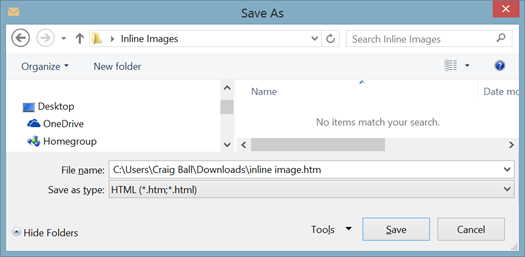
Here’s a simple workaround I came up with that performed splendidly:

1. Create an empty folder on your Windows Desktop called “Inline Images.”

2. In Microsoft Outlook, open the message holding the inline photos you want to extract. 

3. From the Outlook message menu bar select File>Save As then chose Save as Type>HTML (*.htm, *.html) and save the message to your “Inline Images” folder.

4. Open the “Inline Images” folder and locate the subfolder named [subject of the transmitting message]_Files.  Open this folder and you’ll find copies of each inline photo.  If you find two copies of each, small and large, the small copy is a thumbnail lacking EXIF data but the full-size version will have all EXIF metadata intact.  Voila!  We go from The Metadata Vanishes to Return of the Metadata.

I’d prefer clients e-mail photos by transmitting them inside a compressed Zip file rather than forwarding them as inline images or attachments.  The Zip container better protects the integrity of the evidence and forestalls stripping or alteration of metadata.  Plus, a Zip container can be encrypted for superior cybersecurity. 

Have you run into this before, Dear Reader?  Do you know a simpler way to get inline images out of parent messages without corrupting metadata or hiring an expert?  If so, please leave a comment.

Share this:

  • Click to email a link to a friend (Opens in new window) Email
  • Click to print (Opens in new window) Print
  • Click to share on X (Opens in new window) X
  • Click to share on Facebook (Opens in new window) Facebook
  • Click to share on LinkedIn (Opens in new window) LinkedIn
Like Loading...

Gayle McCormick O’Connor

19 Monday Oct 2020

Posted by craigball in Uncategorized

≈ 24 Comments

I’m sad to share that Gayle McCormick O’Connor died suddenly in her sleep on Sunday, October 18, 2020.  Gayle was a longtime legal technology marketing specialist. If you hadn’t the luck to know her, you doublessly noticed her at any of dozens of legal tech conferences.  Gayle was a star, truly a nova who shone brightly and cared passionately about her colleagues, friends and, above all, her son, Seamus and husband, Tom O’Connor–e-discovery and LegalTech thought leader and my dear friend.

Gayle’s luminosity was no accident.  She worked at it.  Gayle turned heads.  Gayle danced in front of the band.  She dressed to the nines in footwear that defied gravity and description.  Gayle was a canvas for her art and her art was celebration.  I’ve seen Gayle spin atop the bar in a packed Vegas biker bar.  I’ve sung Viva Las Vegas with Tom and Gayle at the top of our lungs beside the Bellagio fountains.  Just a month ago, Gayle sang Happy Birthday to me in her unforgettable Marilyn Monroe-Seducing-John-Kennedy style. Gayle was a seductress.  She unapologetically called herself “Cougar.”  Gayle’s tales of trysts with rock stars in the 70’s could have inspired Almost Famous.  Gayle lived large and loved large.  The public Gayle was sensational.  She defied age to change her, and age demurred.

Yet, there was a private side to Gayle; a sweet, maternal aspect that appeared when the makeup and stilettos came off and she was tired, sore and having a cigarette on the porch.  This Gayle deeply missed her mothers, who died in quick succession less than two years ago.  This Gayle was frustrated by COVID and pained by politics.  She found solace in her family and friends.  Gayle was unendingly proud of Seamus, always her deep well of joy.  I’m certain that no wife was ever more supported and adored by her husband than Gayle O’Connor was by Tom O’Connor.  Gayle was Tom’s prize.  He worshipped her, and she him.  After thirty-one years of marriage on their own terms, Tom’s eyes still sparkled when Gayle was the center of attention.  He was so proud to be her husband.  Who wouldn’t envy them?  They were blessed to have each other.  They should have had more time, for themselves, and for all of us who love them.

Tom and Gayle.  Saying that is like saying “red beans and rice.”  Perfect together.  I cannot believe she’s gone, but she lives on in the many happy stories we will tell of her and the light she brought to our lives.

The Irish have a blessing for the departed that seems right for a McCormick O’Connor: “May the road rise to meet you, and the wind always be at your back. May the sun shine warm on your face and the rains fall softly on your fields. And until we meet again, may God hold you gently in the palm of his hand.”

If there’s a rock-and-roll heaven, you’ll find Gayle right up front with the band. She’ll be dancing and all eyes will be on her.

Tom is planning a musical celebration of Gayle’s life for 3:30pm Saturday afternoon, October 24 at Bayou St. John. Here are the details in Tom’s words:

“For anyone in New Orleans, on Sat Oct 24 we’re going to do a New Orleans celebration of Gayle’s life at her place, 3234 Grand Route St.John. (that’s between Moss St and the Esplanade) We’ll walk down to the Bayou (half a block), I’ll say a (very) few words, have a tribute song from her friends Maggie & Kess, scatter some ashes, then go back to her house for some music on the porch from 4 to 6 by Glenn David Andrews, one of Gayle’s favorite New Orleans musicians.”

“We’re still in COVID-19 restrictions folks so wear masks and socially distance in order to allow the celebration to go off without a hitch. If you bring flowers, please bring yellow flowers …it was her favorite color.”

“Donations can be made in her name to the Grace House residential treatment center for women in New Orleans at https://www.bridgehouse.org/support-us/donate/“

A sweet remembrance from Bob Ambrogi.

Share this:

  • Click to email a link to a friend (Opens in new window) Email
  • Click to print (Opens in new window) Print
  • Click to share on X (Opens in new window) X
  • Click to share on Facebook (Opens in new window) Facebook
  • Click to share on LinkedIn (Opens in new window) LinkedIn
Like Loading...

The Case for Native, I Swear

03 Saturday Oct 2020

Posted by craigball in Uncategorized

≈ 12 Comments

Regular readers may tire of my extolling the virtues of native forms of production; but battleships turn slowly, and this one must yet be turned. Apart from judges (whose frequent unfamiliarity with electronic evidence makes them easy prey for prevarication), those best situated to end the ruin of TIFF+ productions are those who profit most from doing nothing.

Articles, speeches and blog posts can only go so far. What’s needed are published judicial decisions. Whether they go one way or the other, we need thoughtful opinions that lay out the issues in an accurate and balanced way, informing litigants what’s at stake. Many published orders fail to weigh the genuine pros and cons of each form of production. A few read as if TIFF images were the evidence and requesting parties were seeking to have God-given TIFF images converted into heretical native files. Talk about confused!

Seeking another published opinion on the merits of native production, I recently supplied a declaration to a federal court. I’m attaching an anonymized version of my testimony in the hope that readers will weigh the arguments. I concede “it ain’t Shakespeare,” but it’s honest. I changed a lot to make it difficult to identify the matter, although the Declaration is a matter of public record. Sorry, but I thought a little less candor would be the wiser path. The lawsuit is still very much in contention.

Here’s the anonymized version in PDF:

2020-08-25_anonymized-ball-declaration

Here’s the guts of it:

Continue reading →

Share this:

  • Click to email a link to a friend (Opens in new window) Email
  • Click to print (Opens in new window) Print
  • Click to share on X (Opens in new window) X
  • Click to share on Facebook (Opens in new window) Facebook
  • Click to share on LinkedIn (Opens in new window) LinkedIn
Like Loading...

The Perfect Preservation Letter: A New Guide

10 Thursday Sep 2020

Posted by craigball in Uncategorized

≈ 10 Comments

Yesterday, I asked my Electronic Evidence class at Tulane Law School, “What’s the difference between a preservation letter and a legal hold notice?”

Do you know?

I got the simple answer I sought: You put your clients on notice of legal hold; you send a preservation letter to the other side.  Another difference is that there is no legal duty to dispatch a preservation letter, but woe betide the lawyer who fails to initiate a prompt and proper litigation hold! 

In truth, the two missives have much in common.  Both seek the preservation of evidence, and both are best when clear, specific and instructive.  Both must go out when you know less than you’d like about sources of potentially responsive information.  Finally, both tend to receive minimal thought before dissemination, resulting in easily ignored, boilerplate forms crowding out artfully-targeted requests.

If I’m frank, most of what passed for preservation letters “back in the day” were, well, crap.  They sprang from forensic service providers and sounded more like ransom notes than statements of a practical and proportionate legal duty.  Literal compliance required pulling the plugs on the computers and backing away…very…very…slowly.  But, with the first 2006 amendments to the Federal Rules of Civil Procedure came a groundswell to routinize e-discovery, to label its stages (as in the iconic EDRM diagram) and to systemize its execution by development of “defensible, repeatable processes.”  So, way back when, I wrote an article introducing requesting parties to the “perfect” preservation letter and offering an example as a drafting aid.  Perhaps because it was the only lifeboat in a storm, it took off; and it wasn’t long before lawyers on the north side of the docket made it their favorite opening salvo. 

If that sounds like bragging, know that I’m not proud of what happened.  People started using the exemplar “perfect” letter in the lazy way I hoped they wouldn’t:  as a form pitched at cases of every stripe and type. 

Hey folks. “Perfect” was tongue-in-cheek!  I wrote,

You won’t find the perfect preservation letter in any formbook. You must custom craft it from a judicious mix of clear, technically astute terminology and fact-specific direction. It compels broad retention while asking for no more than the essentials. It rings with reasonableness. Its demands are proportionate to the needs of the case, and it keeps the focus of e-discovery where it belongs: on relevance.

But no one read that.  It was just too easy to hand the example over to an assistant and say, “send this out in all our cases.”

Fast forward to 2018 and counsel to the President of the United States sends out my letter without updating it to reflect any of the changes we’ve seen in sources and forms of electronically stored information since, say, Hurricane Katrina.  Imagine a preservation letter from President Trump that ignores tweets, for goodness sake!  Clearly, the article and the accompanying exemplar letter both needed more than a fresh coat of paint.  Weirdly, the gap hadn’t been filled by anything else in fifteen years.

A few weeks back, I updated and published the exemplar letter, with a fresh plea to use it as a drafting aid and not as a form.  Today, I finished updating the guide to its use, once again called (IRONICALLY) The Perfect Preservation Letter.  It’s still no masterpiece. To be useful, the letter must be a living document, changing to reflect new sources (Dating sites! I forgot to add dating sites!) and improved ways to preserve and acquire evidence. I hope a new generation of lawyers finds it instructive.  There’s plenty of room for improvement, so dig in, make it better, make it your own.

Share this:

  • Click to email a link to a friend (Opens in new window) Email
  • Click to print (Opens in new window) Print
  • Click to share on X (Opens in new window) X
  • Click to share on Facebook (Opens in new window) Facebook
  • Click to share on LinkedIn (Opens in new window) LinkedIn
Like Loading...
← Older posts
Newer posts →
Follow Ball in your Court on WordPress.com

Enter your email address to subscribe to this blog and receive notifications of new posts by email.

Join 2,227 other subscribers

Recent Posts

  • 2026 Guide to AI and LLMs in Trial Practice January 9, 2026
  • A Master Table of Truth November 4, 2025
  • Kaylee Walstad, 1962-2025 August 19, 2025
  • Native or Not? Rethinking Public E-Mail Corpora for E-Discovery (Redux, 2013→2025) August 16, 2025
  • Still on Dial-Up: Why It’s Time to Retire the Enron Email Corpus August 15, 2025

Archives

RSS Feed RSS - Posts

CRAIGBALL.COM

Helping lawyers master technology

Categories

EDD Blogroll

  • eDiscovery Today (Doug Austin)
  • Minerva 26 (Kelly Twigger)
  • Illuminating eDiscovery (Lighthouse)
  • The Relativity Blog
  • Basics of E-Discovery (Exterro)
  • Corporate E-Discovery Blog (Zapproved )
  • E-Discovery Law Alert (Gibbons)
  • GLTC (Tom O'Connor)
  • eDiscovery Journal (Greg Buckles)
  • CS DISCO Blog
  • Sedona Conference
  • E-D Team (Ralph Losey)
  • Complex Discovery (Rob Robinson)

Admin

  • Create account
  • Log in
  • Entries feed
  • Comments feed
  • WordPress.com

Enter your email address to follow Ball in Your Court and receive notifications of new posts by email.

Website Powered by WordPress.com.

  • Subscribe Subscribed
    • Ball in your Court
    • Join 2,079 other subscribers
    • Already have a WordPress.com account? Log in now.
    • Ball in your Court
    • Subscribe Subscribed
    • Sign up
    • Log in
    • Report this content
    • View site in Reader
    • Manage subscriptions
    • Collapse this bar
 

Loading Comments...
 

    %d