• Home
  • About
  • CRAIGBALL.COM
  • Disclaimer
  • Log In

Ball in your Court

~ Musings on e-discovery & forensics.

Ball in your Court

Category Archives: Computer Forensics

Final Exam Review: How Would You Fare?

28 Wednesday Apr 2021

Posted by craigball in Computer Forensics, E-Discovery

≈ 6 Comments

It’s nearly finals time for the students in my E-Discovery and Digital Evidence course at the University of Texas School of Law. I just completed the Final Exam Study Guide for the class and thought readers who wonder what a tech-centric law school e-discovery curriculum looks like might enjoy seeing what’s asked of the students in a demanding 3-credit law school course. Whether you’re ACEDS certified, head of your e-discovery practice group or just an e-discovery groupie like me, consider how you’d fare preparing for an exam with this scope and depth. I’m proud of my bright students. You’d be really lucky to hire one of my stars.

E-Discovery – Spring 2021 Final Exam Study Guide

The final exam will cover all readings, lectures, exercises and discussions on the syllabus.
(Syllabus ver. 21.0224 in conjunction with Workbook ver. 21.0214 and Announcements).

  1. We spent a month on meeting the preservation duty and proportionality.  You undertook a two-part legal hold drafting exercise.  Be prepared to bring skills acquired from that effort to bear on a hypothetical scenario.  Be prepared to demonstrate your understanding of the requisites of fashioning a defensible legal hold and sensibly targeting a preservation demand to an opponent.  As well, your data mapping skills should prove helpful in addressing the varied sources of potentially relevant ESI that exist, starting at the enterprise level with The Big Six (e-mail, network shares, mobile devices, local storage, social networking and databases).  Of course, we must also consider Cloud repositories and scanned paper documents as potential sources.
  2. An essential capability of an e-discovery lawyer is to assess a case for potentially relevant ESI, fashion and implement a plan to identify accessible and inaccessible sources, determine their fragility and persistence, scope and deploy a litigation hold and take other appropriate first steps to counsel clients and be prepared to propound and respond to e-discovery, especially those steps needed to make effective use of the FRCP Rule 26(f) meet-and-confer process.  Often, you must act without having all the facts you’d like and rely upon your general understanding of ESI and information systems to put forward a plan to acquire the facts and do so with sensitivity to the cost and disruption your actions may engender.  Everything we’ve studied was geared to instilling those capabilities in you.
  3. CASES: You are responsible for all cases covered during the semester.  When you read each case, you should ask yourself, “What proposition might I cite this case to support in the context of e-discovery?”  That’s likely to be the way I will have you distinguish the cases and use them in the exam.  I refer to cases by their style (plaintiff versus defendant), so you should be prepared to employ a mnemonic to remember their most salient principles of each, e.g., Columbia Pictures is the ephemeral data/RAM case; Rambus is the Shred Day case; In re NTL is the right of control case; In re: Weekley Homes is the Texas case about accessing the other side’s hard drives, Wms v. Sprint is the spreadsheet metadata case (you get the idea).  I won’t test your memory of jurists, but it’s helpful-not-crucial to recall the authors of the decisions (especially when they spoke to our class like Judges Peck and Grimm). 

Case Review Hints:

  • Green v. Blitz: (Judge Ward, Texas) This case speaks to the need for competence in those responsible for preservation and collection and what constitutes a defensible eDiscovery strategy. What went wrong here? What should have been done differently?
  • In re: Weekly Homes: (Texas Supreme Court) This is one of the three most important Texas cases on ESI. You should understand the elements of proof which the Court imposes for access to an opponent’s storage devices and know terms of TRCP Rule 196.4, especially the key areas where the state and Federal ESI rules diverge.
  • Zubulake: (Judge Scheindlin, New York) The Zubulake series of decisions are seminal to the study of e-discovery in the U.S.  Zubulake remains the most cited of all EDD cases, so is still a potent weapon even after the Rules amendments codified much of its lessons. Know what the case is about, how the plaintiff persuaded the court that documents were missing and what the defendant did or didn’t do in failing to meet its discovery obligations. Know what an adverse inference instruction is and how it was applied in Zubulake versus what must be established under FRCP Rule 37€ after 2015. Know what Judge Scheindlin found to be a litigant’s and counsel’s duties with respect to preservation. Seven-point analytical frameworks (as for cost-shifting) make good test fodder.
  • Williams v. Sprint: (Judge Waxse, Kansas). Williams is a seminal decision respecting metadata. In Williams v. Sprint, the matter concerned purging of metadata and the locking of cells in spreadsheets in the context of an age discrimination action after a reduction-in-force. Judge Waxse applied Sedona Principle 12 in its earliest (and now twice revised) form. What should Sprint have done?  Did the Court sanction any party? Why or why not?
  • Rodman v. Safeway: (Judge Tigar, ND California) This case, like Zubulake IV, looks at the duties and responsibilities of counsel when monitoring a client’s search for and production of potentially responsive ESI? What is Rule 26(g), and what does it require? What constitutes a reasonable search? To what extent and under what circumstances may counsel rely upon a client’s actions and representations in preserving or collecting responsive ESI?
  • Columbia Pictures v. Bunnell: (Judge Chooljian, California) What prompted the Court to require the preservation of such fleeting, ephemeral information? Why were the defendants deemed to have control of the ephemeral data? Unique to its facts?
  • In re NTL, Inc. Securities Litigation: (Judge Peck, New York) Be prepared to discuss what constitutes control for purposes of imposing a duty to preserve and produce ESI in discovery and how it played out in this case. I want you to appreciate that, while a party may not be obliged to succeed in compelling the preservation or production of relevant information beyond its care, custody or control, a party is obliged to exercise all such control as the party actually possesses, whether as a matter of right or by course of dealing. What’s does The Sedona Conference think about that?
  • William A. Gross Constr. Assocs., Inc. v. Am. Mfrs. Mut. Ins. Co.: (Judge Peck, New York) What was the “wake up call,” who were expected to awaken and on what topics?
  • Adams v. Dell: (Judge Nuffer, Utah) What data was claimed to have been lost? What was supposed to have triggered the duty to preserve? What did the Court say about a responding party’s duty, particularly in designing its information systems? Outlier?
  • RAMBUS: (Judge Whyte, California) I expect you to know what happened and to appreciate that the mere reasonable anticipation of litigation–especially by the party who brings the action–triggers the common law duty to preserve. Be prepared to address the sorts of situations that might or might not trigger a duty to initiate a legal hold.
  • United States v. O’Keefe (Judge Facciola, DC): I like this case for its artful language (Where do angels fear to tread?) and consideration of the limits and challenges of keyword search.  The last being a topic that bears scrutiny wherever it has been addressed in the material.  That is, does keyword search work as well as lawyers think, and how can we improve upon it and compensate for its shortcomings? 
  • Victor Stanley v. Creative Pipe I & II (Judge Grimm, Maryland):  Read VS I with an eye toward understanding the circumstances when inadvertent production triggers waiver (pre-FRE 502).  What are the three standards applied to claims of waiver?  What needs to be in the record to secure relief?

    Don’t get caught up in the prolonged factual minutiae of VS II.  Read VS II to appreciate the varying standards that once existed across the Circuits for imposition of spoliation sanctions and that pre-date the latest FRCP Rules amendments, i.e., Rule 37(e).
  • Anderson Living Trust v. WPX Energy Production, LLC (Judge Browning, New Mexico): This case looks at the application and intricacies of FRCP Rule 34 when it comes to ESI versus documents.  My views about the case were set out in the article you read called “Breaking Badly.”
  • In re: State Farm Lloyds (Texas Supreme Court):  Proportionality is the buzzword here; but does the Court elevate proportionality to the point of being a costly hurdle serving to complicate a simple issue?  What does this case portend for Texas litigants in terms of new hoops to jump over issues as straightforward as forms of production?  What role did the Court’s confusion about forms (and a scanty record) play in the outcome?
  • Monique Da Silva Moore, et al. v. Publicis Groupe & MSL Group and Rio Tinto Plc v. Vale S.A., (Judge Peck, New York): DaSilva Moore is the first federal decision to approve the use of the form of Technology Assisted Review (TAR) called Predictive Coding as an alternative to linear, manual review of potentially responsive ESI.  Rio Tinto is Judge Peck’s follow up, re-affirming the viability of the technology without establishing an “approved” methodology.
  • Brookshire Bros. v. Aldridge (Texas Supreme Court): This case sets out the Texas law respecting spoliation of ESI…or does it?  Is the outcome and “analysis” here consistent with the other preservation and sanctions cases we’ve covered?
  • VanZant v. Pyle (Judge Sweet, New York): Issues of control and spoliation drive this decision.  Does the Court correctly apply Rule 37(e)?
  • CAT3 v. Black Lineage (Judge Francis, New York):This trademark infringement dispute concerned an apparently altered email.  Judge Francis found the alteration sufficient to support sanctions under Rule 37(e).  How did he get there?  Judge Francis also addressed the continuing viability of discretionary sanctions despite 37(e).  What did he say about that?
  • EPAC v. Thos. Nelson, Inc.: Read this report closely to appreciate how the amended Rules, case law and good practice serve to guide the court in fashioning remedial measures and punitive sanctions.  Consider the matter from the standpoint of the preservation obligation (triggers and measures) and from the standpoint of proportionate remedial measures and sanctions.  What did the Special Master do wrong here?
  • Mancia v. Mayflower (Judge Grimm, Maryland): Don’t overlook this little gem in terms of its emphasis on counsel’s duties under FRCP Rule 26(g).  What are those duties?  What do they signify for e-discovery? What is the role of cooperation in an adversarial system?
  • Race Tires America, Inc. v. Hoosier Racing Tire Corp. (Judge Vanaskie, Pennsylvania): This opinion cogently defines the language and limits of 28 U.S.C. §1920 as it relates to the assessment of e-discovery expenses as “taxable costs.”  What common e-discovery expenses might you seek to characterize as costs recoverable under §1920, and how would you make your case?
  • Zoch v. Daimler (Judge Mazzant, Texas):  Did the Court correctly resolve the cross-border and blocking statute issues?  Would the Court’s analysis withstand appellate scrutiny once post-GDPR? 

Remember: bits, bytes, sectors, clusters (allocated and unallocated), tracks, slack space, file systems and file tables, why deleted doesn’t mean gone, forensic imaging, forensic recovery techniques like file carving, EXIF data, geolocation, file headers/binary signatures, hashing, normalization, de-NISTing, deduplication and file shares.  For example: you should know that an old 3.5” floppy disk typically held no more than 1.44MB of data, whereas the capacity of a new hard drive or modern backup tape would be measured in terabytes. You should also know the relative capacities indicated by kilobytes, megabytes, gigabytes, terabytes and petabytes of data (i.e., their order of ascendancy, and the fact that each is 1,000 times more or less than the next or previous tier).  Naturally, I don’t expect you to know the tape chronology/capacities, ASCII/hex equivalencies or other ridiculous-to-remember stuff.

4. TERMINOLOGY: Lawyers, more than most, should appreciate the power of precise language.  When dealing with professionals in technical disciplines, it’s important to call things by their right name and recognize that terms of art in one context don’t necessarily mean the same thing in another.  When terms have been defined in the readings or lectures, I expect you to know what those terms mean.  For example, you should know what ESI, EDRM, RAID, system and application metadata (definitely get your arms firmly around application vs. system metadata), retention, purge and rotation mean (e.g., grandfather-father-son rotation); as well as Exchange, O365, 26(f), 502(d), normalization, recursion, native, near-native, TIFF+, load file, horizontal, global and vertical deduplication, IP addressing, data biopsy, forensically sound, productivity files, binary signatures and file carving, double deletion, load files, delimiters, slack space, unallocated clusters, UTC offset, proportionality, taxable costs, sampling, testing, iteration, TAR, predictive coding, recall, precision, UTC, VTL, SQL, etc.

5. ELECTRONIC DISCOVERY REFERENCE MODEL:  We’ve returned to the EDRM many times as we’ve moved from left to right across the iconic schematic.  Know it’s stages, their order and what those stages and triangles signify.

6. ENCODING: You should have a firm grasp of the concept of encoded information, appreciating that all digital data is stored as numbers notated as an unbroken sequence of 1s and 0s. How is that miracle possible? You should be comfortable with the concepts described in pp. 132-148 of the Workbook (and our class discussions of the fact that the various bases are just ways to express numbers of identical values in different notations). You should be old friends with the nature and purpose of, e.g., base 2 (binary), base 10 (decimal) base 16 (hexadecimal), base 64 (attachment encoding), ASCII and UNICODE.

7 STORAGE: You should have a working knowledge of the principal types and capacities of common electromagnetic and solid-state storage devices and media (because data volume has a direct relationship to cost of processing and time to review in e-discovery). You should be able to recognize and differentiate between, e.g., floppy disks, thumb drives, optical media, hard drives, solid state storage devices, RAID arrays and backup tape, including a general awareness of how much data they hold. Much of this is in pp. 22-48 of the Workbook (Introduction to Data Storage Media).  For ready reference and review, I’ve added an appendix to this study guide called, “Twenty-One Key Concepts for Electronically Stored Information.”

8. E-MAIL: E-mail remains the epicenter of corporate e-discovery; so, understanding e-mail systems, forms and the underlying structure of a message is important.  The e-mail chapter should be reviewed carefully.  I wouldn’t expect you to know file paths to messages or e-mail forensics, but the anatomy of an e-mail is something we’ve covered in detail through readings and exercises.  Likewise, the messaging protocols (POP, MAPI, IMAP, WEB, MIME, etc.), mail single message and container formats (PST, OST, EDB, NSF, EML, MSG, DBX, MHTML, MBOX) and leading enterprise mail client-server pairings (Exchange/Outlook, Domino/Notes, O365/browser) are worth remembering.  Don’t worry, you won’t be expected to extract epoch times from boundaries again. 😉

9. FORMS: Forms of production loom large in our curriculum.  Being that everything boils down to just an unbroken string of ones-and-zeroes, the native forms and the forms in which we elect to request and produce them (native, near-native, images (TIFF+ and PDF), paper) play a crucial role in all the “itys” of e-discovery: affordability, utility, intelligibility, searchability and authenticability.  What are the purposes and common structures of load files?  What are the pros and cons of the various forms of production?  Does one size fit all?  How does the selection of forms play out procedurally in federal and Texas state practice?  How do we deal with Bates numbering and redaction?  Is native and near-native production better and, if so, how do we argue the merits of native production to someone wedded to TIFF images?  This is HUGE in my book!  There WILL be at least one essay question on this and likely several other test questions.

10. SEARCH AND REVIEW: We spent a fair amount of time talking about and doing exercises on search and review.  You should understand the various established and emerging approaches to search: e.g., keyword search, Boolean search, fuzzy search, stemming, clustering, predictive coding and Technology Assisted Review (TAR).  Why is an iterative approach to search useful, and what difference does it make?  What are the roles of testing, sampling and cooperation in fashioning search protocols?  How do we measure the efficacy of search?  Hint: You should know how to calculate recall and precision and know the ‘splendid steps’ to take to improve the effectiveness and efficiency of keyword search (i.e., better F1 scores). 

You should know what a review tool does and customary features of a review platform.  You should know the high points of the Blair and Maron study (you read and heard about it multiple times, so you need not read the study itself).  Please also take care to understand the limitations on search highlighted in your readings and those termed The Streetlight Effect.

11.ACCESSIBILITY AND GOOD CAUSE: Understand the two-tiered analysis required by FRCP Rule 26(b)(2)(B).  When does the burden of proof shift, and what shifts it?  What tools (a/k/a conditions) are available to the Court to protect competing interests of the parties

12. FRE RULE 502: It’s your friend!  Learn it, love it, live it (or at least know when and how to use it).  What protection does it afford against subject matter waiver?  Is there anything like it in state practice?  Does it apply to all legally cognized privileges?

13. 2006 AND 2015 RULES AMENDMENTS: You should understand what they changed with respect to e-discovery.  Concentrate on proportionality and scope of discovery under Rule 26, along with standards for sanctions under new Rule 37(e).  What are the Rule 26 proportionality factors?  What are the findings required to obtain remedial action versus serious sanctions for spoliation of ESI under 37(e)?  Remember “intent to deprive.”

14. MULTIPLE CHOICE: When I craft multiple choice questions, there will typically be two answers you can quickly discard, then two you can’t distinguish without knowing the material. So, if you don’t know an answer, you increase your odds of doing well by eliminating the clunkers and guessing. I don’t deduct for wrong answers.  Read carefully to not whether the question seeks the exception or the rule. READ ALL ANSWERS before selecting the best one(s) as I often include an “all of the above” or “none of the above” option.

15. All lectures and reviews of exercises are recorded and online for your review, if desired.

16. In past exams, I used the following essay questions.  These will not be essay questions on your final exam; however, I furnish them here as examples of the scope and nature of prior essay questions:

EXAMPLE QUESTION A: On behalf of a class of homeowners, you sue a large bank for alleged misconduct in connection with mortgage lending and foreclosures. You and the bank’s counsel agree upon a set of twenty Boolean and proximity queries including:

  • fnma AND deed-in-lieu
  • 1/1/2009 W/4 foreclos!
  • Resumé AND loan officer
  • LTV AND NOT ARM
  • (Problem W/2 years) AND HARP

These are to be run against an index of ten loan officers’ e-mail (with attached spreadsheets, scanned loan applications, faxed appraisals and common productivity files) comprising approximately 540,000 messages and attachments).  Considering the index search problems discussed in class and in your reading called “The Streetlight Effect in E-Discovery,” identify at least three capabilities or limitations of the index and search tool that should be determined to gauge the likely effectiveness of the contemplated searches.  Be sure to explain why each matter. 

I am not asking you to assess or amend the agreed-upon queries.  I am asking what needs to be known about the index and search tool to ascertain if the queries will work as expected.

EXAMPLE QUESTION B: The article, A Bill of Rights for E-Discovery included the following passage:

I am a requesting party in discovery.

I have duties.

I am obliged to: …

Work cooperatively with the producing party to identify reasonable and effective means to reduce the cost and burden of discovery, including, as appropriate, the use of tiering, sampling, testing and iterative techniques, along with alternatives to manual review and keyword search.

Describe how “tiering, sampling, testing and iterative techniques, along with alternatives to manual review and keyword search” serve to reduce the cost and burden of e-discovery.  Be sure to make clear what each term means.

It’s been an excellent semester and a pleasure for me to have had the chance to work with a bright bunch.  Thank you for your effort!  I’ve greatly enjoyed getting to know you notwithstanding the limits imposed by the pandemic and Mother Nature’s icy wrath.  I wish you the absolute best on the exam and in your splendid careers to come.  Count me as a future resource to call on if I can be of help to you.  Best of Luck!   Craig Ball

APPENDIX

Twenty-One Key Concepts for Electronically Stored Information

  1. Common law imposes a duty to preserve potentially relevant information in anticipation of litigation.
  2. Most information is electronically stored information (ESI).
  3. Understanding ESI entails knowledge of information storage media, encodings and formats.
  4. There are many types of e-storage media of differing capacities, form factors and formats:
    a) analog (phonograph record) or digital (hard drive, thumb drive, optical media).
    b) mechanical (electromagnetic hard drive, tape, etc.) or solid-state (thumb drive, SIM card, etc.).
  5. Computers don’t store “text,” “documents,” “pictures,” “sounds.” They only store bits (ones or zeroes).
  6. Digital information is encoded as numbers by applying various encoding schemes:
    a) ASCII or Unicode for alphanumeric characters.
    b) JPG for photos, DOCX for Word files, MP3 for sound files, etc.
  7. We express these numbers in a base or radix (base 2 binary, 10 decimal, 16 hexadecimal, 60 sexagesimal). E-mail messages encode attachments in base 64.
  8. The bigger the base, the smaller the space required to notate and convey the information.
  9. Digitally encoded information is stored (written):
    a) physically as bytes (8-bit blocks) in sectors and partitions.
    b) logically as clusters, files, folders and volumes.
  10. Files use binary header signatures to identify file formats (type and structure) of data.
  11. Operating systems use file systems to group information as files and manage filenames and metadata.
  12. Windows file systems employ filename extensions (e.g., .txt, .jpg, .exe) to flag formats.
  13. All ESI includes a component of metadata (data about data) even if no more than needed to locate it.
  14. A file’s metadata may be greater in volume or utility than the contents of the file it describes.
  15. File tables hold system metadata about the file (e.g., name, locations on disk, MAC dates): it’s CONTEXT.
  16. Files hold application metadata (e.g., EXIF geolocation data in photos, comments in docs): it’s CONTENT.
  17. File systems allocate clusters for file storage, deleting files releases cluster allocations for reuse.
  18. If unallocated clusters aren’t reused, deleted files may be recovered (“carved”) via computer forensics.
  19. Forensic (“bitstream”) imaging is a method to preserve both allocated and unallocated clusters.
  20. Data are numbers, so data can be digitally “fingerprinted” using one-way hash algorithms (MD5, SHA1).
  21. Hashing facilitates identification, deduplication and de-NISTing of ESI in e-discovery.

Share this:

  • Click to email a link to a friend (Opens in new window) Email
  • Click to print (Opens in new window) Print
  • Click to share on X (Opens in new window) X
  • Click to share on Facebook (Opens in new window) Facebook
  • Click to share on LinkedIn (Opens in new window) LinkedIn
Like Loading...

The Great Pandemic Leap

22 Thursday Apr 2021

Posted by craigball in Computer Forensics, E-Discovery, General Technology Posts

≈ 4 Comments

Much has been made of the “Great Pandemic Leap” by law firms and courts. Pandemic proved to be, if not the mother of invention, at least the mother****** who FINALLY got techno tardy lawyers to shuffle forward. The alleged leap had nothing to do with new technology. Zoom and other collaboration tools have been around a long time. In fact, April 21, 2021 was Zoom’s 10th Birthday! Happy Birthday, Zoom! Thanks for being there for us.

No, it wasn’t new technology. The ‘Ten Years in Ten Weeks’ great leap was enabled by compulsion, adoption and support.

“Compulsion” because we couldn’t meet face-to-face, and seeing faces (and slides and white boards) is important.
“Adoption” because so many embraced Zoom and its ilk that we suddenly enjoyed a common meeting place.
“Support” because getting firms and families up and running on Zoom et al. became a transcendent priority.

It didn’t hurt that schools moving to Zoom served to put a support scion in many lawyers’ homes and, let’s face it Atticus, the learning curve wasn’t all that steep. Everyone already had a device with camera and microphone. Zoom made it one-click easy to join a meeting, even if eye-level camera positioning and unmuting of microphones has proven more confounding to lawyers than the Rule Against Perpetuities.

For me, the Great Leap manifested as the near-universal ability to convene on a platform where screen sharing and remote control were simple. I’ve long depended on remote control and screen sharing tools to access machines by Remote Desktop Protocol (RDP) or TeamViewer (not to mention PCAnywhere and legacy applications that made WFH possible in the 90s and aughts). But, that was on my own machines. Linking to somebody else’s machine without a tech-savvy soul on the opposite end was a nightmare. If you’ve ever tried to remotely support a parent, you understand. “No, Mom, please don’t click anything until I tell you. Oh, you already did? What did the error message say? Next time, don’t hit ‘Okay” until you read the message, please Mom.“

E-discovery and digital forensics require defensible data identification, preservation and collection. The pandemic made deskside reviews and onsite collection virtually impossible, or more accurately, those tasks became possible only virtually. Suddenly, miraculously, everyone knew how to join a Zoom call, so custodians could share screens and hand over remote control of keyboard and mouse. I could record the sessions to document the work and remotely load software (like iMazing or CoolMuster) to preserve and access mobile devices. Remote control and screen sharing let me target collection efforts based on my judgment and not be left at the mercy of a custodian’s self-interested actions. Custodians could observe, assist and intervene in my work or they could opt to walk away and leave me to do my thing. I was “there,” but less intrusively and spared the expense and hassle of travel. I could meet FRCP 26(g) obligations and make a record to return to if an unforeseen issue arose.

In my role as investigator, there’s are advantages attendant to being onsite; e.g., I sometimes spot evidence of undisclosed data sources. But, weighed against the convenience and economy of remote identification and collection, I can confidently say I’m never going back to the old normal when I can do the work as well via Zoom.

Working remotely as I’ve described requires a passing familiarity with Zoom screen sharing, if only to be able to talk others through unseen menus. As Zoom host, you will need to extend screen sharing privileges to the remote user. Do this on-the-fly by making the remote user a meeting co-host, (click “More” alongside their name in the Participants screen). Alternatively, you can select Advanced Sharing Options from the Share Screen menu. Under “Who can Share?” choose “All Participants.”

To acquire control of the remote user’s mouse and keyboard, have the remote user initiate a screen share then open the View Options dropdown menu alongside the green bar indicating you’re viewing a shared screen. Select “Request Remote Control,” then click “Request” to confirm. The remote user will see a message box seeking authorization to control their screen. Once authorized, click inside the shared screen window to take control of the remote machine.

If you need to inspect a remote user’s iPhone or iPad, Zoom supports sharing those devices using a free plugin that links the mobile device over the same WiFi connection as the Zoom session. To initiate an iPhone/iPad screen share, instruct the remote user to click Screen Share and then select the iPhone/iPad icon at right for further instructions. Simpler still, have the remote user install Zoom on the phone or pad under scrutiny and join the Zoom session from the mobile device. Once in the meeting, the remote user screen shares from the session on the mobile device. Easy-peasy AND it works for Android phones, too!

So Counselor, go ahead and take that victory lap. Whether you made a great leap or were dragged kicking and screaming to a soupçon of technical proficiency, it’s great to see you! Hang onto those gains, and seek new ways to leverage technology in your practice. Your life may no longer depend on it, but your future certainly does.

Share this:

  • Click to email a link to a friend (Opens in new window) Email
  • Click to print (Opens in new window) Print
  • Click to share on X (Opens in new window) X
  • Click to share on Facebook (Opens in new window) Facebook
  • Click to share on LinkedIn (Opens in new window) LinkedIn
Like Loading...

Can a Producing Party Refuse to Produce Linked Attachments to E-Mail?

25 Thursday Mar 2021

Posted by craigball in Computer Forensics, E-Discovery

≈ 5 Comments

A fellow professor of e-discovery started my morning with a question. He wrote, “In companies using Google business, internal email ‘attachments’ are often linked with a URL to documents on a Google drive rather than actually ‘attached’ to the email…. Can the producing party legally refuse to produce the document as an attachment to the email showing the family? Other links in the email to, for example, a website need not be produced.“

I replied that I didn’t have the definitive answer, but I had a considered opinion. First, I challenged the assertion, “Other links in the email to, for example, a website need not be produced.”

Typically, the link must be produced because it’s part of the relevant and responsive, non-privileged message.  But, the link is just a pointer, a path to an item, and the discoverability of the link’s target hinges upon whether the (non-privileged) target is responsive AND within the care, custody or subject to the control of the producing party.

For the hypothetical case, I assume that the transmittal is deemed relevant and the linked targets are either relevant by virtue of their being linked to the transmittal or independently relevant and responsive.  I also assume that the linked target remains in the care, custody or subject to the control of the producing party because it has a legal and practical right of access to the repository where the linked target resides; that is, the producing party CAN access the linked item, even if they would rather not retrieve the relevant, responsive and non-privileged content to which the custodian has linked the transmittal.

If the link is not broken and the custodian of the message could click the link and access the linked target, where is the undue burden and cost?  Certainly I well know that collection is often delegated to persons other than the custodian, but shouldn’t we measure undue burden and cost from the standpoint of the custodian under the legal duty to preserve and produce, NOT from the perspective of a proxy engaged to collect, but lacking the custodian’s ability to collect, the linked target? Viewed in this light, I don’t see where the law excuses the producing party from collecting and producing the linked target

The difficulty in collection cited results from the producing party contracting to delegate storage to a third-party Cloud Provider, linking to information relegated to the Cloud Provider’s custody.  In certain respects, it’s like the defendant in Columbia Pictures v. Bunnell, who put a contractor (Panther) in control of the IP addresses of the persons trading pirated movies via the defendant’s platform.  Just because you enlist someone to keep your data on your behalf doesn’t defeat your ultimate right of control or your duty of production. 

Having addressed duty, let’s turn to feasibility, which is really what the fight’s about. 

Two key issues I see are: 

1. What if the link is broken by the passage of time?  If the target cannot be collected after reasonable efforts to do so, then it may be infeasible to effect the collection via the link or via pairing the link address to the addresses of the contents of the repository (as by using the Download-Link-Generator tool I highlighted here).  If there is simply no way a link created before a legal hold duty attached can be tied to its target, then you can’t do it, and the Court can’t order the impossible.  But, you can’t just label something “impossible” because you’d rather not do it.  You must make reasonable efforts and you must prove infeasibility. Courts should look askance at claims of infeasibility asserted by producing parties who have created the very situations that make it harder to obtain discovery.

2. What if the content of the target has changed since the time it was linked?  This is where the debate gets stickier, and where I have little empathy for a producing party who expects to be excused from production on the basis that it altered the evidence.  If the evidence has changed to the point where its relevance is in question because it may have been materially changed after linking, then the burden to prove the material change (and diminished relevance) falls on the producing party, not the requesting party.  Else, you take your evidence as you find it, and you produce it as it exists at the time of preservation and collection.  The possibility that it changed goes to its admissibility and weight, not to its discoverability.

I hope you agree my analysis is sound. To paraphrase Abraham Lincoln, you cannot murder your parents and then seek leniency because you’re an orphan. The problem is solvable, but it will be resolved only when Courts supply the necessary incentive by ordering collection and production. Integrating a hash value of the target within the link might go a long way to curing this Humpty-Dumpty dilemma; then, the target can be readily identified AND proven to be in the same state as when the link was created.

While we are at it, embedded links should be addressed from the standpoint of security and ethics. If a producing party supplies a message or document with a live link and opposing counsel’s clicks on the link exposing information not meant to be produced, whose head should roll there? If a party produces a live link in an email, is it reasonable to assume that the target was delivered, too? To my mind, the link is fair game, just as the attachment would be had it been embedded in the message. Electronic delivery is delivery. We have rules governing inadvertent production of privileged content, but not for the scenario described.

Share this:

  • Click to email a link to a friend (Opens in new window) Email
  • Click to print (Opens in new window) Print
  • Click to share on X (Opens in new window) X
  • Click to share on Facebook (Opens in new window) Facebook
  • Click to share on LinkedIn (Opens in new window) LinkedIn
Like Loading...

Don’t BE a Tool, GET a Tool!

22 Monday Mar 2021

Posted by craigball in Computer Forensics, E-Discovery

≈ 4 Comments

Considering the billions of dollars spent on e-discovery every year, wouldn’t you think every trial lawyer would have some sort of e-discovery platform?  Granted, the largest firms have tools; in fact, e-discovery software provider Relativity (lately valued at $3.6 billion) claims 198 of the 200 largest U.S. law firms as its customers.  But, for the smaller firms and solo practitioners who account for 80% or more of lawyers in private practice, access to e-discovery tools falls off.  Off a cliff, that is. 

When law firms or solos seek my help obtaining native production, my first question is often, “what platform are you using?”  Their answer is usually “PC” or simply a blank stare.  When I add, “your e-discovery platform–the software tool you’ll use to review and search electronically stored information,” the dead air makes clear they haven’t a clue.  I might as well ask a dog where it will drive if it catches the car.    

Let’s be clear: no lawyer should expect to complete an ESI review of native forms using native applications. 

Don’t do it.

I don’t care how many regale me with tales of their triumphs using Outlook or Microsoft Word as ‘review tools.’  That’s not how it’s done.  It’s reckless.  The integrity of electronic evidence will be compromised by that workflow.  You will change hash values.  You will alter metadata.  Your searches will be spotty.  Worst case scenario: your copy of Outlook could start spewing read receipts and calendar reminders.  I dare you to dig your way out of that with a smile.  Apart from the risks, review will be slow.  You won’t be able to tag or categorize data.   When you print messages, they’ll bear your name instead of the custodian’s name. Doh!

None of this is an argument against native production. 
It’s an argument against incompetence. 

I am as dedicated a proponent of native production as you’ll find; but to reap the benefits and huge cost savings of native production, you must use purpose-built review tools.  Notwithstanding your best efforts to air gap computers and use working copies, something will fail.  Just don’t do it.

You’ll also want to use an e-discovery review tool because nothing else will serve to graft the contents of load files onto native evidence.  For the uninitiated, load files are ancillary, delimited text files supplied with a production and used to carry information about the items produced and the layout of the production.

I know some claim that native productions do away with the need for load files, and I concede there are ways to structure native productions to convey some of the data we now exchange via load files.  But why bother?  After years in the trenches, I’ve given up cursing the use of load files in native, hybrid and TIFF+ productions.  Load files are clunky, but they’re a proven way to transmit filenames and paths, supply Bates numbers, track duplicates, share hash values, flag family relationships, identify custodians and convey system metadata (that’s the kind not stored in files but residing in the host system’s file table).   Until there’s a better mousetrap, we’re stuck with load files.

The takeaway is get a tool. If you’re new to e-discovery, you need to decide what e-discovery tool you will use to review ESI and integrate load files.  Certainly, no producing party can expect to get by without proper tools to process, cull, index, deduplicate, search, review, tag and export electronic evidence—and to generate load files.  But requesting parties, too, are well-served to settle on an e-discovery platform before they serve their first Request for Production.  Knowing the review tool you’ll use informs the whole process, particularly when specifying the forms of production and the composition of load files.  Knowing the tool also impacts the keywords used in and structure of search queries.

There are a ton of tools out there, and one or two might not skin you alive on price. Kick some tires. Ask for a test drive. Shop around. Do the math. But, figure out what you’re going to do before you catch that car. Oh, and don’t even THINK about using Outlook and Word. I mean it. I’ve got my eye on you, McFly.

Share this:

  • Click to email a link to a friend (Opens in new window) Email
  • Click to print (Opens in new window) Print
  • Click to share on X (Opens in new window) X
  • Click to share on Facebook (Opens in new window) Facebook
  • Click to share on LinkedIn (Opens in new window) LinkedIn
Like Loading...

Understanding the UPC: Because You Can

25 Monday Jan 2021

Posted by craigball in Computer Forensics, General Technology Posts

≈ 5 Comments

Where does the average person encounter binary data?  Though we daily confront a deluge of digital information, it’s all slickly packaged to spare us the bare binary bones of modern information technology.  All, that is, save the humble Universal Product Code, the bar code symbology on every packaged product we purchase from a 70-inch TV to a box of Pop Tarts.  Bar codes and their smarter Japanese cousins, QR Codes, are perhaps the most unvarnished example of binary encoding in our lives. 

Barcodes have an ancient tie to e-discovery as they were once used to Bates label hard copy documents, linking them to “objective coding” databases. A lawyer using barcoded documents was pretty hot stuff back in the day.

Just a dozen numeric characters are encoded by the ninety-five stripes of a UPC-A barcode, but those digits are encoded so ingeniously as to make them error resistant and virtually tamperproof. The black and white stripes of a UPC are the ones and zeroes of binary encoding.  Each number is encoded as seven bars and spaces (12×7=84 bars and spaces) and an additional eleven bars and spaces denote start, middle and end of the UPC.  The start and end markers are each encoded as bar-space-bar and the middle is always space-bar-space-bar-space.  Numbers in a bar code are encoded by the width of the bar or space, from one to four units. 

This image has an empty alt attribute; its file name is barcode-water.png

The bottle of Great Value purified water beside me sports the bar code at right.

Humans can read the numbers along the bottom, but the checkout scanner cannot; the scanner reads the bars. Before we delve into what the numbers signify in the transaction, let’s probe how the barcode embodies the numbers.  Here, I describe a bar code format called UPC-A.  It’s a one-dimensional code because it’s read across.  Other bar codes (e.g., QR codes) are two-dimensional codes and store more information because they use a matrix that’s read side-to-side and top-to-bottom.

The first two black bars on each end of the barcode signal the start and end of the sequence (bar-space-bar).  They also serve to establish the baseline width of a single bar to serve as a touchstone for measurement.  Bar codes must be scalable for different packaging, so the ability to change the size of the codes hinges on the ability to establish the scale of a single bar before reading the code.

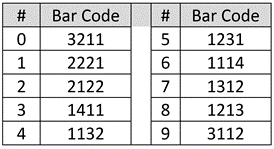
Each of the ten decimal digits of the UPC are encoded using seven “bar width” units per the schema in the table at right.

To convey the decimal string 078742, the encoded sequence is 3211 1312 1213 1312 1132 2122 where each number in the encoding is the width of the bars or spaces.  So, for the leading value “zero,” the number is encoded as seven consecutive units divided into bars of varying widths: a bar three units wide, then (denoted by the change in color from white to black or vice-versa), a bar two units wide, then one then one.  Do you see it? Once more, left-to-right, a white band, three units wide, a dark band two units wide , then a single white band and a single dark band (3-2-1-1 encoding the decimal value zero).

You could recast the encoding in ones and zeroes, where a black bar is a one and a white bar a zero. If you did, the first digit would be 0001101, the number seven would be 0111011 and so on; but there’s no need for that, because the bands of light and dark are far easier to read with a beam of light than a string of printed characters.

Taking a closer look at the first six digits of my water bottle’s UPC, I’ve superimposed the widths and corresponding decimal value for each group of seven units. The top is my idealized representation of the encoding and the bottom is taken from a photograph of the label:

Now that you know how the bars encode the numbers, let’s turn to what the twelve digits mean.  The first six digits generally denote the product manufacturer. 078742 is Walmart. 038000 is assigned to Kellogg’s.  Apple is 885909 and Starbucks is 099555.  The first digit can define the operation of the code.  For example, when the first digit is a 5, it signifies a coupon and ties the coupon to the purchase required for its use.  If the first digit is a 2, then the item is something sold by weight, like meats, fruit or vegetables, and the last six digits reflect the weight or price per pound.  If the first digit is a 3, the item is a pharmaceutical.

Following the leftmost six-digit manufacturer code is the middle marker (1111, as space-bar-space-bar-space) followed by five digits identifying the product.  Every size, color and combo demands a unique identifier to obtain accurate pricing and an up-to-date inventory.

The last digit in the UPC serves as an error-correcting check digit to ensure the code has been read correctly.  The check digit derives from a calculation performed on the other digits, such that if any digit is altered the check digit won’t match the changed sequence. Forget about altering a UPC with a black marker: the change wouldn’t work out to the same check digit, so the scanner will reject it.

In case you’re wondering, the first product to be scanned at a checkout counter using a bar code was a fifty stick pack of Juicy Fruit gum in Troy, Ohio on June 26, 1974.  It rang up for sixty-seven cents.  Today, 45 sticks will set you back $2.48 (UPC 22000109989).

Share this:

  • Click to email a link to a friend (Opens in new window) Email
  • Click to print (Opens in new window) Print
  • Click to share on X (Opens in new window) X
  • Click to share on Facebook (Opens in new window) Facebook
  • Click to share on LinkedIn (Opens in new window) LinkedIn
Like Loading...

It’s About Time!

17 Wednesday Jun 2020

Posted by craigball in Computer Forensics, E-Discovery, General Technology Posts, Uncategorized

≈ 9 Comments

“Time heals all wounds.”  “Time is money.” “Time flies.” 

To these memorable mots, I add one more: “Time is truth.”

A defining feature of electronic evidence is its connection to temporal metadata or timestamps.  Electronically stored information is frequently described by time metadata denoting when ESI was created, modified, accessed, transmitted, or received.  Clues to time are clues to truth because temporal metadata helps establish and refute authenticity, accuracy, and relevancy.

But in the realms of electronic evidence and digital forensics, time is tricky.  It hides in peculiar places, takes freakish forms, and doesn’t always mean what we imagine.  Because time is truth, it’s valuable to know where to find temporal clues and how to interpret them correctly.

Everyone who works with electronic evidence understands that files stored in a Windows (NTFS) environment are paired with so-called “MAC times,” which have nothing to do with Apple Mac computers or even the MAC address identifying a machine on a network.  In the context of time, MAC is an initialization for Modified, Accessed and Created times.

That doesn’t sound tricky.  Modified means changed, accessed means opened and created means authored, right?  Wrong.  A file’s modified time can change due to actions neither discernible to a user nor reflective of user-contributed edits.  Accessed times change from events (like a virus scan) that most wouldn’t regard as accesses. Moreover, Windows stopped reliably updating file access times way back in 2007 when it introduced the Windows Vista operating system.  Created may coincide with the date a file is authored, but it’s as likely to flow from the copying of the file to new locations and storage media (“created” meaning created in that location). Copying a file in Windows produces an object that appears to have been created after it’s been modified!

it’s crucial to protect the integrity of metadata in e-discovery, so changing file creation times by copying is a big no-no.  Accordingly, e-discovery collection and processing tools perform the nifty trick of changing MAC times on copies to match times on the files copied.  Thus, targeted collection alters every file collected, but done correctly, original metadata values are restored and hash values don’t change.  Remember: system metadata values aren’t stored within the file they describe so system metadata values aren’t included in the calculation of a file’s hash value.  The upshot is that changing a file’s system metadata values—including its filename and MAC times—doesn’t affect the file’s hash value. 

Conversely and ironically, opening a Microsoft Word document without making a change to the file’s contents can change the file’s hash value when the application updates internal metadata like the editing clock.  Yes, there’s even a timekeeping feature in Office applications!

Other tricky aspects of MAC times arise from the fact that time means nothing without place.  When we raise our glasses with the justification, “It’s five o’clock somewhere,” we are acknowledging that time is a ground truth. “Time” means time in a time zone, adjusted for daylight savings and expressed as a UTC Offset stating the number of time zones ahead of or behind GMT, time at the Royal Observatory in Greenwich, England atop the Prime or “zero” Meridian.

Time values of computer files are typically stored in UTC, for Coordinated Universal Time, essentially Greenwich Mean Time (GMT) and sometimes called Zulu or “Z” time, military shorthand for zero meridian time.  When stored times are displayed, they are adjusted by the computer’s operating system to conform to the user’s local time zone and daylight savings time rules.  So in e-discovery and computer forensics, it’s essential to know if a time value is a local time value adjusted for the location and settings of the system or if it’s a UTC value.  The latter is preferred in e-discovery because it enables time normalization of data and communications, supporting the ability to order data from different locales and sources across a uniform timeline.

Four months of pandemic isolation have me thinking about time.  Lost time. Wasted time. Pondering where the time goes in lockdown.   Lately, I had to testify about time in a case involving discovery malfeasance and corruption of time values stemming from poor evidence handling.  When time values are absent or untrustworthy, forensic examiners draw on hidden time values—or, more accurately, encoded time values—to construct timelines or reveal forgeries.

Time values are especially important to the reliable ordering of email communications.  Most e-mails are conversational threads, often a mishmash of “live” messages (with their rich complement of header data, encoded attachments and metadata) and embedded text strings of older messages.  If the senders and receivers occupy different time zones, the timeline suffers: replies precede messages that prompted them, and embedded text strings make it child’s play to alter times and text.  It’s just one more reason I always seek production of e-mail evidence in native and near-native forms, not as static images.  Mail headers hold data that support authenticity and integrity—data you’ll never see produced in a load file.

Underscoring that last point, I’ll close with a wacky, wonderful example of hidden timestamps: time values embedded in Gmail boundaries.  This’ll blow your mind.

If you know where to look in digital evidence, you’ll find time values hidden like Easter eggs. 

E-mail must adhere to structural conventions to traverse the internet and be understood by different e-mail programs. One of these conventions is the use of a Content-Type declaration and setting of content boundaries, enabling systems to distinguish the message header region from the message body and attachment regions.

The next illustration is a snippet of simplified code from a forged Gmail message.  To see the underlying code of a Gmail message, users can select “Show original” from the message options drop-down menu (i.e., the ‘three dots’).

The line partly outlined in red advises that the message will be “multipart/alternative,” indicating that there will be multiple versions of the content supplied; commonly a plain text version followed by an HTML version. To prevent confusion of the boundary designator with message text, a complex sequence of characters is generated to serve as the content boundary. The boundary is declared to be “00000000000063770305a4a90212” and delineates a transition from the header to the plain text version (shown) to the HTML version that follows (not shown).

Thus, a boundary’s sole raison d’être is to separate parts of an e-mail; but because a boundary must be unique to serve its purpose, programmers insure against collision with message text by integrating time data into the boundary text.  Now, watch how we decode that time data.

Here’s our boundary, and I’ve highlighted fourteen hexadecimal characters in red:

Next, I’ve parsed the highlighted text into six- and eight-character strings, reversed their order and concatenated the strings to create a new hexadecimal number:

A decimal number is Base 10.  A hexadecimal number is Base 16.  They are merely different ways of notating numeric values.  So, 05a4a902637703 is just a really big number. If we convert it to its decimal value, it becomes: 1,588,420,680,054,531.  That’s 1 quadrillion, 588 trillion, 420 billion, 680 million, 54 thousand, 531.  Like I said, a BIG number.

But, a big number…of what?

Here’s where it gets amazing (or borderline insane, depending on your point of view).

It’s the number of microseconds that have elapsed since January 1, 1970 (midnight UTC), not counting leap seconds. A microsecond is a millionth of a second, and 1/1/1970 is the “Epoch Date” for the Unix operating system. An Epoch Date is the date from which a computer measures system time. Some systems resolve the Unix timestamp to seconds (10-digits), milliseconds (13-digits) or microseconds (16-digits).

When you make that curious calculation, the resulting date proves to be Saturday, May 2, 2020 6:58:00.054 AM UTC-05:00 DST.  That’s the genuine date and time the forged message was sent.  It’s not magic; it’s just math.

Had the timestamp been created by the Windows operating system, the number would signify the number of 100 nanosecond intervals between midnight (UTC) on January 1, 1601 and the precise time the message was sent.

Why January 1, 1601?  Because that’s the “Epoch Date” for Microsoft Windows.  Again, an Epoch Date is the date from which a computer measures system time.  Unix and POSIX measure time in seconds from January 1, 1970.  Apple used one second intervals since January 1, 1904, and MS-DOS used seconds since January 1, 1980. Windows went with 1/1/1601 because, when the Windows operating system was being designed, we were in the first 400-year cycle of the Gregorian calendar (implemented in 1582 to replace the Julian calendar). Rounding up to the start of the first full century of the 400-year cycle made the math cleaner.

Timestamps are everywhere in e-mail, hiding in plain sight.  You’ll find them in boundaries, message IDs, DKIM stamps and SMTP IDs.  Each server handoff adds its own timestamp.  It’s the rare e-mail forger who will find every embedded timestamp and correctly modify them all to conceal the forgery. 

When e-mail is produced in its native and near-native forms, there’s more there than meets the eye in terms of the ability to generate reliable timelines and flush out forgeries and excised threads.  Next time the e-mail you receive in discovery seems “off” and your opponent balks at giving you suspicious e-mail evidence in faithful electronic formats, ask yourself: What are they trying to hide?

The takeaway is this: Time is truth and timestamps are evidence in their own right.  Isn’t it about time we stop letting opponents strip it away?

Tip of the hat to Arman Gungor at Metaspike whose two excellent articles about e-mail timestamp forensics reminded me how much I love this stuff.  https://www.metaspike.com/timestamps-forensic-email-examination/

Share this:

  • Click to email a link to a friend (Opens in new window) Email
  • Click to print (Opens in new window) Print
  • Click to share on X (Opens in new window) X
  • Click to share on Facebook (Opens in new window) Facebook
  • Click to share on LinkedIn (Opens in new window) LinkedIn
Like Loading...

Don’t Bet the Farm on Slack Space

14 Thursday May 2020

Posted by craigball in Computer Forensics, E-Discovery, General Technology Posts

≈ 7 Comments

A depiction of file slack from Ball, E-Discovery Workbook © 2020

A federal court appointed me Special Master, tasked to, in part, search the file slack space of a party’s computers and storage devices.  The assignment prompted me to reconsider the value of this once-important forensic artifact.

Slack space is the area between the end of a stored file and the end of its concluding cluster: the difference between a file’s logical and physical size. It’s wasted space from the standpoint of the computer’s file system, but it has forensic significance by virtue of its potential to hold remnants of data previously stored there.  Slack space is often confused with unallocated clusters or  free space, terms describing areas of a drive not currently used for file storage (i.e., not allocated to a file) but which retain previously stored, deleted files. 

A key distinction between unallocated clusters and slack space is that unallocated clusters can hold the complete contents of a deleted file whereas slack space cannot.  Data recovered (“carved”) from unallocated clusters can be quite large—spanning thousands of clusters—where data recovered from a stored file’s slack space can never be larger than one cluster minus one byte.  Crucially, unallocated clusters often retain a deleted file’s binary header signature serving to identify the file type and reveal the proper way to decode the data, whereas binary header signatures in slack space are typically overwritten.

A little more background in file storage may prove useful before I describe the dwindling value of slack space in forensics.

Electronic storage media are physically subdivided into millions, billions or trillions of sectors of fixed storage capacity.  Historically, disk sectors on electromagnetic hard drives were 512 bytes  in size.  Today, sectors may be much larger (e.g., 4,096 bytes).  A sector is the smallest physical storage unit on a disk drive, but not the smallest accessible storage unit.  That distinction belongs to a larger unit called the cluster, a logical grouping of sectors and the smallest storage unit a computer can read from or write to.  On Windows machines, clusters are 4,096 bytes (4kb) by default for drives up to 16 terabytes.  So, when a computer stores or retrieves data, it must do so in four kilobyte clusters.

File storage entails allocation of enough whole clusters to hold a file.  Thus, a 2kb file will only fill half a 4kb cluster–the balance being slack space.  A 13kb file will tie up four clusters, although just a fraction of the final, fourth cluster is occupied is occupied by the file.  The balance is slack space and it could hold fragments of whatever was stored there before.  Because it’s rare for files to be perfectly divisible by 4 kilobytes and many files stored are tiny, much drive space is lost to slack space.  Using smaller clusters would mean less slack space, but any efficiencies gained would come at the cost of unwieldy file tracking and retrieval.

So, slack space holds forensic artifacts and those artifacts tend to hang around a long time.  Unallocated clusters may be called into service at any time and their legacy content overwritten.  But data lodged in slack space endures until the file allocated to the cluster is deleted–on conventional “spinning” hard drives at any rate.

When I started studying computer forensics in the MS-DOS era, slack space loomed large as a source of forensic intelligence.  Yet, apart from training exercises where something was always hidden in slack, I can’t recall a matter I’ve investigated this century which turned on evidence found in slack space.  The potential is there, so when it makes sense to do it, examiners search slack using unique phrases unlikely to throw off countless false positives.

But how often does it make sense to search slack nowadays?

I’ve lately grappled with that question because it seems to me that the shopworn notions respecting slack space must be re-calibrated.  

Keep in mind that slack space holds just a shard of data with its leading bytes overwritten.  It may be overwritten minimally or overwritten extensively, but some part is obliterated, always.  Too, slack space may hold the remnants of multiple deleted files; that is, as overlapping artifacts: files written, deleted overwritten by new data, deleted again, then overwritten again (just less extensively so).  Slack can be a real mess.

Fifteen years ago, when programs stored text in ASCII (i.e., encoded using the American Standard Code for Information Interchange or simply “plain text”), you could find intelligible snippets in slack space.  But since 2007, when Microsoft changed the format of Office productivity files like Word, PowerPoint and Excel files to Zip-compressed XML formats, there’s been a sea change in how Office applications and other programs store text.  Today, if a forensic examiner looks at a Microsoft Office file as it’s written on the media, the content is compressed.  You won’t see any plain text.  The file’s contents resemble encrypted data.  The “PK” binary header signature identifying it as compressed content is gone, so how will you recognize zipped content?  What’s more, the parts of the Zip file required to decompress the snippet have likely been obliterated, too. How do you decode fragments if you don’t know the file type or the encoding schema?

The best answer I have is you throw common encodings against the slack and hope something matches up with the search terms.  More-and-more, nothing matches, even when what you seek really is in the slack space. Searches fail because the data’s encoded and invisible to the search tool.  I don’t know how searching slack stacks up against the odds of winning the lottery, but a lottery ticket is cheap; a forensic examiner’s time isn’t.

That’s just the software.  Storage hardware has evolved, too.  Drives are routinely encrypted, and some oddball encryption methods make it difficult or impossible to explore the contents of file slack.  The ultimate nail in the coffin for slack space will be solid state storage devices and features, like wear leveling and TRIM that routinely reposition data and promise to relegate slack space and unallocated clusters to the digital dung heap of history.

Taking a fresh look at file slack persuades me that it still belongs in a forensic examiner’s bag of tricks when it can be accomplished programmatically and with little associated cost.  But, before an expert characterizes it as essential or a requesting party offers it as primary justification for an independent forensic examination, I’d urge the parties and the Court to weigh cost versus benefit; that is, to undertake a proportionality analysis in the argot of electronic discovery.  Where searching slack space was once a go-to for forensic examination, it’s an also-ran now. Do it, when it’s an incidental feature of a thoughtfully composed examination protocol; but don’t bet the farm on finding the smoking gun because the old gray mare, she ain’t what she used to be!
See? I never metaphor I didn’t like.

******************************

Postscript: A question came up elsewhere about solid state drive forensics. Here was my reply:

The paradigm-changing issue with SSD forensic analysis versus conventional magnetic hard drives is the relentless movement of data by wear leveling protocols and a fundamentally different data storage mechanism. Solid state cells have a finite life measured in the number of write-rewrite cycles.

To extend their useful life, solid state drives move data around to insure that all cells are written with roughly equal frequency. This is called “wear leveling,” and it works. A consequence of wear leveling is that unallocated cells are constantly being overwritten, so SSDs do not retain deleted data as electromagnetic drives do. Wear leveling (and the requisite remapping of data) is handled by an SSD drive’s onboard electronics and isn’t something users or the operating system control or access.

Another technology, an ATA command called TRIM, is controllable by the operating system and serves to optimize drive performance by disposing of the contents of storage cell groups called “pages” that are no longer in use. Oversimplified, it’s faster to write to an empty memory page than to initiate an erasure first; so, TRIM speeds the write process by clearing contents before they are needed, in contrast to an electromagnetic hard drive which overwrites clusters without need to clear contents beforehand.

The upshot is that resurrecting deleted files by identifying their binary file signatures and “carving” their remnant contents from unallocated clusters isn’t feasible on SSD media. Don’t confuse this with forensically-sound preservation and collection. You can still image a solid state drive, but you’re not going to get unallocated clusters. Too, you won’t be interfacing with the physical media grabbing a bitstream image. Everything is mediated by the drive electronics.

******************************

Dear Reader, Sorry I’ve been remiss in posting here during the COVID crisis. I am healthy, happy and cherishing the peace and quiet of the pause, hunkered down in my circa-1880 double shotgun home in New Orleans, enjoying my own cooking far too much. Thanks to Zoom, I completed my Spring Digital Evidence class at the University of Texas School of Law, so now one day just bubbles into the next, and I’m left wondering, Where did the day go?. Every event where I was scheduled to speak or teach cratered, with no face-to-face events sensibly in sight for 2020. One possible exception: I’ve just joined the faculty of the Tulane School of Law ten minutes upriver for the Fall semester, and plan to be back in Austin teaching in the Spring. But, who knows, right? Man plans and gods laugh.

We of a certain age may all be Zooming and distancing for many months. As one who’s bounced around the world peripatetically for decades, not being constantly on airplanes and in hotels is strange…and stress-relieving. While I miss family, friends and colleagues and mourn the suffering others are enduring, I’ve benefited from the reboot, ticking off household projects and kicking the tires on a less-driven day-to-day. It hasn’t hurt that it’s been the best two months of good weather I’ve ever seen, here or anywhere. The prospect of no world travel this summer–and no break from the soon-to-be balmy Big Easy heat–is disheartening, but small potatoes in the larger scheme of things.

Be well, be safe, be kind to yourself. This, too, shall pass and as my personal theme song says, There's a Great Big Beautiful Tomorrow. Just a Dream Away.

Share this:

  • Click to email a link to a friend (Opens in new window) Email
  • Click to print (Opens in new window) Print
  • Click to share on X (Opens in new window) X
  • Click to share on Facebook (Opens in new window) Facebook
  • Click to share on LinkedIn (Opens in new window) LinkedIn
Like Loading...

Degradation: How TIFF+ Disrupts Search

15 Wednesday Jan 2020

Posted by craigball in Computer Forensics, E-Discovery, Uncategorized

≈ 7 Comments

broken searchRecently, I wrote on the monstrous cost of TIFF+ productions compared to the same data produced as native files.  I’ve wasted years trying to expose the loss of utility and completeness caused by converting evidence to static formats.  I should have recognized that no one cares about quality in e-discovery; they only care about cost.  But I cannot let go of quality because one thing the Federal Rules make clear is that producing parties are not permitted to employ forms of production that significantly impair the searchability of electronically stored information (ESI).

In the “ordinary course of business,” none but litigators “ordinarily maintain” TIFF images as substitutes for native evidence   When requesting parties seek production in native forms, responding parties counter with costly static image formats by claiming they are “reasonably usable” alternatives.  However, the drafters of the 2006 Rules amendments were explicit in their prohibition:

[T]he option to produce in a reasonably usable form does not mean that a responding party is free to convert electronically stored information from the form in which it is ordinarily maintained to a different form that makes it more difficult or burdensome for the requesting party to use the information efficiently in the litigation. If the responding party ordinarily maintains the information it is producing in a way that makes it searchable by electronic means, the information should not be produced in a form that removes or significantly degrades this feature.

 FRCP Rule 34, Committee Notes on Rules – 2006 Amendment.

I contend that substituting a form that costs many times more to load and host counts as making the production more difficult and burdensome to use.  But what is little realized or acknowledged is the havoc that so-called TIFF+ productions wreck on searchability, too.  It boggles the mind, but when I share what I’m about to relate below to opposing counsel, they immediately retort, “that’s not true.”  They deny the reality without checking its truth, without caring whether what they assert has a basis in fact.  And I’m talking about lawyers claiming deep expertise in e-discovery.  It’s disheartening, to say the least.

A little background: We all know that ESI is inherently electronically searchable.  There are quibbles to that statement but please take it at face value for now.  When parties convert evidence in native forms to static image forms like TIFF, the process strips away all electronic searchability.  A monochrome screenshot replaces the source evidence.  Since the Rules say you can’t remove or significantly degrade searchability, the responding party must act to restore a measure of searchability.  They do this by extracting text from the native ESI and delivering it in a “load file” accompanying the page images.  This is part of the “plus” when people speak of TIFF+ productions.

E-discovery vendors then seek to pair the page images with the extracted text in a manner that allows some text searchability.  Vendors index the extracted text to speed search, a mapping process intended to display the page where the text was located when mapped.  This is important because where the text appears in the load file dictates what page will be displayed when the text is searched and determines whether features like proximity search and even predictive coding work as well as we have a right to expect.  Upshot: The location and juxtaposition of extracted text in the load file matters significantly in terms of accurate searchability.  If you don’t accept that, you can stop reading.

Now, let’s consider the structure of modern electronic evidence.  We could talk about formulae in spreadsheets or speaker notes in presentations, but those are not what we fight over when it comes to forms of production. Instead,  I want to focus on Microsoft Word documents and those components of Word documents called Comments and Tracked Changes; particularly Comments because these aren’t “metadata” by any stretch.  Comments are user-contributed content, typically communications between collaborators.  Users see this content on demand and it’s highly contextual and positional because it is nearly always a comment on adjacent body text.  It’s NOT the body text, and it’s not much use when it’s separated from the body text.  Accordingly, Word displays comments as marginalia, giving it the power of place but not enmeshing it with the body text.

But what happens to these contextual comments when you extract the text of a Word document to a load file and then index the load files?

There are three ways I’ve seen vendors handle comments and all three significantly degrade searchability:

First, they suppress comments altogether and do not capture the text in the load files.  This is content deletion.  It’s like the content was never there and you can’t find the text using any method of electronic search.  Responding parties don’t disclose this deletion nor is it grounded on any claim of privilege or right.  Spoliation is just S.O.P.

Second, they merge the comments into the adjacent body text. This has the advantage of putting the text more-or-less on the same page where it appears in the source, but it also serves to frustrate proximity search and analytics.  The injection of the comment text between a word combination or phrase causes searches for that word combo or phrase to fail.  For example, if your search was for ignition w/3 switch and a four-word comment comes between “ignition” and “switch,” the search fails.

Third, and frequently, vendors aggregate comments and dump them at the end of the load file with no clue as to the page or text they reference.  No links.  No pointers.  Every search hitting on comment text takes you to the wrong page, devoid of context.

Some of what I describe are challenges inherent to dealing with three-dimensional data using two-dimensional tools.  Native applications deal with Comments, speaker notes and formulae three-dimensionally.  We can reveal that data as needed, and it appears in exactly the way witnesses use it outside of litigation.  But flattening native forms to static images and load files destroys that multidimensional capability.   Vendors do what they can to add back functionality; but we should not pretend the results are anything more than a pale shadow of what’s possible when native forms are produced.  I’d call it a tradeoff, but that implies requesting parties know what’s being denied them.  How can requesting party’s counsel know what’s happening when responding parties’ counsel haven’t a clue what their tools do, yet misrepresent the result?

But now you know.  Check it out.  Look at the extracted text files produced to accompany documents with comments and tracked changes.  Ask questions.  Push back.  And if you’re producing party’s counsel, fess up to the evidence vandalism you do.  Defend it if you must but stop denying it.  You’re better than that.

Share this:

  • Click to email a link to a friend (Opens in new window) Email
  • Click to print (Opens in new window) Print
  • Click to share on X (Opens in new window) X
  • Click to share on Facebook (Opens in new window) Facebook
  • Click to share on LinkedIn (Opens in new window) LinkedIn
Like Loading...

Preserving Social Media Content: DIY

24 Tuesday Dec 2019

Posted by craigball in Computer Forensics, E-Discovery, General Technology Posts, Uncategorized

≈ 3 Comments

Social Media Content (SMC) is a rich source of evidence.  Photos and posts shed light on claims of disability and damages, establish malicious intent and support challenges to parental fitness–to say nothing of criminals who post selfies at crime scenes or holding stolen goods, drugs and weapons.  SMC may expose propensity to violence, hate speech, racial animus, misogyny or mental instability (even at the highest levels of government).  SMC is increasingly a medium for business messaging and the primary channel for cross-border communications.  In short, SMC and messaging are heirs-apparent to e-mail in their importance to e-discovery.

Competence demands swift identification and preservation of SMC.

Screen shots of SMC are notoriously unreliable, tedious to collect and inherently unsearchable.  Applications like X1 Social Discovery and service providers like Hanzo can help with SMC preservation; but frequently the task demands little technical savvy and no specialized tools.  Major SMC sites offer straightforward ways users can access and download their content.  Armed with a client’s login credentials, lawyers, too, can undertake the ministerial task of preserving SMC without greater risk of becoming a witness than if they’d photocopied paper records.

Collecting your Client’s SMC
Collecting SMC is a two-step process of requesting the data followed by downloading.  Minutes to hours or longer may elapse between a request and download availability. Having your client handle collection weakens the chain of custody; so, instruct the client to forward download links to you or your designee for collection.  Better yet, do it all yourself.

Obtain your client’s user ID and password for each account and written consent to collect. Instruct your client to change account passwords for your use, re-enabling customary passwords following collection.  Clients may need to temporarily disable two-factor account security.  Download data promptly as downloads are available briefly.

Collection Steps for Seven Social Media Sites
Facebook: After login, go to Settings>Your Facebook Information>Download Your Information.  Select the data and date ranges to collect (e.g., Posts, Messages, Photos, Comments, Friends, etc.).  Facebook will e-mail the account holder when the data is ready for download (from the Available Copies tab on the user’s Download Your Information page). Facebook also offers an Access Your Information link for review before download. Continue reading →

Share this:

  • Click to email a link to a friend (Opens in new window) Email
  • Click to print (Opens in new window) Print
  • Click to share on X (Opens in new window) X
  • Click to share on Facebook (Opens in new window) Facebook
  • Click to share on LinkedIn (Opens in new window) LinkedIn
Like Loading...

Privacy: A Wolf in Sheep’s Clothing?

12 Tuesday Nov 2019

Posted by craigball in Computer Forensics, E-Discovery, Uncategorized

≈ 3 Comments

Next week is Georgetown Law Center’s sixteenth annual Advanced E-Discovery Institute.  Sixteen years of a keen focus on e-discovery; what an impressive, improbable achievement!  Admittedly, I’m biased by longtime membership on its advisory board and my sometime membership on its planning committees, but I regard the GTAEDI confab of practitioners and judges as the best e-discovery conference still standing.  So, it troubles me how much of the e-discovery content of the Institute and other conferences is ceded to other topics, and one topic in particular, privacy, is being pushed to be the focus of the Institute in future.

This is not a post about the Georgetown Institute, but about privacy, particularly whether our privacy fears are stoked and manipulated by companies and counsel as an opportunistic means to beat back discovery.  I ask you: Is privacy a stalking horse for a corporate anti-discovery agenda? Continue reading →

Share this:

  • Click to email a link to a friend (Opens in new window) Email
  • Click to print (Opens in new window) Print
  • Click to share on X (Opens in new window) X
  • Click to share on Facebook (Opens in new window) Facebook
  • Click to share on LinkedIn (Opens in new window) LinkedIn
Like Loading...
← Older posts
Newer posts →
Follow Ball in your Court on WordPress.com

Enter your email address to subscribe to this blog and receive notifications of new posts by email.

Join 2,231 other subscribers

Recent Posts

  • A Master Table of Truth November 4, 2025
  • Kaylee Walstad, 1962-2025 August 19, 2025
  • Native or Not? Rethinking Public E-Mail Corpora for E-Discovery (Redux, 2013→2025) August 16, 2025
  • Still on Dial-Up: Why It’s Time to Retire the Enron Email Corpus August 15, 2025
  • Chambers Guidance: Using AI Large Language Models (LLMs) Wisely and Ethically June 19, 2025

Archives

RSS Feed RSS - Posts

CRAIGBALL.COM

Helping lawyers master technology

Categories

EDD Blogroll

  • Illuminating eDiscovery (Lighthouse)
  • Corporate E-Discovery Blog (Zapproved )
  • Complex Discovery (Rob Robinson)
  • E-D Team (Ralph Losey)
  • GLTC (Tom O'Connor)
  • eDiscovery Today (Doug Austin)
  • Sedona Conference
  • E-Discovery Law Alert (Gibbons)
  • eDiscovery Journal (Greg Buckles)
  • CS DISCO Blog
  • Minerva 26 (Kelly Twigger)
  • The Relativity Blog
  • Basics of E-Discovery (Exterro)

Admin

  • Create account
  • Log in
  • Entries feed
  • Comments feed
  • WordPress.com

Enter your email address to follow Ball in Your Court and receive notifications of new posts by email.

Website Powered by WordPress.com.

  • Subscribe Subscribed
    • Ball in your Court
    • Join 2,083 other subscribers
    • Already have a WordPress.com account? Log in now.
    • Ball in your Court
    • Subscribe Subscribed
    • Sign up
    • Log in
    • Report this content
    • View site in Reader
    • Manage subscriptions
    • Collapse this bar
 

Loading Comments...
 

    %d