
 “Will the person who left their cell phone at the security checkpoint please retrieve it?” People constantly leave their phones behind at security checkpoints, washrooms, checkout counters and charge stations. Too, the little buggers slip out of pockets and purses. More than three million phones are lost in the U.S. every year, and less than one-in-ten lost phones finds its way home. Saturday night, I found an iPhone on the floor at a big party in the Faubourg Marigny in New Orleans. I located the owner by asking everyone in sight if they’d lost a phone, and when I found her, the owner didn’t know she’d dropped it.
There are high tech tools to find lost phones like the Find My iPhone app or Tile locators; but, these only work for owners and require a second connected device. What do the persons who find your phone or the Lost & Found staff do to quickly locate you, often before you realize your phone’s gone? You don’t have an ID tag with contact data on your phone, right?
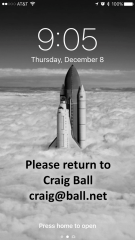
I do something that’s so darn simple, it’s a wonder it’s not already an option on every iPhone: I embed my name and email address in the lock screen photo (i.e., the wallpaper image that appears when you press the sleep/wake button, even when the phone is locked). Now, any announcement over the P.A. includes my name, and I’ve furnished a secure way for good samaritans to contact me to arrange return. It’s also an easy means to supply emergency contact information, should the good samaritan find you dropped alongside your phone.
There are plenty of ways to add text to your lock screen image–I’ve used the drawing tools in PowerPoint–but the simplest is to use the image editing tools right on your iPhone. Here’s how (in iOS 10.1.1):
- Select an image to serve as your lockscreen wallpaper. Use one with not-too-busy space for text (like the clouds in mine). The text location shouldn’t conflict with the date and time text. You may prefer to use a picture of yourself to make it easier to find you and prove it’s your phone.
- Duplicate the image so as not to alter your original. Do this by selecting Share (box with the up arrow) and Duplicate.
- Working with the duplicate image, choose Edit from the toolbar (abacus-like slider), then choose More (circle with three dots). Select Markup (toolbox icon) and finally choose the Text option (uppercase “T” in a box).
- A text box will appear in the center of your image. You can resize it by dragging the blue dots or reposition it by dragging the box. You can change the font face, font size, text color and alignment from the menu bar.
- Type your information. Be sensible, e.g., don’t include your home address, and don’t use your mobile number (duh). Click Done (upper right corner).
- To make the edited image your lockscreen wallpaper, go to Settings>Wallpaper>Choose a New Wallpaper. In All Photos, navigate to the annotated image you just created and select it (tap). Move and scale the image as suits you, then select Set from the menu and choose Set Lock Screen. You’re done!


 As I stow the turkey platter and box up the pilgrim décor, I’m reminded that it’s time once more to celebrate E-Discovery Day, TODAY, Thursday, December 1. No doubt, you’re saying, “So SOON?!?! I still haven’t retrieved those E-Discovery Day 2015 balloons that got loose in the atrium, and who’s going to eat all that E-Discovery Day Kringle taking up space in the office freezer?” (Special-ordered from Racine in the traditional e-discovery flavor, Cinnamon, TIFF and Tears™).
 In the wee hours last evening, I received a question posed by Angela Bunting with Nuix down in Sydney, Australia. Angela has such deep knowledge of e-discovery above and below the Equator that I was flattered to be queried by someone I’d go to for guidance. It was a magnificent hypothetical question.
 Each September for the last four years, I’ve had the pleasure to participate in a splendid e-discovery conference in Portland, Oregon called PREX, so-called because the whole event is devoted to PReservation EXcellence. It’s sponsored by Zapproved, but unlike other developer events, it’s less a celebration of self than a product-neutral effort to promote better practices in mounting a defensible enterprise legal hold. A bevy of prominent judges and thought leaders turn out to speak; but, the real star of PREX is Portland itself, resplendent in those precious, late-Summer weeks when one can count on abundant sunshine. If you’re looking for fine, fun education in excellent company, pencil PREX in for
  In my law practice, I use PowerPoint more frequently than Word. Word processing tools are for preparing documents for people to read and understand; I use presentation tools like PowerPoint when I want people to see and understand. PowerPoint isn’t a word processor; it’s a visual presentation tool. You can fill slides with text as you might a word-processed document, but when you do that, you’re killing the power of PowerPoint.
 I’ve just returned from a quick trip to San Juan, Puerto Rico. I travelled there to deliver a three-hour presentation on e-discovery as part of a day of education commemorating the 50th anniversary of Article III federal courts on the island. It’s a trip that’s been in the works for some time, and an event about which I was more than usually anxious and discreet. Part of my anxiety stemmed from three hours being a LOOOONG time for an audience to listen to one voice, especially when the topic is somewhat esoteric and technical. My time slot was the three hour block smack in the middle of the day. Too, there were more than 500 people in attendance, and I wanted it to be the performance of a lifetime.
 Ball in your Court