Don’t BE a Tool, GET a Tool!

Considering the billions of dollars spent on e-discovery every year, wouldn’t you think every trial lawyer would have some sort of e-discovery platform?  Granted, the largest firms have tools; in fact, e-discovery software provider Relativity (lately valued at $3.6 billion) claims 198 of the 200 largest U.S. law firms as its customers.  But, for the smaller firms and solo practitioners who account for 80% or more of lawyers in private practice, access to e-discovery tools falls off.  Off a cliff, that is. 

When law firms or solos seek my help obtaining native production, my first question is often, “what platform are you using?”  Their answer is usually “PC” or simply a blank stare.  When I add, “your e-discovery platform–the software tool you’ll use to review and search electronically stored information,” the dead air makes clear they haven’t a clue.  I might as well ask a dog where it will drive if it catches the car.    

Let’s be clear: no lawyer should expect to complete an ESI review of native forms using native applications

Don’t do it.

I don’t care how many regale me with tales of their triumphs using Outlook or Microsoft Word as ‘review tools.’  That’s not how it’s done.  It’s reckless.  The integrity of electronic evidence will be compromised by that workflow.  You will change hash values.  You will alter metadata.  Your searches will be spotty.  Worst case scenario: your copy of Outlook could start spewing read receipts and calendar reminders.  I dare you to dig your way out of that with a smile.  Apart from the risks, review will be slow.  You won’t be able to tag or categorize data.   When you print messages, they’ll bear your name instead of the custodian’s name. Doh!

None of this is an argument against native production. 
It’s an argument against incompetence. 

I am as dedicated a proponent of native production as you’ll find; but to reap the benefits and huge cost savings of native production, you must use purpose-built review tools.  Notwithstanding your best efforts to air gap computers and use working copies, something will fail.  Just don’t do it.

You’ll also want to use an e-discovery review tool because nothing else will serve to graft the contents of load files onto native evidence.  For the uninitiated, load files are ancillary, delimited text files supplied with a production and used to carry information about the items produced and the layout of the production.

I know some claim that native productions do away with the need for load files, and I concede there are ways to structure native productions to convey some of the data we now exchange via load files.  But why bother?  After years in the trenches, I’ve given up cursing the use of load files in native, hybrid and TIFF+ productions.  Load files are clunky, but they’re a proven way to transmit filenames and paths, supply Bates numbers, track duplicates, share hash values, flag family relationships, identify custodians and convey system metadata (that’s the kind not stored in files but residing in the host system’s file table).   Until there’s a better mousetrap, we’re stuck with load files.

The takeaway is get a tool. If you’re new to e-discovery, you need to decide what e-discovery tool you will use to review ESI and integrate load files.  Certainly, no producing party can expect to get by without proper tools to process, cull, index, deduplicate, search, review, tag and export electronic evidence—and to generate load files.  But requesting parties, too, are well-served to settle on an e-discovery platform before they serve their first Request for Production.  Knowing the review tool you’ll use informs the whole process, particularly when specifying the forms of production and the composition of load files.  Knowing the tool also impacts the keywords used in and structure of search queries.

There are a ton of tools out there, and one or two might not skin you alive on price. Kick some tires. Ask for a test drive. Shop around. Do the math. But, figure out what you’re going to do before you catch that car. Oh, and don’t even THINK about using Outlook and Word. I mean it. I’ve got my eye on you, McFly.

Understanding the UPC: Because You Can

Where does the average person encounter binary data?  Though we daily confront a deluge of digital information, it’s all slickly packaged to spare us the bare binary bones of modern information technology.  All, that is, save the humble Universal Product Code, the bar code symbology on every packaged product we purchase from a 70-inch TV to a box of Pop Tarts.  Bar codes and their smarter Japanese cousins, QR Codes, are perhaps the most unvarnished example of binary encoding in our lives. 

Barcodes have an ancient tie to e-discovery as they were once used to Bates label hard copy documents, linking them to “objective coding” databases. A lawyer using barcoded documents was pretty hot stuff back in the day.

Just a dozen numeric characters are encoded by the ninety-five stripes of a UPC-A barcode, but those digits are encoded so ingeniously as to make them error resistant and virtually tamperproof. The black and white stripes of a UPC are the ones and zeroes of binary encoding.  Each number is encoded as seven bars and spaces (12×7=84 bars and spaces) and an additional eleven bars and spaces denote start, middle and end of the UPC.  The start and end markers are each encoded as bar-space-bar and the middle is always space-bar-space-bar-space.  Numbers in a bar code are encoded by the width of the bar or space, from one to four units. 

This image has an empty alt attribute; its file name is barcode-water.png

The bottle of Great Value purified water beside me sports the bar code at right.

Humans can read the numbers along the bottom, but the checkout scanner cannot; the scanner reads the bars. Before we delve into what the numbers signify in the transaction, let’s probe how the barcode embodies the numbers.  Here, I describe a bar code format called UPC-A.  It’s a one-dimensional code because it’s read across.  Other bar codes (e.g., QR codes) are two-dimensional codes and store more information because they use a matrix that’s read side-to-side and top-to-bottom.

The first two black bars on each end of the barcode signal the start and end of the sequence (bar-space-bar).  They also serve to establish the baseline width of a single bar to serve as a touchstone for measurement.  Bar codes must be scalable for different packaging, so the ability to change the size of the codes hinges on the ability to establish the scale of a single bar before reading the code.

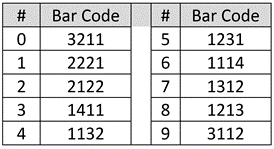
Each of the ten decimal digits of the UPC are encoded using seven “bar width” units per the schema in the table at right.

To convey the decimal string 078742, the encoded sequence is 3211 1312 1213 1312 1132 2122 where each number in the encoding is the width of the bars or spaces.  So, for the leading value “zero,” the number is encoded as seven consecutive units divided into bars of varying widths: a bar three units wide, then (denoted by the change in color from white to black or vice-versa), a bar two units wide, then one then one.  Do you see it? Once more, left-to-right, a white band, three units wide, a dark band two units wide , then a single white band and a single dark band (3-2-1-1 encoding the decimal value zero).

You could recast the encoding in ones and zeroes, where a black bar is a one and a white bar a zero. If you did, the first digit would be 0001101, the number seven would be 0111011 and so on; but there’s no need for that, because the bands of light and dark are far easier to read with a beam of light than a string of printed characters.

Taking a closer look at the first six digits of my water bottle’s UPC, I’ve superimposed the widths and corresponding decimal value for each group of seven units. The top is my idealized representation of the encoding and the bottom is taken from a photograph of the label:

Now that you know how the bars encode the numbers, let’s turn to what the twelve digits mean.  The first six digits generally denote the product manufacturer. 078742 is Walmart. 038000 is assigned to Kellogg’s.  Apple is 885909 and Starbucks is 099555.  The first digit can define the operation of the code.  For example, when the first digit is a 5, it signifies a coupon and ties the coupon to the purchase required for its use.  If the first digit is a 2, then the item is something sold by weight, like meats, fruit or vegetables, and the last six digits reflect the weight or price per pound.  If the first digit is a 3, the item is a pharmaceutical.

Following the leftmost six-digit manufacturer code is the middle marker (1111, as space-bar-space-bar-space) followed by five digits identifying the product.  Every size, color and combo demands a unique identifier to obtain accurate pricing and an up-to-date inventory.

The last digit in the UPC serves as an error-correcting check digit to ensure the code has been read correctly.  The check digit derives from a calculation performed on the other digits, such that if any digit is altered the check digit won’t match the changed sequence. Forget about altering a UPC with a black marker: the change wouldn’t work out to the same check digit, so the scanner will reject it.

In case you’re wondering, the first product to be scanned at a checkout counter using a bar code was a fifty stick pack of Juicy Fruit gum in Troy, Ohio on June 26, 1974.  It rang up for sixty-seven cents.  Today, 45 sticks will set you back $2.48 (UPC 22000109989).

Don’t Bet the Farm on Slack Space

A depiction of file slack from Ball, E-Discovery Workbook © 2020

A federal court appointed me Special Master, tasked to, in part, search the file slack space of a party’s computers and storage devices.  The assignment prompted me to reconsider the value of this once-important forensic artifact.

Slack space is the area between the end of a stored file and the end of its concluding cluster: the difference between a file’s logical and physical size. It’s wasted space from the standpoint of the computer’s file system, but it has forensic significance by virtue of its potential to hold remnants of data previously stored there.  Slack space is often confused with unallocated clusters or  free space, terms describing areas of a drive not currently used for file storage (i.e., not allocated to a file) but which retain previously stored, deleted files. 

A key distinction between unallocated clusters and slack space is that unallocated clusters can hold the complete contents of a deleted file whereas slack space cannot.  Data recovered (“carved”) from unallocated clusters can be quite large—spanning thousands of clusters—where data recovered from a stored file’s slack space can never be larger than one cluster minus one byte.  Crucially, unallocated clusters often retain a deleted file’s binary header signature serving to identify the file type and reveal the proper way to decode the data, whereas binary header signatures in slack space are typically overwritten.

A little more background in file storage may prove useful before I describe the dwindling value of slack space in forensics.

Electronic storage media are physically subdivided into millions, billions or trillions of sectors of fixed storage capacity.  Historically, disk sectors on electromagnetic hard drives were 512 bytes  in size.  Today, sectors may be much larger (e.g., 4,096 bytes).  A sector is the smallest physical storage unit on a disk drive, but not the smallest accessible storage unit.  That distinction belongs to a larger unit called the cluster, a logical grouping of sectors and the smallest storage unit a computer can read from or write to.  On Windows machines, clusters are 4,096 bytes (4kb) by default for drives up to 16 terabytes.  So, when a computer stores or retrieves data, it must do so in four kilobyte clusters.

File storage entails allocation of enough whole clusters to hold a file.  Thus, a 2kb file will only fill half a 4kb cluster–the balance being slack space.  A 13kb file will tie up four clusters, although just a fraction of the final, fourth cluster is occupied is occupied by the file.  The balance is slack space and it could hold fragments of whatever was stored there before.  Because it’s rare for files to be perfectly divisible by 4 kilobytes and many files stored are tiny, much drive space is lost to slack space.  Using smaller clusters would mean less slack space, but any efficiencies gained would come at the cost of unwieldy file tracking and retrieval.

So, slack space holds forensic artifacts and those artifacts tend to hang around a long time.  Unallocated clusters may be called into service at any time and their legacy content overwritten.  But data lodged in slack space endures until the file allocated to the cluster is deleted–on conventional “spinning” hard drives at any rate.

When I started studying computer forensics in the MS-DOS era, slack space loomed large as a source of forensic intelligence.  Yet, apart from training exercises where something was always hidden in slack, I can’t recall a matter I’ve investigated this century which turned on evidence found in slack space.  The potential is there, so when it makes sense to do it, examiners search slack using unique phrases unlikely to throw off countless false positives.

But how often does it make sense to search slack nowadays?

I’ve lately grappled with that question because it seems to me that the shopworn notions respecting slack space must be re-calibrated.  

Keep in mind that slack space holds just a shard of data with its leading bytes overwritten.  It may be overwritten minimally or overwritten extensively, but some part is obliterated, always.  Too, slack space may hold the remnants of multiple deleted files; that is, as overlapping artifacts: files written, deleted overwritten by new data, deleted again, then overwritten again (just less extensively so).  Slack can be a real mess.

Fifteen years ago, when programs stored text in ASCII (i.e., encoded using the American Standard Code for Information Interchange or simply “plain text”), you could find intelligible snippets in slack space.  But since 2007, when Microsoft changed the format of Office productivity files like Word, PowerPoint and Excel files to Zip-compressed XML formats, there’s been a sea change in how Office applications and other programs store text.  Today, if a forensic examiner looks at a Microsoft Office file as it’s written on the media, the content is compressed.  You won’t see any plain text.  The file’s contents resemble encrypted data.  The “PK” binary header signature identifying it as compressed content is gone, so how will you recognize zipped content?  What’s more, the parts of the Zip file required to decompress the snippet have likely been obliterated, too. How do you decode fragments if you don’t know the file type or the encoding schema?

The best answer I have is you throw common encodings against the slack and hope something matches up with the search terms.  More-and-more, nothing matches, even when what you seek really is in the slack space. Searches fail because the data’s encoded and invisible to the search tool.  I don’t know how searching slack stacks up against the odds of winning the lottery, but a lottery ticket is cheap; a forensic examiner’s time isn’t.

That’s just the software.  Storage hardware has evolved, too.  Drives are routinely encrypted, and some oddball encryption methods make it difficult or impossible to explore the contents of file slack.  The ultimate nail in the coffin for slack space will be solid state storage devices and features, like wear leveling and TRIM that routinely reposition data and promise to relegate slack space and unallocated clusters to the digital dung heap of history.

Taking a fresh look at file slack persuades me that it still belongs in a forensic examiner’s bag of tricks when it can be accomplished programmatically and with little associated cost.  But, before an expert characterizes it as essential or a requesting party offers it as primary justification for an independent forensic examination, I’d urge the parties and the Court to weigh cost versus benefit; that is, to undertake a proportionality analysis in the argot of electronic discovery.  Where searching slack space was once a go-to for forensic examination, it’s an also-ran now. Do it, when it’s an incidental feature of a thoughtfully composed examination protocol; but don’t bet the farm on finding the smoking gun because the old gray mare, she ain’t what she used to be!
See? I never metaphor I didn’t like.

******************************

Postscript: A question came up elsewhere about solid state drive forensics. Here was my reply:

The paradigm-changing issue with SSD forensic analysis versus conventional magnetic hard drives is the relentless movement of data by wear leveling protocols and a fundamentally different data storage mechanism. Solid state cells have a finite life measured in the number of write-rewrite cycles.

To extend their useful life, solid state drives move data around to insure that all cells are written with roughly equal frequency. This is called “wear leveling,” and it works. A consequence of wear leveling is that unallocated cells are constantly being overwritten, so SSDs do not retain deleted data as electromagnetic drives do. Wear leveling (and the requisite remapping of data) is handled by an SSD drive’s onboard electronics and isn’t something users or the operating system control or access.

Another technology, an ATA command called TRIM, is controllable by the operating system and serves to optimize drive performance by disposing of the contents of storage cell groups called “pages” that are no longer in use. Oversimplified, it’s faster to write to an empty memory page than to initiate an erasure first; so, TRIM speeds the write process by clearing contents before they are needed, in contrast to an electromagnetic hard drive which overwrites clusters without need to clear contents beforehand.

The upshot is that resurrecting deleted files by identifying their binary file signatures and “carving” their remnant contents from unallocated clusters isn’t feasible on SSD media. Don’t confuse this with forensically-sound preservation and collection. You can still image a solid state drive, but you’re not going to get unallocated clusters. Too, you won’t be interfacing with the physical media grabbing a bitstream image. Everything is mediated by the drive electronics.

******************************

Dear Reader, Sorry I’ve been remiss in posting here during the COVID crisis. I am healthy, happy and cherishing the peace and quiet of the pause, hunkered down in my circa-1880 double shotgun home in New Orleans, enjoying my own cooking far too much. Thanks to Zoom, I completed my Spring Digital Evidence class at the University of Texas School of Law, so now one day just bubbles into the next, and I’m left wondering, Where did the day go?. Every event where I was scheduled to speak or teach cratered, with no face-to-face events sensibly in sight for 2020. One possible exception: I’ve just joined the faculty of the Tulane School of Law ten minutes upriver for the Fall semester, and plan to be back in Austin teaching in the Spring. But, who knows, right? Man plans and gods laugh.

We of a certain age may all be Zooming and distancing for many months. As one who’s bounced around the world peripatetically for decades, not being constantly on airplanes and in hotels is strange…and stress-relieving. While I miss family, friends and colleagues and mourn the suffering others are enduring, I’ve benefited from the reboot, ticking off household projects and kicking the tires on a less-driven day-to-day. It hasn’t hurt that it’s been the best two months of good weather I’ve ever seen, here or anywhere. The prospect of no world travel this summer–and no break from the soon-to-be balmy Big Easy heat–is disheartening, but small potatoes in the larger scheme of things.

Be well, be safe, be kind to yourself. This, too, shall pass and as my personal theme song says, There's a Great Big Beautiful Tomorrow. Just a Dream Away.

Don’t Let Plaintiffs’ Lawyers Read This!!

Be honest.  Wouldn’t you love to stick it to the plaintiffs?  Wouldn’t your corporate client or carrier be ecstatic if you could make litigation much more expensive for those greedy opportunists bringing frivolous suits and demanding discovery?  What if you could make discovery not just more costly, but make it, say, five times more costly, ten times more costly, than it is for you?  Really bring the pain.  Would you do it?

Now that I have your attention–and the attention of plaintiffs’ counsel wondering if they’ve stumbled into a closed meeting at a corporate counsel retreat—I want to show you this is real.  Not just because I say so, but because you prove it to yourself.  You do the math.

Math!  You didn’t say there would be math!

Stop.  You know you’re good at math when the numbers come with dollar signs.  Legendary Texas trial lawyer W. James Kronzer used to say to me, “I’m no good at math, Herman; but I can divide any number by three.”  That was back when a third was the customary contingent fee.

Even after you do the math, you’re not going to believe it; instead, you’ll conclude it can’t be true.  Surely nothing so unjust could have escaped my notice.  Why would Courts allow this?  How can I be such a sap?

The real question is this: What am I going to do about it? Continue reading

Dig We Must: Get It in Writing

This isn’t a post about e-discovery per se, but it bears on process and integrity issues we face in cooperating to craft e-discovery expectations.  Still, it’s more parable than parallel.

My home in New Orleans sits at the intersection of two narrow streets built for horse and mule traffic.  It’s held its corner ground since 1881, serving as abattoir, ancestral home of a friend and now, my foot on the ground in the Big Easy.  New Orleanians are the friendliest folks.  You can strike up a spirited tête-à-tête with anyone since everyone has something to say about food, festivals, Saints football, Mardi Gras, the Sewage and Water Board and the gross ineptitude of local government in its abject failure to deliver streets and sidewalks that don’t swallow you whole or otherwise conspire to kill or maim the populace.

That’s not to say the City does nothing in the way of maintaining infrastructure.  Right now, New Orleans is replacing its low-pressure gas lines with high pressure lines.  Gas is a big deal where everyone eats red beans on Mondays, but it’s also useful for heating and, even now—still—for lighting.  So, every street must have new subterranean lines installed and new risers brought to gas meters.  I knew nothing of this until I awoke to find a crew with an excavator on my property destroying the curbs and antique brick sidewalks I’d lately installed at considerable expense. Continue reading

Cryptographic Hashing: “Exceptionally” Deep in the Weeds

We all need certainty in our lives; we need to trust that two and two is four today and will be tomorrow.  But the more we learn about any subject, the more we’re exposed to the qualifiers and exceptions that belie perfect certainty.  It’s a conundrum for me when someone writes about cryptographic hashing, the magical math that allows an infinite range of numbers to match to a finite complement of digital fingerprints. Trying to simplify matters, well-meaning authors say things about hashing that just aren’t so.  Their mistakes are inconsequential for the most part—what they say is true enough–but it’s also misleading enough to warrant caveats useful in cross-examination.

I’m speaking of the following two assertions:

  1. Hash values are unique; i.e., two different files never share a hash value.
  2. Hash values are irreversible, i.e., you can’t deduce the original message using its hash value.

Both statements are wrong. Continue reading

Cryptographic Hashing: A Deeper Dive

It’s October (already?!?!) and–YIKES–I haven’t posted for two weeks.  I’m tapping away on a primer about e-discovery processing, a topic that’s received scant attention…ever.  One could be forgiven for thinking the legal profession doesn’t care what happens to all that lovely data when it goes off to be processed!  Yet, I know some readers share my passion for ESI and adore delving deeply into the depths of data processing.  So, here are a few paragraphs pulled from my draft addressing the well-worn topic of hashing in e-discovery where I attempt a foolhardy tilt at the competence windmill and seek to explain how hashing works and what those nutty numbers mean.  Be warned, me hearties, there be math ahead!  It’s still a draft, so feel free to push back and all criticism (constructive/destructive/dismissive) warmly welcomed.

My students at the  University of Texas School of Law and the Georgetown E-Discovery Training Academy spend considerable time learning that all ESI is just a bunch of numbers.  They muddle through readings and exercises about Base2 (binary), Base10 (decimal), Base16 (hexadecimal) and Base64; as well as about the difference between single-byte encoding schemes (ASCIII) and double-byte encoding schemes (Unicode).  It may seem like a wonky walk in the weeds; but the time is well spent when the students snap to the crucial connection between numeric encoding and our ability to use math to cull, filter and cluster data.  It’s a necessary precursor to their gaining Proustian “new eyes” for ESI.

Because ESI is just a bunch of numbers, we can use algorithms (mathematical formulas) to distill and compare those numbers.  Every student of electronic discovery learns about cryptographic hash functions and their usefulness as tools to digitally fingerprint files in support of identification, authentication, exclusion and deduplication.  When I teach law students about hashing, I tell them that hash functions are published, standard mathematical algorithms into which we input digital data of arbitrary size and the hash algorithm spits out a bit string (again, just a sequence of numbers) of fixed length called a “hash value.”  Hash values almost exclusively correspond to the digital data fed into the algorithm (termed “the message”) such that the chance of two different messages sharing the same hash value (called a “hash collision”) is exceptionally remote.  But because it’s possible, we can’t say each hash value is truly “unique.”

Using hash algorithms, any volume of data—from the tiniest file to the contents of entire hard drives and beyond—can be almost uniquely expressed as an alphanumeric sequence; in the case of the MD5 hash function, distilled to a value written as 32 hexadecimal characters (0-9 and A-F).  It’s hard to understand until you’ve figured out Base16; but, those 32 characters represent 340 trillion, trillion, trillion different possible values (2128 or 1632). Continue reading

Preserving Android Evidence: Return of the Clones?

When computer forensics was in its infancy, examiners collected evidence from disks by copying their contents byte-for-byte to matching, sterilized disks, creating archival and working copies called “clones.”  Cloning drives was inefficient, expensive and error prone compared to the imaging processes that replaced it.  Yet, disk cloning worked for years, and countless cases were made on forensic evidence preserved by cloning and examined on cloned drives.

Now, cloning may be coming back; not to preserve hard drives but  to collect data from mobile devices backed up online, particularly Android phones.  If I’m right, it will be only a stopgap technique; but, it will also be an effective (if not terribly efficient) conduit by which mobile data preserved online can be collected and analyzed in discovery.

Case in point: Google’s recently expanded offering of cheap-and-easy online backup of Android phones, including SMS and MMS messaging, photos, video, contacts, documents, app data and more.  This is a leap forward for all obliged to place a litigation hold on the contents of Android phones — a process heretofore unreasonably expensive and insufficiently scalable for e-discovery workflows.  There just weren’t good ways to facilitate defensible, custodial-directed preservation of Android phone content.  Instead, you had to take phones away from users and have a technical expert image them one-by-one.

Now, it should be feasible to direct custodians to undertake a simple online preservation process for Android phones having many of the same advantages as the preservation methodology I described for iPhones two years ago.  Simple.  Scalable.  Inexpensive.

But unlike the iOS/iTunes methodology, Android backups live in the cloud.  At first, I anticipate there will be no means to download the complete Android backup to a PC for analysis.  Consequently, when we must process the preserved data for litigation, we may need to first restore the data to a factory-initialized “clean” phone as a means to localize the data for collection.  That’s not to say that Google won’t eventually offer a suitable takeout mechanism; after all, Google Takeout capabilities are second to none.  But, until we can backup Android content in a way that it can be faithfully and intelligibly retrieved directly from Google, examiners may revive the tried-and-true cloning of evidence to clean devices then collecting from the restored device.  Everything old is new again.

It won’t be so bad to use this stopgap approach considering that e-discovery typically entails preservation of far more mobile sources than need ultimately be processed.  So, while backing up many online and cloning a few to clean phones certainly isn’t a perfect solution for Android evidence, it’s good enough and cheap enough that courts should give short shrift to parties claiming that preserving phone evidence is unduly burdensome or complex.  For, as my e-discovery colleagues love to say, “Perfect isn’t the standard.”  I agree.  But, neither is the standard, “we couldn’t be bothered, judge.”

Who Am I If I’m Not That Guy Anymore?

This is a personal post.  I’m baring my soul in hopes that colleagues grappling with doubt and transition will know they are not alone.  I’m at a point in my career—in my life, really—where I’m obliged to ask, “Who am I if I’m not that guy anymore?”

At the ILTA conference last month, a colleague lately risen to rarified heights in e-discovery mentioned she’d heard I’d retired.  It was a dagger to the heart.  I sputtered that, yes, I’d cut back on my insane speaking schedule and was writing less frequently.  I was playing more but I hadn’t taken my shingle down.

That’s true, but what I didn’t say was that ofttimes retirement isn’t a choice.  It’s thrust upon you when you don’t fight it.  And you can’t always fight it.  I’m not retired; I’ve just conducted myself as if I were, and chickens have come home to roost.  Call it a crisis of confidence.  I struggle to feel I’ve got anything to say.  After more than 2,000 confident turns at the podium, I feel like a fraud.  Do you ever feel that, dear reader?  You know, Imposter Syndrome, that feeling that, at any moment, someone might point and say, “you’re not the real deal!”

Let’s put aside the quirks and tics of personality built on shame, insecurity and emotional scarring.  We’ve all got that.  I think there are three main causes behind my gnawing self-doubt.

The self-serving first is that, having focused on electronic evidence and forensic technology for thirty-odd years, new information must compete for brain space and context against a hoard of old knowledge and experience.  I started my professional career when MS-DOS was the dominant operating system and networking meant sharing a daisy wheel printer.  That was before e-mail, before the Web and long before mobile.  It was possible to be a generalist expert in legal technology, and I was.  Back then, you could ask me a question about almost any topic at TechShow and I probably knew the answer.  We all did.  WordPerfect tips?  Sure!  The best TSR tools for lawyers?  I’ve got that.  If you’ve never used WordPerfect or have no clue what “TSR” means, I rest my case.

Expertise demands I acquire new, relevant information and afford it space and ready access among all the once-useful-and-still-occasionally-valuable junk jamming the cerebral storeroom.  Did I mention I’m something of a hoarder?  It’s a godawful mess in there.

“I know too much” sounds like a Trumpian tweet, and it’s a rotten rationale from anyone.  That said, you try keeping track of the forensic artifacts left by Windows XP versus Windows 10, how to crack the latest iOS release and what counts as proof of intentional deprivation under Rule 37(e).  I can’t help feeling that life is simpler and confidence in one’s expertise easier to come by when your only context is “now.”

The second contributor to my crisis of confidence is that I’ve lost my laboratory.  I no longer work enough matters to feel at the top of my game.  It’s not the first time that’s happened.  Back when I was trying lawsuits, I spoke frequently about how to create and use demonstrative evidence.  I had many examples of visuals I’d built and used in my own cases.  They blew folks away.  As my practice shifted from first-chair trial lawyer to tech evangelist preaching the gospel of electronic evidence, I no longer built visuals for cases, and my inventory of salient examples grew stale.  I lost my laboratory.  I stopped making fresh discoveries; so, I stopped teaching demonstrative evidence.

As my engagement in cases has diminished over a few Big Easy years, so, too, has my need to navigate real-world challenges in computer forensics and electronic evidence.  I’ve lost my laboratory again and, without fresh challenges, I’m fresh out of insights.  I feel rusty, like I’m just an academic.

The third factor is harder to articulate, but it’s a sense that the world has moved on.  E-discovery has been “handled.”  Forensics is done more by tools than people.  Discovery service providers have commoditized and packaged the tasks I once thought lawyers would manage.  Civil trials have disappeared, and with them the need to authenticate, offer and challenge electronic evidence.  Lawyers no longer do much of what I was helping them to do–or perhaps I wasn’t helping them enough and they’ve found others easier or cheaper to work with.

I don’t discount the unrelenting passage of time either and my aging out (62 last week).  Many of my repeat clients have changed careers, retired or died.  I did nothing to replace them.  Most of the judges who knew me as a go-to guy for computer forensics and e-discovery are off the bench, either by retirement or blown by political winds having nothing to do with their abilities.

Finally, there is competition.  I had the field to myself for quite a while.  There are more people to go to now.  Are they as steeped in e-discovery and computer forensics as I am? Who knows?  More to the point, who cares?  Lawyers were never especially discriminating when hiring digital forensics and e-discovery experts; less so now.  I greatly benefitted from the fact that there weren’t many experts to choose from and amongst lawyers and judges, I enjoyed a high profile.  I always strove to be the real deal and supply correct answers; but, if I hadn’t, I’m not convinced anyone would have been the wiser.

I have not retired.  I’m still here, and I feel like I have another reinvention in me—a last, best act yet to come.  At the same time, I am not so clouded as to miss the signs auguring otherwise.  Starting over sounds at once exhilarating and exhausting.  I keep wondering: Who am I if I’m not that guy anymore?

I’m fortunate that, even lacking new direction, I enjoy the freedom to move on.   No one depends upon me and I have ample savings.  As my mother used to say, I just need to handle my money “so I have ten cents left to tip the undertaker.”

I won’t cut it that close and I’ve had a great run (not done, not done); but, I’m worried for those who followed me or found their own way into the field and still need to build their nest eggs.  Has it been a hard road?  Are they finding it difficult to make a happy living doing what once was so lucrative and exciting?  I worry that some followed me down a disappointing path.  If you have doubts as I do, please do not despair.  Take comfort in schadenfreude.  You are not alone, and when we all get to the same place, we can have a wonderful party and talk about it.

How Will We Back Up iPhones Without iTunes?

I’ve been on something of an e-discovery crusade for the last few years.  No, not my Quixotic, decade-long, “Native Production is More Utile and Efficient” crusade.  This is the other, later-but-just-as-frustrating crusade I call, “Mobile to the Mainstream.”  It’s a relentless, battleship-banging effort to foster recognition that mobile devices and their online information ecosystems are the most important sources of probative electronic evidence we have today.  Unless privileged, mobile evidence should be routinely preserved and produced in mainstream electronic discovery.  Honestly, shouldn’t that be obvious to even the most casual observer of modern life?

That mobile evidence is routinely ignored in civil matters by counsel, government and industry is troubling, and defended–if defended at all–by pointing to the alleged burden and technical “forensic-ness” of marshalling phone content.  I’ve countered with articles showing the ease with which iPhone content can be preserved, extracted and searched–at little to no cost and, crucially, without separating custodians from their devices.  The “trick” for Apple iOS devices was exploiting iTunes, and it was a good trick because iTunes is free, easy to use and supported by Apple on both Mac and Windows platforms around the world.

Then, Apple lately announced it was doing away with iTunes.  ARRRRGGHHH! 😱😖😭

But, no worries, the iPhone backup methodology I’ve put forward is still going to work after Apple releases the new Catalina operating system and cleaves iTunes into dedicated apps for music, podcasts and TV.  In fact, preserving iPhones may be easier for Mac users as Apple is shifting the backup tool into the Finder app.  You’ll do exactly the same thing I wrote about but Mac users with Catalina won’t even need to use iTunes to preserve mobile evidence.  It’ll be built in.

From what I understand, Windows users will still have an app for the task, probably iTunes for the foreseeable future.  So, I’m relieved to know that the “demise” of iTunes won’t be a barrier to simple, scalable preservation of iPhone content.  Things may even get a little easier.